
Accessories
Best UGREEN Laptop Accessories for Home and Office Workstations
Nov
Best UGREEN Laptop Accessories for Home and Office Workstations
The best UGREEN laptop accessories can help create a more organised, comfortable and productive home or office workstation. From USB-C docking stations and adjustable laptop stands to GaN desktop chargers and desk accessories, UGREEN offers solutions for common laptop limitations, including restricted connectivity, untidy cables and uncomfortable screen positioning.
Whether you work from home, manage an office workstation or move between different workplaces, choosing compatible accessories can make everyday computing more convenient. This guide explores UGREEN Revodok docking stations, ergonomic laptop stands, Nexode GaN chargers and other practical accessories for workstations in Kenya.
Building a Home or Office Workstation?
Rapidtech Networks Limited supplies UGREEN laptop connectivity products and computer accessories in Kenya. Explore our UGREEN accessories in Kenya to compare available models, features and compatibility before ordering.
Why UGREEN Accessories Matter for Laptop Workstations
Modern laptops are designed for portability, but their compact construction can limit the number of built-in ports and the flexibility of a permanent desk setup. Accessories can help expand connectivity, position the laptop more comfortably and simplify charging arrangements.
Better Connectivity
USB-C hubs and docking stations add supported connections for external monitors, storage, Ethernet and office peripherals.
Improved Screen Position
Adjustable laptop stands can help position a screen closer to a comfortable viewing height when combined with suitable input devices.
Simplified Charging
Multiport GaN chargers can reduce the need for separate charging adapters when powering compatible electronic devices.
Organised Desk Space
Laptop stands, suitable cables and USB accessories can help reduce clutter and improve access to essential equipment.
Best UGREEN Laptop Accessories Compared
The following UGREEN products address different workstation requirements, from compact home-office arrangements to professional multi-monitor setups.
| UGREEN Product | Main Function | Recommended Application |
|---|---|---|
| Revodok Max 213 | 13-in-1 Thunderbolt 4 docking | Premium professional workstations |
| CM555 12-in-1 | Multiport USB-C display and peripheral connectivity | Office and presentation setups |
| Revodok Pro 210 | 10-in-1 USB-C hub with dual HDMI | Hybrid working and laptop expansion |
| LP399 / LP876 Stand | Adjustable laptop positioning | Ergonomic desk arrangements |
| LP258 Vertical Stand | Upright laptop storage | External-monitor desk setups |
| Nexode 200W GaN Charger | Multi-device desktop charging | Power-intensive workstations |
| Nexode 65W GaN Charger | Compact USB-C charging | Minimalist desks and mobile work |
1. Best UGREEN Docking Stations for Home and Office Productivity
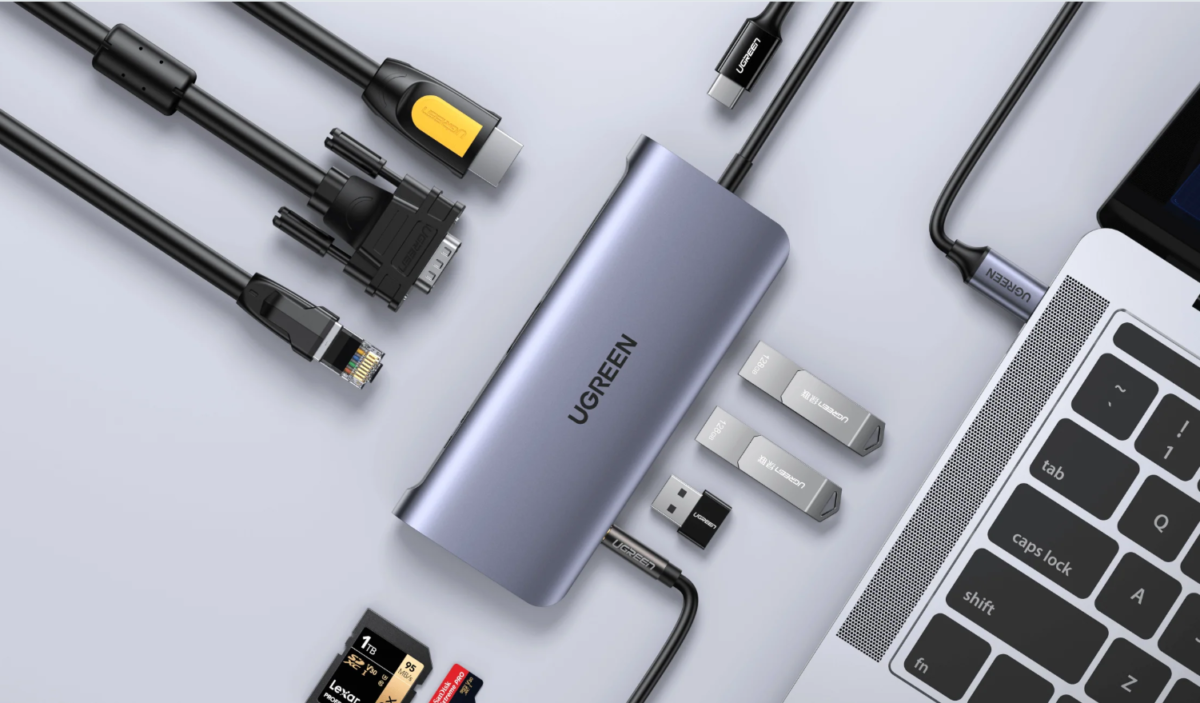
A USB-C docking station is one of the most useful accessories for a laptop workstation. Depending on the model, it can connect external monitors, keyboards, mice, wired networking equipment and external storage through a single host connection.
UGREEN Revodok Max 213 Thunderbolt 4 Docking Station
The UGREEN Revodok Max 213 is a premium 13-in-1 Thunderbolt 4 docking station designed for compatible high-performance laptops and desktop workstation environments.
It offers Thunderbolt 4 connectivity with data transfer capability up to 40Gbps, DisplayPort 1.4, USB-A and USB-C data ports, 2.5 Gigabit Ethernet, memory card readers and audio connectivity. The included 180W power adapter supports laptop charging at up to 90W through the host connection.
- Connectivity: 13-in-1 Thunderbolt 4 docking station.
- Data transfer: Up to 40Gbps over supported Thunderbolt connections.
- Display support: Up to dual 4K at 60Hz or a single 8K display on supported configurations.
- Networking: 2.5 Gigabit Ethernet.
- Laptop charging: Up to 90W.
- Best for: Engineers, designers, programmers and professional workstation users.
Compatibility note: Dual-monitor functionality depends on the laptop’s Thunderbolt capabilities, graphics hardware and operating system. Certain MacBooks and standard USB-C connections have additional display limitations.
UGREEN CM555 12-in-1 USB-C Multifunction Docking Station Pro
The UGREEN CM555 12-in-1 is designed for users who need multiple display and peripheral connections in one docking solution.
The configuration described for this model includes HDMI 2.1, HDMI 2.0, DisplayPort, USB data connections and USB-C Power Delivery input. This makes it an option worth comparing for office users connecting monitors, presentation equipment and everyday computer peripherals.
- Product type: 12-in-1 USB-C multifunction docking station.
- Video: HDMI and DisplayPort connections on the described configuration.
- Charging: USB-C Power Delivery pass-through, subject to the exact SKU.
- Construction: Aluminum-alloy housing with desk-contact protection on selected versions.
- Best for: Office workstations, presentations and multi-device connectivity.
Before purchasing, confirm the exact CM555 product SKU, video output specifications and supported display arrangements. Having multiple display connectors does not automatically guarantee independent extended monitors.
UGREEN Revodok Pro 210 10-in-1 USB-C Hub
The UGREEN Revodok Pro 210 is a practical multiport adapter for compatible laptops used at home, in offices or between different work locations.
It includes two HDMI outputs, USB-A and USB-C data connections, Gigabit Ethernet, SD and microSD card readers and a USB-C Power Delivery input. Its portable design makes it suitable for users who want to connect essential peripherals without maintaining a large desktop docking station.
- Connectivity: 10-in-1 USB-C hub.
- Video: Two HDMI outputs with supported 4K configurations.
- Networking: Gigabit Ethernet.
- Storage: SD and microSD card readers.
- Power Delivery: 100W PD input with up to 85W laptop charging.
- Best for: Hybrid workers, business laptops and portable workstation setups.
MacBook users: The Revodok Pro 210 has macOS display limitations. Check whether your intended monitor arrangement supports independent extended displays or mirroring.
2. Best UGREEN Ergonomic Laptop Stands for Desk Setups
Correct screen positioning is important for a comfortable workstation. An adjustable laptop stand can help raise the display and reduce the need to look down continuously during extended computer use.
For longer working sessions, combine a suitable laptop stand with an external keyboard and mouse so that screen height and input-device positioning can be adjusted separately.
UGREEN 360-Degree Rotating Laptop Stand – LP399 / LP876
UGREEN offers adjustable aluminum laptop stands with rotating bases for compatible notebooks. These stands can be useful in shared offices, meeting rooms and home workstations where users need to change the laptop’s viewing angle or turn the screen toward another person.
Adjustable Viewing Height
Position the laptop screen closer to a comfortable viewing level while using an external keyboard and mouse.
Rotating Base
Selected models allow 360-degree rotation for screen sharing and flexible desk positioning.
Open Support Design
An open structure can help avoid obstructing laptop ventilation areas when correctly positioned.
LP399 and LP876 are separate model references. Confirm the exact stand model, supported laptop size, load rating and adjustment mechanism before ordering.
UGREEN LP258 Vertical Laptop Stand
The UGREEN LP258 Vertical Laptop Stand is intended for users who want to store a compatible laptop upright instead of leaving it flat on the desk.
A vertical stand is particularly useful for external-monitor workstations where the laptop can operate in a supported closed-lid configuration.
- Helps free horizontal desk space.
- Supports upright storage of compatible laptops.
- Useful alongside external monitors and keyboards.
- Adjustable-slot versions accommodate different laptop thicknesses.
- Check laptop dimensions, ventilation requirements and closed-lid operating support.
3. Best UGREEN GaN Chargers for Laptop Workstations
A desktop charging station can help reduce the number of separate adapters around your desk. UGREEN Nexode GaN chargers are available in different wattages and port configurations for compatible laptops, phones, tablets and other USB-powered devices.
UGREEN Nexode 200W GaN Desktop Charger
The UGREEN Nexode 200W GaN Desktop Charger is suitable for workstation users who need to charge several compatible devices from a central charging unit.
Selected 200W Nexode desktop charger models distribute a combined output of up to 200W across multiple charging ports. Individual port limits and power allocation depend on the exact model and number of connected devices.
- Total rated output: Up to 200W on supported models.
- Charging: Multiple USB charging ports.
- Application: Compatible laptops, tablets, smartphones and accessories.
- Desk benefit: Centralises charging connections.
- Best for: Multi-device home and professional workstations.
The 200W rating represents the charger’s total supported output, not necessarily the maximum power available from one port. Confirm the power-sharing table before connecting multiple high-demand devices.
UGREEN Nexode 65W GaN Charger
The UGREEN Nexode 65W GaN Charger is a compact option for compatible USB-C laptops, smartphones and tablets. It can suit a minimalist workstation where users prefer fewer charging accessories.
Depending on the exact version, a 65W Nexode charger may provide one or more USB-C and USB-A ports. The charging power available to each device can change when multiple ports are used.
- Rated power class: 65W.
- Technology: GaN-based charging design.
- Port configuration: Depends on the selected model.
- Best for: Compact desks, compatible USB-C laptops and mobile work.
- Buying consideration: Match output, charging protocol and cable to the device.
4. Other UGREEN Accessories for an Organised Workspace
Docking stations, laptop stands and chargers form the foundation of a workstation, but smaller accessories can also improve comfort and daily usability.
UGREEN Mouse Pads
A suitable mouse pad provides a consistent surface for compatible computer mice and helps organise a desktop input area.
Headphones and Audio Accessories
Headphones can support online meetings, calls and personal listening in shared office environments.
Portable Power Banks
Portable charging can help compatible devices remain powered while commuting, travelling or working away from a desk.
UGREEN Home and Office Workstation Configuration Guide
The right workstation configuration depends on the number of connected devices, available desk space, laptop specifications and daily working requirements.
| Workstation Setup | Docking Solution | Laptop Stand | Charging Solution |
|---|---|---|---|
| Minimalist Home Office | Revodok Pro 210 | LP258 Vertical Stand | Nexode 65W GaN |
| Hybrid Professional | Revodok Pro 210 | Adjustable rotating stand | Compatible multiport GaN charger |
| Office Power User | CM555 12-in-1 | LP399 / compatible adjustable stand | Nexode 200W GaN |
| Premium Professional | Revodok Max 213 | Adjustable or vertical stand | Dock’s supplied adapter, plus optional desktop charger |
Configuration note: These are suggested combinations, not guaranteed compatibility bundles. Confirm the laptop’s display, charging and connection capabilities, along with each accessory’s specifications, before purchasing.
How to Build a Clutter-Free Laptop Workstation
Step 1: Position Your Laptop and Monitor
Place the screen at a comfortable viewing distance and height. Use an adjustable stand where appropriate and consider an external keyboard and mouse for extended desk work.
Step 2: Choose a Compatible Docking Station
Identify the ports you need for monitors, external drives, Ethernet and other peripherals. Check the host laptop’s USB-C or Thunderbolt capabilities before selecting a dock.
Step 3: Organise Charging Connections
Use a suitable USB-C or GaN charger based on the required device wattages. Avoid overloading chargers or assuming that all ports deliver maximum power simultaneously.
Step 4: Arrange Peripherals
Position your keyboard, mouse, headphones and other regularly used accessories within comfortable reach. Choose cable lengths that suit the desk without creating unnecessary loops or tension.
Step 5: Review Ventilation and Safety
Keep laptop vents and charger ventilation areas unobstructed. Follow the manufacturer’s guidance on power adapters, cables, device positioning and operating conditions.
Important Features to Check Before Buying UGREEN Laptop Accessories
- USB-C compatibility: Confirm whether the laptop supports data, video and charging through its USB-C port.
- Display output: Check the number of supported monitors, resolution and refresh rate.
- Operating system: Review Windows and macOS limitations for external displays.
- Charging wattage: Match the charger or docking station output to the laptop’s power requirements.
- Laptop dimensions: Check the size, thickness and weight supported by the stand.
- Desk space: Choose accessories that fit your available workstation area.
- Exact SKU: Confirm the product configuration rather than relying on the model family alone.
Common Mistakes When Setting Up a Laptop Workstation
Choosing accessories without checking compatibility can lead to unnecessary expense and disappointing results. Avoid these common mistakes:
Assuming All USB-C Ports Are Equal
Some USB-C ports support data only, while others also support display output and charging.
Ignoring Display Limitations
Multiple HDMI or DisplayPort connections do not always provide independent extended monitors.
Choosing an Undersized Charger
A charger with insufficient output may charge a laptop slowly or fail to meet its operating requirements.
Overlooking Ergonomics
Raising a laptop without adjusting keyboard and mouse positioning may create an uncomfortable working arrangement.
Frequently Asked Questions About UGREEN Laptop Accessories
What are the best UGREEN laptop accessories for a home office?
Useful accessories include a compatible USB-C hub or docking station, adjustable laptop stand, suitable GaN charger, keyboard, mouse and other peripherals selected according to the workstation requirements.
Which UGREEN docking station is best for professional workstations?
The Revodok Max 213 is designed for advanced Thunderbolt workstation connectivity. The CM555 and Revodok Pro 210 are alternatives for different USB-C connection requirements. Choose according to your laptop and required ports.
Can UGREEN docking stations connect multiple monitors?
Selected models support multiple external displays, but the number of independent screens depends on the docking station, laptop graphics hardware, USB-C or Thunderbolt capabilities and operating system.
Are UGREEN laptop stands useful for office work?
A suitable adjustable laptop stand can improve screen positioning and desk organisation. For comfortable extended use, combine it with an external keyboard and mouse where appropriate.
Can a UGREEN 65W GaN charger power a laptop?
A 65W GaN charger may power compatible USB-C laptops that support its output and charging protocol. Check your laptop’s power requirements and the charger’s individual port specifications.
Is a 200W desktop charger better than a 65W charger?
A 200W multiport charger may suit workstations with several devices, while a 65W charger may be sufficient for a compatible laptop or smaller setup. Compare the actual charging requirements rather than wattage alone.
Where can I buy UGREEN laptop accessories in Nairobi?
Rapidtech Networks Limited supplies UGREEN laptop connectivity products and accessories online and from our Nairobi CBD office. Contact our team to confirm product specifications, prices and availability.
Final Buying Advice: Choosing the Right UGREEN Workstation Accessories
For a minimalist home office, a compatible USB-C hub, adjustable stand and compact GaN charger may be enough. Hybrid workers may benefit from a portable Revodok Pro hub, while professional users with demanding connectivity requirements can consider higher-end docking solutions such as the Revodok Max 213.
The most effective workstation is not necessarily the one with the most accessories. Choose equipment that addresses your actual connectivity, comfort and charging needs while remaining compatible with your laptop.
Buy UGREEN Laptop Accessories in Kenya from Rapidtech Networks Limited
Rapidtech Networks Limited supplies UGREEN laptop connectivity products, computer peripherals and accessories for home offices, business workstations and professional computing environments. Our team can assist with product selection, compatibility inquiries, quotations and delivery arrangements.
Explore the UGREEN Online Shop in Kenya to compare available docking stations, chargers, cables, adapters and other UGREEN products.
We arrange delivery within Nairobi and to Mombasa, Kisumu, Nakuru, Eldoret, Thika, Kiambu, Machakos, Nyeri, Meru, Embu, Kakamega, Kisii, Kitale, Naivasha, Kericho, Bungoma, Garissa, Malindi and other towns throughout Kenya.
Contact Rapidtech Networks Limited for UGREEN laptop accessory prices, product availability, compatibility assistance and quotations in Kenya.
