
Buy TP-Link Network Access Points – Best Price Online in Nairobi, Kenya
Buy TP-Link access points in Kenya from Rapidtech Networks Limited. We supply TP-Link Omada EAP wireless access points for homes, offices, hotels, schools, hospitals, restaurants, retail businesses and commercial networks. Our range includes selected indoor and outdoor Wi-Fi 5 and Wi-Fi 6 access points designed for reliable wireless connectivity, network expansion and centrally managed business Wi-Fi installations.
Whether you need a TP-Link EAP225 for a small office, an EAP245 for a business network, an EAP610 Wi-Fi 6 access point for modern wireless devices or an EAP660 HD for demanding multi-user environments, our team can help you compare suitable models based on coverage, connected users, wireless standards, Omada management compatibility, PoE requirements and budget.
Need Help Choosing the Right TP-Link Access Point?
Our team can assist with TP-Link Omada access point selection, indoor and outdoor Wi-Fi coverage planning, controller compatibility, PoE power requirements and multi-access-point network expansion. We help customers compare suitable wireless solutions for residential, commercial and institutional installations.
Explore our Network Access Points in Kenya, browse the wider Networking Equipment in Kenya category, or discover additional products from our TP-Link brand range.
Browse our TP-Link wireless access points below to compare available Omada EAP models, Wi-Fi technology, indoor and outdoor installation options, management capabilities, power requirements and prices. We supply TP-Link wireless networking equipment for homes, businesses and professional installations throughout Kenya.
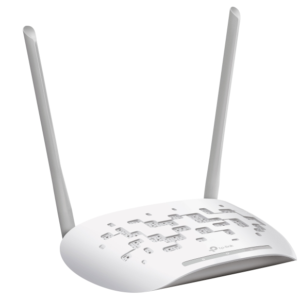
TP-Link Access Points
TP-Link TL-WA801N 300Mbps Wireless N Multi-Mode Access Point

TP-Link Access Points
TP-Link Omada BE9300 Indoor/Outdoor Wi-Fi 7 Access Point (EAP772-Outdoor)

TP-Link Access Points
TP-Link Omada AX5400 Ceiling Mount WiFi 6 Access Point (EAP670)

TP-Link Access Points
TP-Link Omada AX3000 Wall Plate WiFi 6 Access Point (EAP650-Wall)

TP-Link Access Points
TP-Link Omada AX3000 Indoor/Outdoor WiFi 6 Access Point (EAP650-Outdoor)

TP-Link Access Points
TP-Link Omada AX1800 Indoor/Outdoor Wi-Fi 6 Access Point (EAP625-Outdoor HD)

TP-Link Access Points
TP-Link Omada AX1800 Indoor/Outdoor WiFi 6 Access Point (EAP610-Outdoor)

TP-Link Access Points
TP-Link Omada AX3000 Wall Plate WiFi 6 Access Point (EAP655-Wall)

TP-Link Access Points
TP-Link Omada AC1200 MU-MIMO Gigabit Wall Plate Access Point (EAP235-Wall)

TP-Link Access Points
TP-Link Omada AC1200 MU-MIMO Gigabit Wall Plate Access Point (EAP230-Wall)

TP-Link Access Points
TP-Link Omada AX1800 Indoor/Outdoor WiFi 6 Access Point (EAP603-Outdoor)

TP-Link Access Points
TP-Link Omada N300 Wireless N Outdoor Access Point (EAP113-Outdoor)

TP-Link Access Points
TP-Link Omada BE9300 Ceiling Mount Tri-Band Wi-Fi 7 Access Point (EAP773)

TP-Link Access Points
TP-Link Omada BE3600 Ceiling Mount Wi-Fi 7 Access Point (EAP723)

TP-Link Access Points
TP-Link Omada AX3000 Ceiling Mount Wi-Fi 6 Access Point (EAP653 UR)

TP-Link Access Points
TP-Link Omada AX3000 Ceiling Mount Wi-Fi 6 Access Point (EAP650)


TP-Link Access Points
TP-Link Omada AC1750 MU-MIMO Gigabit Ceiling Mount Access Point (EAP245)

TP-Link Access Points
TP-Link Deco M4 AC1200 Whole Home Mesh Wi-Fi System (2 Pack)

TP-Link Access Points
TP-Link Deco M4 AC1200 Whole Home Mesh Wi-Fi System (3 Pack)

TP-Link Access Points
TP-Link Deco P9 AC1200 + AV1000 Whole Home Hybrid Mesh Wi-Fi System (3-Pack)

TP-Link Access Points
TP-Link Deco E4 AC1200 Whole Home Mesh Wi-Fi System (3-Pack)

TP-Link Access Points
TP-Link Deco P9 AC1200 + AV1000 Whole Home Hybrid Mesh Wi-Fi System (2-Pack)

TP-Link Access Points
TP-Link Deco M5 AC1300 Whole Home Mesh Wi-Fi System (2 Pack)
TP-Link Omada Access Points Buying Guide in Kenya
TP-Link Omada wireless access points provide Wi-Fi connectivity for compatible home, office and business networks. The Omada EAP product family includes ceiling-mounted, wall-plate and outdoor access points with different wireless standards, antenna configurations, Ethernet interfaces and management capabilities.
Choosing the right TP-Link access point depends on your installation environment, building layout, number of connected devices, expected network traffic and available infrastructure. Business deployments should also consider Omada controller compatibility, Power over Ethernet requirements, guest Wi-Fi, VLAN configuration and future network expansion.
Important TP-Link Access Point Selection Advice
Not all TP-Link EAP models have identical wireless features. Wi-Fi 6, WPA3, Omada Mesh, fast roaming, Ethernet uplink speeds and PoE requirements vary by model, hardware version and firmware. Check the exact product specifications before purchasing.
Types of TP-Link Wireless Access Points
Indoor Ceiling Access Points
TP-Link Omada ceiling-mounted access points are suitable for offices, classrooms, hotels, restaurants and commercial buildings requiring planned indoor Wi-Fi coverage.
Outdoor TP-Link Access Points
Selected EAP outdoor models are designed for compatible installations in compounds, campuses, courtyards and other outdoor environments, with model-specific environmental protection.
TP-Link Wi-Fi 5 Access Points
Models such as the EAP225 and EAP245 support 802.11ac technology for compatible business and residential wireless networks.
TP-Link Wi-Fi 6 Access Points
Selected EAP models, including the EAP610 and EAP660 HD, support 802.11ax technology with additional wireless efficiency features for compatible devices.
Omada Wall-Plate Access Points
Selected EAP wall-plate models are designed for room-based wireless coverage in suitable hotels, offices and other multi-room installations.
Controller-Managed Access Points
Compatible Omada EAP models can be centrally configured and monitored using supported Omada management platforms.
Popular TP-Link EAP225, EAP245, EAP610 & EAP660 HD Models
The following TP-Link Omada models illustrate different Wi-Fi generations and deployment requirements. Product examples are provided for comparison and do not guarantee current stock availability.
| TP-Link Model | Wi-Fi Standard | Installation Type | Typical Application |
|---|---|---|---|
| EAP225 | Wi-Fi 5 (802.11ac) | Indoor ceiling or wall | Small offices and business Wi-Fi |
| EAP245 | Wi-Fi 5 (802.11ac) | Indoor ceiling or wall | Business networks with multiple users |
| EAP610 | Wi-Fi 6 (802.11ax) | Indoor ceiling or wall | Modern office and commercial Wi-Fi |
| EAP660 HD | Wi-Fi 6 (802.11ax) | Indoor ceiling or wall | Higher-density business environments |
| EAP225-Outdoor | Wi-Fi 5 (802.11ac) | Outdoor | Compounds and outdoor business areas |
| EAP610-Outdoor | Wi-Fi 6 (802.11ax) | Outdoor | Modern outdoor wireless networks |
Which TP-Link EAP Model Should You Choose?
The EAP225 and EAP245 are Wi-Fi 5 models, while the EAP610 and EAP660 HD support Wi-Fi 6. The EAP660 HD is intended for more demanding wireless environments, but actual capacity depends on client activity, network design and uplink bandwidth. For outdoor use, choose an explicitly outdoor-rated EAP model rather than a standard indoor unit.
TP-Link EAP225 vs EAP245 vs EAP610 vs EAP660 HD
| Feature | EAP225 | EAP245 | EAP610 | EAP660 HD |
|---|---|---|---|---|
| Wi-Fi Generation | Wi-Fi 5 | Wi-Fi 5 | Wi-Fi 6 | Wi-Fi 6 |
| Wireless Class | AC1350 | AC1750 | AX1800 | AX3600 |
| Frequency Bands | 2.4GHz / 5GHz | 2.4GHz / 5GHz | 2.4GHz / 5GHz | 2.4GHz / 5GHz |
| Ethernet Uplink | Gigabit | Gigabit | Gigabit | 2.5 Gigabit |
| Management | Compatible Omada management | Compatible Omada management | Compatible Omada management | Compatible Omada management |
| Typical Use | Smaller business Wi-Fi | Business Wi-Fi | Modern Wi-Fi 6 networks | Higher-capacity Wi-Fi 6 networks |
Wireless classes represent combined theoretical radio rates, not guaranteed internet speeds. Exact hardware revisions and regional variants may differ in supported features and power requirements.
TP-Link Wi-Fi 5 vs Wi-Fi 6 Access Points
| Feature | Wi-Fi 5 | Wi-Fi 6 |
|---|---|---|
| IEEE Standard | 802.11ac | 802.11ax |
| Representative Models | EAP225, EAP245 | EAP610, EAP660 HD |
| Multi-User Efficiency | Established Wi-Fi 5 features | Additional efficiency technologies |
| OFDMA | Not a standard Wi-Fi 5 feature | Supported by Wi-Fi 6 technology |
| Client Compatibility | Compatible Wi-Fi devices | Compatible Wi-Fi 6 and supported older clients |
| Buying Consideration | Existing equipment and budget | Modern devices and capacity planning |
Wi-Fi 6 can improve efficiency in busy wireless environments, but actual results depend on client compatibility, interference, Ethernet capacity, network configuration and internet bandwidth.
TP-Link Omada SDN & Centralised Wi-Fi Management
TP-Link Omada provides management options for compatible access points, switches and gateways. Depending on the equipment and deployment, administrators can use supported standalone or controller-based management options.
Omada Hardware Controllers
Compatible Omada hardware controllers provide centralised management for supported network devices. Confirm the controller model, firmware and device capacity.
Omada Software Controller
Supported software controller deployments allow administrators to manage compatible Omada equipment through a suitable host environment.
Cloud-Based Administration
Supported Omada management services can provide remote administration features, subject to platform, account and licensing conditions.
Guest Wi-Fi & Captive Portals
Compatible access points and management platforms support selected guest access and authentication features.
VLAN & Network Segmentation
Supported Omada configurations can separate network traffic when combined with appropriately configured routers and switches.
Wireless Monitoring
Compatible management platforms provide access point status, connected-client information and supported network monitoring features.
Do TP-Link Omada Access Points Need a Controller?
Not every installation requires a dedicated hardware controller. Many compatible EAP models support standalone configuration, while controller-based management enables additional centralised features. Omada Mesh, fast roaming and certain advanced functions may require supported controllers, firmware and client devices.
Indoor vs Outdoor TP-Link Access Points
| Feature | Indoor EAP Models | Outdoor EAP Models |
|---|---|---|
| Examples | EAP225, EAP245, EAP610, EAP660 HD | EAP225-Outdoor, EAP610-Outdoor |
| Typical Installation | Offices, classrooms, hotels and shops | Compounds, courtyards and campuses |
| Environmental Protection | Indoor operating conditions | Model-specific weather resistance |
| Mounting | Supported ceiling or wall mounting | Supported wall or pole mounting |
| Coverage | Depends on building layout | Depends on outdoor conditions and antennas |
| Power | Model-specific PoE requirements | Model-specific PoE requirements |
For outdoor deployments, confirm the exact product's environmental rating, operating temperature, mounting requirements and electrical protection. Indoor models should not be assumed suitable for outdoor exposure.
TP-Link Omada Mesh, Fast Roaming & Wireless Security
Omada Mesh Networking
Selected compatible EAP models support wireless mesh links under supported Omada configurations. Mesh availability depends on the model and controller environment.
Fast Roaming
Compatible access points and management platforms can support roaming assistance features. Actual roaming decisions and performance also depend on client devices.
WPA2 & WPA3 Security
Supported wireless encryption options vary by model and firmware. Confirm WPA3 availability when it is a project requirement.
Multiple Wireless Networks
Selected EAP models can broadcast multiple SSIDs for appropriately configured employee, visitor or other wireless networks.
Mesh is not automatically the best option for every deployment. Where practical, wired Ethernet backhaul can provide more predictable capacity than wireless backhaul, particularly in demanding commercial environments.
Power over Ethernet Requirements for TP-Link Access Points
Many TP-Link Omada EAP access points support Power over Ethernet, but the required standard varies by model and hardware revision. Some models support standards-based PoE, while certain products also support specified passive PoE arrangements.
| Power Type | General Specification | Important Consideration |
|---|---|---|
| IEEE 802.3af PoE | Up to 15.4W at source | Compatible lower-power access points |
| IEEE 802.3at PoE+ | Up to 30W at source | Compatible higher-power access points |
| IEEE 802.3bt PoE | Higher-power standards-based PoE | Requires supported devices and power budgets |
| Passive PoE | Model-specific voltage and wiring | Must match exact equipment requirements |
| DC Adapter | Model-specific input | Confirm compatible adapter and availability |
Before purchasing, check the access point's power consumption, supported input standard and available switch power budget. A compatible PoE injector or switch must supply sufficient power for the selected model.
Browse our PoE Injectors in Kenya for related network power accessories.
Important TP-Link PoE Compatibility Warning
Do not assume all EAP225, EAP245, EAP610 and EAP660 HD units use the same power standard. Verify the exact model and hardware revision before connecting a PoE injector or switch. Incompatible power equipment may prevent normal operation or damage devices.
TP-Link Access Point Coverage & Client Capacity
Access point coverage and performance depend on installation conditions rather than advertised wireless speed alone. For offices, hotels, schools and busy public venues, plan for both signal coverage and simultaneous network traffic.
Building Layout
Concrete walls, floors, partitions and metal structures can reduce wireless signal strength.
Connected Devices
Estimate the number of simultaneously active users and their expected applications.
Wireless Interference
Nearby networks and other radio sources can affect performance. Suitable channel planning is important.
Ethernet Backhaul
Check uplink speed and switch capacity, particularly when deploying higher-performance access points.
Coverage Overlap
Multi-access-point installations require appropriate placement and compatible roaming settings.
Network Traffic
Video meetings, streaming, cloud applications and large file transfers create different bandwidth requirements.
Applications of TP-Link Access Points in Kenya
Home Offices & Small Businesses
Selected Omada EAP access points can provide wireless connectivity for laptops, smartphones and compatible office equipment.
Corporate Offices
Managed access point deployments can support employee Wi-Fi, guest access and multiple office departments.
Hotels & Hospitality
Compatible ceiling and wall-plate access points can support planned guest and staff coverage in hotels and accommodation facilities.
Schools & Universities
Omada wireless equipment can support classrooms, libraries, administration offices and shared learning spaces.
Restaurants & Retail Businesses
Suitable EAP models can support employee devices, business applications and appropriately configured guest Wi-Fi.
Outdoor Compounds & Campuses
Outdoor-rated EAP devices can provide planned wireless connectivity for compatible external areas.
TP-Link Access Points Price Guide in Kenya
TP-Link access point prices in Kenya depend on Wi-Fi generation, wireless capacity, Ethernet uplink speed, indoor or outdoor design, PoE requirements and management capabilities. Compare current product listings for actual prices and availability.
| Access Point Category | Example Models | Price Considerations | Typical Application |
|---|---|---|---|
| Indoor Wi-Fi 5 | EAP225 | Entry-level business features | Small offices and shops |
| Higher-Capacity Wi-Fi 5 | EAP245 | Radio configuration and hardware | Business wireless networks |
| Indoor Wi-Fi 6 | EAP610 | Wi-Fi 6 features and hardware | Modern offices |
| Higher-Capacity Wi-Fi 6 | EAP660 HD | Wireless capacity and 2.5GbE uplink | Demanding business networks |
| Outdoor Wi-Fi 5 | EAP225-Outdoor | Environmental protection and mounting | Outdoor business Wi-Fi |
| Outdoor Wi-Fi 6 | EAP610-Outdoor | Wi-Fi 6 and outdoor hardware | Modern outdoor installations |
Factors Affecting TP-Link Access Point Prices
Wi-Fi Generation
Wi-Fi 5 and Wi-Fi 6 models differ in supported wireless capabilities and hardware specifications.
Wireless Capacity
Radio design, spatial streams and supported wireless rates influence model selection.
Ethernet Uplink
Gigabit and multi-gigabit Ethernet interfaces affect network infrastructure requirements.
PoE Power Requirements
Compatible switches, injectors and power accessories may affect the total installation cost.
Outdoor Protection
Environmental ratings, antennas and mounting accessories can influence product pricing.
Management Requirements
Controller hardware, software hosting and applicable cloud services may affect deployment costs.
How to Choose the Right TP-Link Access Point
1. Identify Your Coverage Requirements
Determine the size, layout and installation environment of the area requiring wireless coverage.
2. Estimate Connected Users
Consider simultaneous devices, expected traffic and business applications.
3. Compare Wi-Fi Standards
Review Wi-Fi 5 and Wi-Fi 6 options based on your existing and planned client devices.
4. Check Omada Compatibility
Confirm supported controller platforms, firmware and required management features.
5. Verify Power & Cabling
Check PoE requirements, Ethernet uplink capacity and mounting accessories.
6. Plan for Network Expansion
Consider additional access points, switching capacity, VLANs and future user demand.
TP-Link Access Point Installation, Security & Maintenance
Install TP-Link Omada access points according to the manufacturer's mounting and electrical instructions. Position indoor devices to provide suitable coverage while reducing obstructions and interference. For larger installations, consider a wireless site survey before finalising access point locations.
Configure appropriate Wi-Fi security, restrict administrative access and maintain compatible firmware. Business networks may benefit from separate employee and guest wireless networks, VLAN segmentation and centrally managed configuration.
For outdoor installations, select explicitly outdoor-rated equipment and follow the manufacturer's grounding, surge protection, mounting and weatherproofing guidance. Verify PoE power compatibility before connecting the equipment.
Planning a Multi-Access-Point Omada Network?
Check controller compatibility, supported roaming features, Ethernet backhaul, switch power budgets and network expansion requirements before purchasing multiple access points. Mesh and roaming features are model-dependent and should not be assumed universal.
Frequently Asked Questions About TP-Link Access Points in Kenya
Where can I buy TP-Link access points online in Kenya?
Rapidtech Networks Limited supplies TP-Link wireless access points and accessories online and from our Nairobi CBD office.
Which TP-Link access points are suitable for business Wi-Fi?
Popular Omada models include the EAP225, EAP245, EAP610 and EAP660 HD. The right choice depends on the installation environment, user capacity, Wi-Fi requirements and management compatibility.
What is the difference between TP-Link EAP225 and EAP245?
Both are Wi-Fi 5 access points. The EAP225 is an AC1350-class model, while the EAP245 is an AC1750-class model. Compare hardware revisions, power requirements and supported features.
Is TP-Link EAP610 a Wi-Fi 6 access point?
Yes. The EAP610 supports Wi-Fi 6 (802.11ax) and is designed for compatible indoor wireless deployments.
Which TP-Link access point is suitable for high-density environments?
The EAP660 HD is designed for demanding multi-user environments. Actual suitability depends on wireless traffic, client density and network infrastructure.
Are TP-Link Omada access points compatible with other router brands?
Yes. Compatible EAP access points can connect to standards-based Ethernet networks and suitable third-party routers. Advanced Omada management features may require supported Omada equipment or software.
Do TP-Link access points require an Omada controller?
Not always. Many EAP models support standalone configuration, while supported controllers enable centralised administration and additional network features.
Do TP-Link access points support Mesh networking?
Selected Omada EAP models support Mesh under compatible configurations. Availability depends on the model, firmware and management platform.
Do TP-Link access points support WPA3 security?
Selected models and firmware versions support WPA3. Confirm the exact product specifications if WPA3 is required for your network.
Are TP-Link access points available for outdoor use?
Yes. Models such as the EAP225-Outdoor and EAP610-Outdoor are designed for specified outdoor installations. Confirm the environmental rating and mounting requirements.
Do TP-Link access points support Power over Ethernet?
Many Omada EAP models support PoE, but the applicable standards and power requirements vary. Check the exact model and hardware revision before purchasing a power source.
Do TP-Link access points come with a warranty?
Warranty coverage depends on the specific model and applicable manufacturer or seller terms. Confirm the warranty period and conditions before purchasing.
Can I pay on delivery for TP-Link access points?
Cash on delivery may be available for eligible Nairobi orders, subject to confirmation. Customers can also enquire about M-PESA and bank transfer payment options.
Is same-day delivery available for TP-Link access points in Nairobi?
Same-day dispatch may be available for eligible confirmed orders placed before the applicable cutoff, subject to stock availability. Actual delivery timing depends on the destination and courier arrangements.
Do you provide TP-Link access point installation assistance?
Contact Rapidtech Networks Limited to discuss available technical guidance, configuration assistance and installation requirements for your wireless networking project.
Can I return a faulty TP-Link access point?
Faulty products may qualify for warranty assessment or remedies under applicable warranty and returns policies. Contact our team with your order details and a description of the issue.
Buy TP-Link Access Points in Kenya from Rapidtech Networks Limited
Rapidtech Networks Limited supplies TP-Link Omada wireless access points for homes, offices, hotels, schools, hospitals, restaurants, commercial buildings and business networks. Compare available EAP225, EAP245, EAP610, EAP660 HD and outdoor EAP models based on Wi-Fi technology, installation requirements, Omada management compatibility, PoE specifications and price.
We deliver TP-Link access points countrywide, including Nairobi, Mombasa, Kisumu, Nakuru, Eldoret, Thika, Kiambu, Machakos, Kitengela, Naivasha, Nyeri, Meru, Embu, Kisii, Kericho, Kakamega, Bungoma, Malindi, Kilifi, Garissa and other towns throughout Kenya.
Our team provides technical guidance on TP-Link access point selection, indoor and outdoor Wi-Fi coverage, Omada management compatibility, PoE power requirements and network expansion. Contact Rapidtech Networks Limited for assistance choosing suitable TP-Link wireless equipment for your home, office, business or institutional network.