
Accessories
UGREEN 65W vs 100W vs 140W GaN Chargers: Which Should You Buy?
Nov
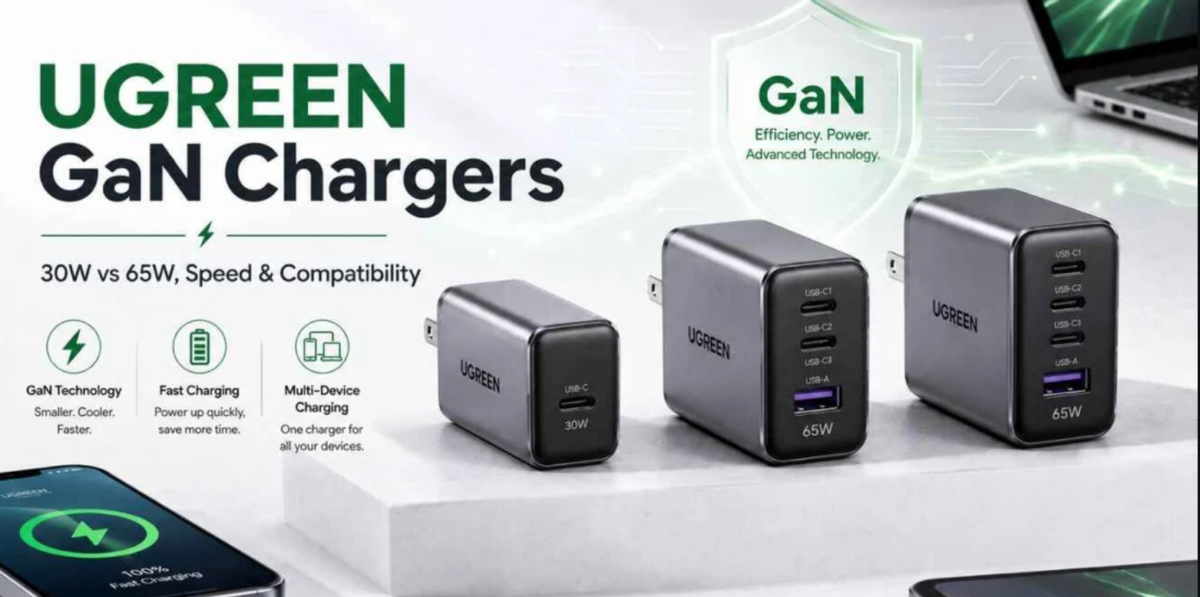
Choosing between UGREEN 65W vs 100W vs 140W GaN chargers depends on your laptop’s power requirements, the number of devices you charge and whether you need a compact travel charger or a higher-output desktop solution.
UGREEN Nexode and Uno GaN chargers support fast charging for compatible smartphones, tablets, laptops and other USB-powered devices. However, a charger with more watts is not automatically faster for every device. Understanding USB-C Power Delivery, individual port output and multi-device power sharing will help you select the right model.
Quick Recommendation
- 65W GaN charger: Best for phones, tablets, MacBook Air and compatible lightweight office laptops.
- 100W GaN charger: Best for many USB-C laptops and users charging several devices.
- 140W GaN charger: Best for compatible high-power USB PD 3.1 laptops and users needing greater charging headroom.
UGREEN 65W vs 100W vs 140W GaN Charger Comparison
The following table compares these three charging classes by their typical applications and technical considerations.
| Feature | UGREEN 65W | UGREEN 100W | UGREEN 140W |
|---|---|---|---|
| Maximum Rated Output | 65W | 100W | 140W |
| Typical Devices | Phones, tablets, ultrabooks | USB-C laptops, tablets, phones | Compatible high-power laptops |
| Multi-Device Charging | Suitable for lighter combined loads | More headroom for multiple devices | Higher combined power budget |
| Portability | Generally compact | Varies by model | Generally larger |
| USB PD 3.1 | Not required for 65W output | Not required for 100W output | Required for standard 140W USB PD EPR charging |
| Best Buying Reason | Compact everyday charging | Balanced laptop and multi-device charging | High-power USB-C charging |
Note: These are charging power classes, not identical product models. Exact port arrangements, dimensions, weight, charging protocols and power-sharing limits depend on the specific UGREEN charger.
What Is a GaN Charger and Why Does It Matter?
GaN stands for Gallium Nitride, a semiconductor material used in modern power electronics. GaN technology enables efficient switching and can help manufacturers design compact, high-output chargers.
Compared with conventional charger designs, GaN technology can offer practical benefits for users carrying multiple devices.
Compact Design
GaN technology can support smaller charger designs relative to comparable conventional power supplies.
Efficient Power Conversion
Efficient power electronics help manage energy losses during charging.
Multiple Charging Ports
Selected models combine USB-C and USB-A connections for different compatible devices.
Travel Convenience
A suitable multi-port charger may reduce the number of separate adapters needed.
1. UGREEN 65W GaN Chargers: Best for Everyday Charging
A UGREEN 65W GaN charger is a practical option for users charging smartphones, tablets, lightweight USB-C laptops and accessories.
Many compact office laptops and ultrabooks use USB-C charging within this power range, although you should always check the device’s actual requirements.
UGREEN Uno Robot 65W 3-Port GaN Charger
The UGREEN Uno Robot 65W combines a distinctive robot-shaped design with USB-C fast charging and multiple device connections.
Its configuration includes two USB-C ports and one USB-A port. The primary USB-C connection supports up to 65W when used individually, while available power is distributed between devices during multi-port charging.
- Rated output: Up to 65W total.
- Ports: Two USB-C and one USB-A.
- Charging: USB-C Power Delivery on supported connections.
- Design: Robot-style housing with charging status display.
- Best for: Smartphones, tablets and compatible lightweight laptops.
Explore the UGREEN Uno Robot 65W 3-Port GaN Fast Charger at Rapidtech Networks Limited.
When Should You Choose a 65W Charger?
- You mainly charge a smartphone and tablet.
- Your laptop supports USB-C charging at 65W or less.
- You want a compact adapter for travel or office use.
- You usually charge one high-power device at a time.
- You do not need substantial simultaneous laptop and accessory charging.
2. UGREEN 100W GaN Chargers: Best for Laptop and Multi-Device Charging
A UGREEN 100W GaN charger offers more charging headroom than a 65W adapter. It is suitable for many USB-C laptops that accept higher charging power and for users carrying multiple devices.
For example, a compatible 100W multi-port charger may power a laptop and smartphone simultaneously, although the exact power allocation depends on the model.
Why Choose a UGREEN Nexode 100W Charger?
UGREEN Nexode 100W chargers are designed for higher-output USB-C charging. Depending on the variant, they may include several USB-C and USB-A ports, making them useful for home offices, travelling professionals and shared charging setups.
- Rated output: Up to 100W on the specified charger.
- Application: Compatible laptops, tablets and smartphones.
- Multi-port charging: Supported on selected Nexode models.
- Power distribution: Changes according to connected devices.
- Best for: Users requiring greater flexibility than a 65W charger.
Is 100W Enough for a Laptop?
For many USB-C laptops, a 100W Power Delivery charger can be sufficient. However, some gaming laptops, mobile workstations and high-performance systems require more power or use proprietary charging connections.
Always confirm whether your laptop supports USB-C charging and the maximum power it can accept.
3. UGREEN 140W GaN Chargers: Best for High-Power USB-C Devices
A UGREEN 140W GaN charger is intended for compatible devices that can take advantage of higher USB Power Delivery output.
The UGREEN Nexode 140W charger supports USB PD 3.1, with up to 140W through its primary USB-C port under the appropriate single-port charging conditions.
This makes it relevant to selected high-power USB-C laptops, including compatible 16-inch MacBook Pro configurations.
UGREEN Nexode 140W Charging Features
- Rated total output: Up to 140W.
- Primary USB-C port: Up to 140W on the specified model.
- Charging standard: USB Power Delivery 3.1.
- Connections: Two USB-C and one USB-A on the specified Nexode model.
- Application: Compatible high-power laptops and other USB-powered devices.
Does a 140W Charger Make Every Laptop Charge Faster?
No. The connected laptop controls how much charging power it accepts.
If a laptop supports a maximum charging input of 65W, connecting it to a 140W charger does not automatically increase its charging speed.
Higher output is useful when the device supports that charging level or when a multi-port charger can allocate additional power to other connected devices.
MacBook consideration: Some 16-inch MacBook Pro models require a compatible USB-C to MagSafe 3 cable to achieve their specified 140W fast-charging mode. Confirm the exact MacBook model and charging requirements.
65W vs 100W vs 140W: Which Charger Is Best for Your Laptop?
| Device or Use Case | Suggested Charger Class | Important Consideration |
|---|---|---|
| Smartphones and earbuds | 65W or lower | Device charging protocol determines actual speed. |
| Tablets and lightweight laptops | 65W | Confirm laptop power requirements. |
| Mainstream USB-C laptops | 65W–100W | Choose according to the specified input rating. |
| Laptop plus phone and tablet | 100W or higher | Check simultaneous port allocation. |
| Compatible high-power USB-C laptop | 140W | Requires suitable USB PD 3.1 support and cable. |
| Multiple high-demand devices | Higher-output multi-port desktop charger | Compare total and per-port output limits. |
Understanding USB-C Power Delivery and Charger Wattage
USB Power Delivery is a charging standard that allows compatible devices and chargers to negotiate suitable voltage and current levels.
The charger’s maximum rated wattage represents its available output capacity, not the power automatically delivered to every device.
USB PD 3.0 vs USB PD 3.1
USB Power Delivery 3.0 commonly supports charging up to 100W using suitable USB-C cables and supported voltage profiles.
USB PD 3.1 introduces Extended Power Range (EPR), allowing compatible equipment to negotiate higher power levels, including 140W through the appropriate 28V profile.
To achieve 140W charging, the charger, cable and connected device must support the required charging configuration.
Why a Higher-Wattage Charger Does Not Always Charge Faster
A charger rated at 100W or 140W can supply lower-power devices when compatible charging protocols are negotiated.
However, the device determines the charging power it requests, subject to the charger and cable capabilities.
Charging speed may also change depending on battery temperature, battery level, device activity and charging management.
How Multi-Port Charging Affects Power Distribution
One of the most important differences between UGREEN 65W, 100W and 140W chargers is the amount of power available when several devices are connected.
A charger may advertise its maximum wattage when only one USB-C port is used. Connecting additional devices can change the available output at each port.
65W Multi-Port Charger
A good option for lower combined charging loads. Laptop charging power may decrease when a phone or tablet is connected simultaneously.
100W Multi-Port Charger
Provides more total charging capacity for supported laptops and mobile devices, subject to the charger’s power-sharing configuration.
140W Multi-Port Charger
Offers a higher overall power budget, although connecting several devices can reduce the output available from the primary USB-C port.
Important Buying Tip
Always check the manufacturer’s port-sharing table. A charger rated at 140W total does not necessarily provide 140W to one laptop while simultaneously charging additional devices.
UGREEN 160W and 500W GaN Chargers for Higher Power Requirements
Beyond the 65W, 100W and 140W categories, UGREEN offers higher-output GaN charging solutions for users who need additional ports or a larger combined power budget.
These products are not direct equivalents to a 140W single-port charger. Their individual USB-C output limits and power-sharing arrangements should be compared separately.
UGREEN Nexode Pro 160W 4-Port GaN Fast Charger
A higher-output multi-port charging solution for compatible laptops, tablets, smartphones and other USB-powered devices.
- Rated combined output of up to 160W.
- Four-port charging configuration.
- UK-plug variant with supplied USB-C cable as listed.
- Suitable for users requiring multiple charging connections.
Best for: Professionals carrying several USB-C devices.
UGREEN Nexode GaN 500W Desktop Fast Charger
A high-capacity desktop charging solution intended for supported multi-device charging environments.
- Rated combined output of up to 500W.
- Six charging ports.
- Designed for desktop charging setups.
- Suitable for multiple compatible devices.
Best for: Shared workstations and high-demand desktop charging arrangements.
Note: The 160W and 500W figures refer to rated total output. Individual USB-C ports may have lower maximum output limits, and supported charging combinations depend on the exact product.
Which UGREEN GaN Charger Is Best for Travel?
Travellers should consider charger size, weight, plug type, number of ports and the devices they regularly carry.
- 65W: Suitable for lightweight travel kits containing a smartphone, tablet or compatible ultrabook.
- 100W: A practical balance for travellers carrying a laptop and several accessories.
- 140W: Worth considering when travelling with a compatible high-power USB-C laptop.
- 160W or higher: Relevant for users requiring additional simultaneous charging capacity, although these chargers may be less compact.
Check the physical dimensions and weight of the exact charger rather than assuming all products within the same wattage class have identical portability.
Can You Use a 100W or 140W Charger with a 65W Laptop?
Yes, provided the charger, cable and laptop support compatible USB-C charging protocols.
A 100W or 140W charger does not force its maximum power into a lower-rated device. Compatible USB Power Delivery equipment negotiates the appropriate charging profile.
However, a higher-wattage charger does not guarantee faster charging when the connected laptop has a lower maximum charging input.
Choosing the Right USB-C Charging Cable
The charging cable is an important part of a USB-C fast-charging setup.
For higher charging currents and USB PD EPR operation, use a cable with the appropriate power rating and electronic identification support.
- Check the cable’s rated charging wattage.
- Confirm support for the required USB Power Delivery profile.
- Use a suitable 5A-rated cable where required.
- For 140W EPR charging, use an appropriately rated EPR cable.
- Check whether the laptop requires a specific charging cable or connector.
A cable rated for 240W does not make a 65W device charge at 240W. The actual charging power depends on the entire charging system.
UGREEN Wall Charger vs Power Bank: Which Do You Need?
A wall charger and a power bank serve different charging needs.
A GaN wall charger uses an electrical outlet to power compatible devices, while a power bank stores energy for charging when a wall outlet is unavailable.
If you frequently work while travelling, consider both the charging wattage and portable battery capacity you require. Our UGREEN 10000mAh vs 20000mAh vs 25000mAh power bank comparison explains capacity, portability and laptop charging differences.
Best UGREEN Charging Setup for Home and Office Workstations
For a home or office workstation, consider how many devices you need to charge and whether your laptop uses a docking station.
A compact 65W charger may be sufficient for a lightweight laptop, while a 100W or higher multi-port model may provide greater flexibility for several compatible devices.
For additional workstation equipment, read our best UGREEN laptop accessories for home and office workstations guide, which covers laptop stands, USB-C docking stations, chargers and desk accessories.
Common Mistakes When Buying a UGREEN GaN Charger
Ignoring Laptop Wattage
A charger should be selected according to the laptop’s supported charging input, not only its advertised maximum output.
Confusing Total and Port Output
Combined charger wattage may be shared between ports, with different limits for each connection.
Using an Unsuitable Cable
High-power USB-C charging may require a cable supporting the necessary current and USB PD profile.
Overlooking Charging Protocols
Not every device uses the same fast-charging standard. Verify compatibility before purchasing.
Frequently Asked Questions
Is a 100W UGREEN charger better than a 65W charger?
A 100W charger provides greater maximum output, which can benefit compatible laptops and multi-device charging. A 65W charger may still be the more practical choice for lower-power devices and compact travel setups.
Do I need a 140W charger for my MacBook Pro?
It depends on the MacBook Pro model and its charging requirements. Selected 16-inch models support 140W fast charging with the appropriate charging connection, while other models may require less power.
Can I charge a 65W laptop with a 140W USB-C charger?
Yes, when the laptop, charger and cable support compatible USB-C charging protocols. The laptop negotiates the appropriate power level rather than automatically drawing 140W.
Does a 140W charger charge phones faster than a 65W charger?
Not necessarily. Smartphone charging speed depends on the device’s supported input, charging protocols, battery conditions and cable compatibility.
Can a UGREEN GaN charger charge a laptop and phone together?
Selected multi-port models can charge multiple compatible devices simultaneously. The available power at each port depends on the specific charger and its power-sharing configuration.
What is the difference between USB PD 3.0 and USB PD 3.1?
USB PD 3.1 adds Extended Power Range capabilities for supported higher-power charging configurations. Achieving 140W requires compatible equipment and the appropriate cable.
Where can I buy UGREEN GaN chargers in Nairobi?
Rapidtech Networks Limited supplies UGREEN chargers and charging accessories online and from our Nairobi CBD office. Contact our team for available models, prices and quotations.
Final Verdict: UGREEN 65W, 100W or 140W?
The best UGREEN GaN charger depends on your devices rather than simply choosing the highest wattage.
- Choose 65W for compatible smartphones, tablets, ultrabooks and everyday portable charging.
- Choose 100W for many USB-C laptops and more flexible multi-device charging.
- Choose 140W for compatible high-power USB PD 3.1 laptops and demanding charging requirements.
- Consider 160W or higher when your main requirement is charging several supported devices from one adapter.
Check the exact product’s USB-C port output, supported charging protocols, cable requirements and power-sharing configuration before making a purchase.
Buy UGREEN GaN Chargers in Kenya from Rapidtech Networks Limited
Rapidtech Networks Limited supplies UGREEN GaN fast chargers, USB-C charging accessories and compatible laptop power solutions for home, office and travel applications.
Browse our USB-C and mobile phone chargers in Kenya category or explore UGREEN accessories in Kenya for available charging products.
You can also visit the UGREEN Online Shop in Kenya to discover other UGREEN products.
For purchase guidance, read our where to buy UGREEN chargers and accessories in Nairobi article.
We arrange delivery within Nairobi and to Mombasa, Kisumu, Nakuru, Eldoret, Thika, Kiambu, Machakos, Nyeri, Meru, Embu, Kakamega, Kisii, Kitale, Naivasha, Kericho, Bungoma, Garissa, Malindi and other towns across Kenya.
Contact Rapidtech Networks Limited for UGREEN GaN charger prices, availability, quotations and compatibility assistance.
