
Accessories
UGREEN HDMI vs DisplayPort vs VGA: Differences, Compatibility & Which Cable Should You Use?
Nov
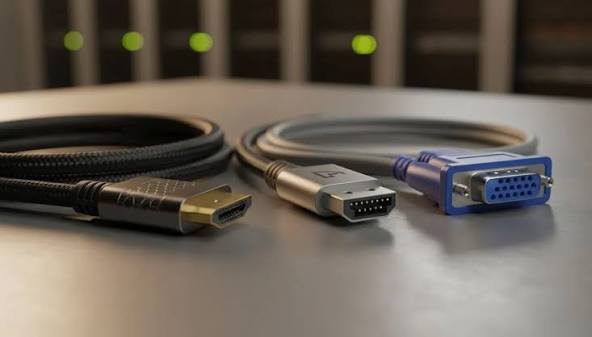
Choosing between HDMI vs DisplayPort vs VGA depends on the devices you want to connect, the display resolution you need and whether your setup requires audio, high refresh rates or multiple monitors. These three display connections are commonly used with laptops, desktop computers, monitors, projectors and audiovisual equipment, but they have important differences.
In this UGREEN display cable guide, we explain how HDMI, DisplayPort and VGA work, compare their compatibility and performance, and help you select the right UGREEN cable, converter or adapter for your home, office, gaming or presentation setup.
Quick Answer: HDMI, DisplayPort or VGA?
- Choose HDMI for televisions, gaming consoles, projectors, home entertainment and general laptop-to-monitor connections.
- Choose DisplayPort for compatible gaming PCs, professional monitors, high-refresh-rate displays and supported multi-monitor configurations.
- Choose VGA when connecting older monitors, projectors or legacy computer equipment that lacks a suitable digital video input.
HDMI vs DisplayPort vs VGA: Key Differences
HDMI and DisplayPort transmit digital video and can carry audio, while VGA uses an analog video signal and does not carry audio. Their practical performance also differs according to the supported standard and connected hardware.
| Feature | HDMI | DisplayPort | VGA |
|---|---|---|---|
| Signal | Digital | Digital | Analog |
| Video | Yes | Yes | Yes |
| Audio | Yes, where supported | Yes, where supported | No |
| High Resolution | 4K, 8K and higher on suitable versions | 4K, 8K and higher on suitable versions | Legacy analog resolutions; quality varies |
| High Refresh Rates | Supported by suitable versions | Supported by suitable versions | Limited by analog equipment and signal quality |
| MST Daisy-Chaining | Not standard HDMI functionality | Yes, on supported equipment | No |
| Typical Devices | TVs, consoles, laptops, projectors | PCs, graphics cards, monitors | Older monitors and projectors |
Important: Maximum resolution and refresh rate are not determined by the cable name alone. They depend on the video source, display, supported interface version, cable capability and any adapter or docking station in between.
1. What Is HDMI and When Should You Use It?
HDMI (High-Definition Multimedia Interface) is a digital connection used to transmit video and audio between compatible devices. It is widely used in home entertainment systems, gaming consoles, laptops, televisions, projectors and computer monitors.
HDMI is often the simplest choice when both devices have compatible HDMI ports.
Common Uses of HDMI Cables
- Connecting a laptop to a monitor or television.
- Connecting gaming consoles to compatible TVs.
- Connecting a computer to a projector.
- Connecting streaming devices to televisions.
- Connecting compatible audiovisual equipment.
- Connecting media players and presentation systems.
HDMI Versions: HDMI 1.4 vs 2.0 vs 2.1
| HDMI Version | Typical Supported Modes | Application |
|---|---|---|
| HDMI 1.4 | Up to 4K at 30Hz in common configurations | Older 4K and Full HD equipment |
| HDMI 2.0 | Up to 4K at 60Hz in common configurations | 4K monitors and televisions |
| HDMI 2.1 | 4K at 120Hz and 8K at 60Hz on suitable equipment | High-refresh-rate gaming and advanced displays |
Actual supported modes vary with hardware capabilities, signal format and available bandwidth. HDMI 2.1-labelled devices do not necessarily implement every optional feature.
UGREEN HDMI 2.1 8K Male-to-Male Cable
The UGREEN HDMI 2.1 8K Male-to-Male Cable HD171, 3m is an option for connecting compatible HDMI source devices to monitors, televisions and other displays.
For high-resolution or high-refresh-rate use, verify that the source, display and cable support the intended signal format.
2. What Is DisplayPort and When Is It Better Than HDMI?
DisplayPort (DP) is a digital display interface commonly found on desktop graphics cards, professional monitors, business workstations and selected laptops.
It supports digital video and audio and is widely used in computer environments requiring high resolutions, high refresh rates or advanced monitor configurations.
Why Use DisplayPort?
- Connecting desktop graphics cards to compatible monitors.
- Supporting high-resolution professional displays.
- Using high-refresh-rate gaming monitors.
- Connecting supported multiple-monitor workstations.
- Using compatible adaptive-sync display technologies.
- Supporting DisplayPort MST on compatible hardware.
DisplayPort 1.2 vs 1.4 vs 2.1
Different DisplayPort versions offer different bandwidth capabilities.
- DisplayPort 1.2: Commonly supports 4K at 60Hz on suitable hardware.
- DisplayPort 1.4: Supports higher-bandwidth display modes and Display Stream Compression (DSC) on compatible devices.
- DisplayPort 2.1: Supports newer high-bandwidth configurations for demanding resolutions and refresh rates, depending on the supported link rate.
DisplayPort version alone does not guarantee a particular resolution. Check the capabilities of the graphics card, monitor and cable.
Can DisplayPort Connect Multiple Monitors?
Yes. DisplayPort supports Multi-Stream Transport (MST), which allows compatible systems to transmit multiple display streams through a supported connection.
Some monitors also support DisplayPort daisy-chaining, although this requires appropriate monitor outputs and compatible hardware.
For practical connection instructions, read our guide to connecting two monitors to a laptop using a UGREEN docking station. It explains laptop compatibility, Windows and Mac display settings, and common dual-monitor troubleshooting steps.
3. What Is VGA and Is It Still Useful?
VGA (Video Graphics Array) is a legacy analog video connection commonly recognised by its 15-pin connector.
VGA is still useful when connecting older office monitors, projectors, industrial displays and legacy computers.
Unlike HDMI and DisplayPort, VGA transmits analog video only and does not carry audio.
Common VGA Applications
- Older office desktop monitors.
- Legacy classroom and meeting-room projectors.
- Older desktop computers.
- Industrial and specialised legacy equipment.
- Existing audiovisual installations using VGA.
Does VGA Support Full HD?
VGA can carry Full HD and some higher-resolution analog video signals when the source, display and cable support them.
However, VGA signal quality can be affected by cable length, shielding, electrical interference and the quality of the connected hardware.
For modern high-resolution digital displays, HDMI or DisplayPort is generally preferable where available.
UGREEN VGA Male-to-Male Cable
For equipment with compatible VGA connections, the UGREEN VGA Male-to-Male Cable, 2m provides an analog video connection between supported devices.
Remember that a VGA cable does not carry audio. If sound is required, use a separate supported audio connection.
HDMI vs DisplayPort for Gaming: Which Is Better?
Both HDMI and DisplayPort can support high-quality gaming displays. The best connection depends on your graphics card, monitor, console and desired resolution or refresh rate.
HDMI for Gaming
HDMI is widely used by gaming consoles and televisions. Suitable HDMI 2.1 equipment can support 4K at 120Hz and compatible variable refresh rate features.
Best for: Consoles, gaming TVs and compatible HDMI monitors.
DisplayPort for Gaming
DisplayPort is common on PC graphics cards and gaming monitors. Supported configurations provide high refresh rates and compatible adaptive-sync capabilities.
Best for: Desktop gaming PCs and compatible high-refresh-rate monitors.
Recommendation: Compare the exact HDMI and DisplayPort specifications of your monitor and graphics card. The better connection is the one that supports your required resolution, refresh rate, colour format and display features.
HDMI vs VGA: Which Is Better for Office Monitors and Projectors?
For modern office monitors and projectors, HDMI is generally preferable because it provides digital video and can also transmit audio.
VGA remains useful when existing equipment lacks HDMI or another compatible digital connection.
If your laptop has HDMI but the projector only accepts VGA, a compatible active converter may be required.
UGREEN HDMI to VGA Converter
The UGREEN HDMI to VGA Converter MM103 with Audio is designed for connecting a compatible HDMI source to a VGA display.
The conversion is directional: an HDMI-to-VGA converter should not be assumed to work from a VGA source to an HDMI display.
Because VGA does not carry audio, a converter with a separate audio output may provide sound through an additional compatible audio connection.
DisplayPort to HDMI: Can You Connect Different Video Ports?
Yes. A suitable DisplayPort-to-HDMI adapter can connect compatible equipment with different video connectors.
However, not every adapter supports both signal directions, and some connections require active conversion.
UGREEN DisplayPort to HDMI Female Converter
The UGREEN DisplayPort to HDMI Female Converter 1080p is intended for connecting a compatible DisplayPort source to an HDMI display.
Its listed 1080p specification should be considered when selecting an adapter for Full HD monitors. Do not assume it supports 4K or reverse HDMI-to-DisplayPort conversion.
Adapter Direction Matters
HDMI to VGA, VGA to HDMI, DisplayPort to HDMI and HDMI to DisplayPort are not automatically interchangeable. Confirm the source connector, display input, adapter direction and supported resolution before purchasing.
HDMI Splitter vs HDMI Adapter: What Is the Difference?
HDMI accessories perform different functions, and choosing the wrong type can prevent a display setup from working as intended.
UGREEN HDMI 1 In 4 Out Splitter
An HDMI splitter distributes a compatible HDMI input signal to multiple HDMI outputs.
For example, the UGREEN HDMI 1 In 4 Out Splitter 40202 is intended for distributing one source to multiple compatible displays.
Important: A conventional HDMI splitter generally duplicates the same video source. It does not create four independent extended computer desktops.
UGREEN HDMI Female-to-Female Adapter
An HDMI coupler connects two compatible HDMI cables together.
The UGREEN HDMI Female-to-Female Adapter is useful where two HDMI cable ends need to be joined.
Keep in mind that extending a cable connection can affect signal reliability, particularly at higher bandwidths or over longer cable runs.
Can You Connect Two Monitors Using HDMI or DisplayPort?
Yes, provided your laptop or computer supports the required number of external displays and has suitable video outputs or a compatible docking station.
For example, a supported docking station may offer HDMI and DisplayPort outputs for connecting two monitors. The available display modes depend on the dock, host computer and operating system.
DisplayPort MST can also support multiple monitors on compatible equipment, while conventional HDMI splitters generally mirror the same image rather than creating independent desktops.
If your laptop has limited video connections, explore our best UGREEN USB-C hubs and docking stations for laptops in Kenya guide to understand the connectivity features worth comparing.
Which Display Cable Should You Choose for Your Device?
| Device / Application | Recommended Connection | What to Check |
|---|---|---|
| Laptop to office monitor | HDMI or DisplayPort | Available ports and supported resolution |
| Gaming console to TV | HDMI | HDMI version, refresh rate and TV features |
| Gaming PC to monitor | DisplayPort or HDMI | GPU and monitor capabilities |
| Laptop to older projector | VGA or suitable converter | Source output and converter direction |
| Multiple-monitor workstation | Compatible DisplayPort or docking station | Host display limits and MST support |
| Conference room display | HDMI or suitable adapter | Display inputs, cable length and audio needs |
Common HDMI, DisplayPort and VGA Connection Problems
1. Monitor Displays No Signal
Check that the monitor is powered on, the correct input source is selected and the cable is connected securely.
2. HDMI Display Is Limited to 30Hz
Confirm the supported HDMI version, display settings, cable capability and graphics hardware. Some older HDMI connections support 4K only at lower refresh rates.
3. DisplayPort Adapter Does Not Work
Check the adapter’s supported direction, resolution and active or passive conversion requirements.
4. VGA Picture Looks Blurry
Check the cable quality, supported resolution, connector condition and cable length. Analog interference or poor signal quality can affect image sharpness.
5. HDMI Video Works but Audio Does Not
Check the selected audio output device, monitor speaker capability and operating system sound settings.
6. Second Monitor Is Not Detected
Verify the computer’s external display support and the connection method. A conventional HDMI splitter does not replace a docking station designed for independent extended displays.
Frequently Asked Questions
Is DisplayPort better than HDMI?
Neither connection is universally better. DisplayPort is widely used with computer monitors and gaming PCs, while HDMI is common on TVs, consoles, laptops and audiovisual equipment. Compare the specific versions and hardware capabilities.
Does HDMI support 4K at 120Hz?
Yes, compatible HDMI 2.1 source devices, displays and cables can support 4K at 120Hz. The actual available modes depend on the equipment and supported signal format.
Can VGA support 1080p resolution?
Yes, compatible VGA equipment can support 1080p analog video. However, picture quality depends on the source, monitor and cable conditions.
Can I connect an HDMI laptop to a VGA projector?
Yes, using a compatible active HDMI-to-VGA converter. Check the supported direction, resolution and whether a separate audio connection is needed.
Does DisplayPort carry audio?
Yes. DisplayPort can carry digital audio alongside video when the source device and connected display or adapter support it.
Can an HDMI splitter extend my desktop across four monitors?
A conventional HDMI splitter normally duplicates one source image across multiple displays. Independent extended desktops require compatible graphics hardware, video outputs or suitable docking technology.
Where can I buy UGREEN HDMI, DisplayPort and VGA accessories in Nairobi?
Rapidtech Networks Limited supplies UGREEN display cables, converters and connectivity accessories online and from our Nairobi CBD office.
Final Verdict: HDMI, DisplayPort or VGA?
For most modern televisions, consoles and general-purpose laptop connections, HDMI is a practical choice. DisplayPort is well suited to compatible desktop monitors, gaming PCs and professional multi-display workstations. VGA remains useful for older monitors and projectors.
The best cable is the one that matches your device ports, required resolution, refresh rate and audio needs. When different connectors are involved, select an adapter with the correct conversion direction and supported specifications.
Buy UGREEN HDMI, DisplayPort and VGA Cables in Kenya
Rapidtech Networks Limited supplies UGREEN HDMI cables, VGA cables, video converters, display adapters and connectivity accessories for laptops, desktop computers, monitors, projectors and audiovisual installations.
Browse our UGREEN accessories in Kenya category for relevant cables and adapters, or visit the UGREEN Online Shop in Kenya to explore available products.
We arrange delivery to Nairobi, Mombasa, Kisumu, Nakuru, Eldoret, Thika, Kiambu, Machakos, Nyeri, Meru, Embu, Kakamega, Kisii, Kitale, Naivasha, Kericho, Bungoma, Garissa, Malindi and other towns across Kenya.
Contact Rapidtech Networks Limited for UGREEN HDMI, DisplayPort and VGA cable availability, quotations and assistance selecting compatible connectivity accessories.
