
Accessories
Vention HDMI vs DisplayPort vs VGA in Kenya: Which Connection Should You Use?
Nov
Vention HDMI vs DisplayPort vs VGA in Kenya
Choosing between Vention HDMI, DisplayPort and VGA accessories in Kenya depends on the equipment you want to connect, the video quality required and the available display ports. Whether you are setting up a gaming monitor, connecting a laptop to a projector or upgrading an office workstation, the correct connection helps ensure compatibility and reliable performance.
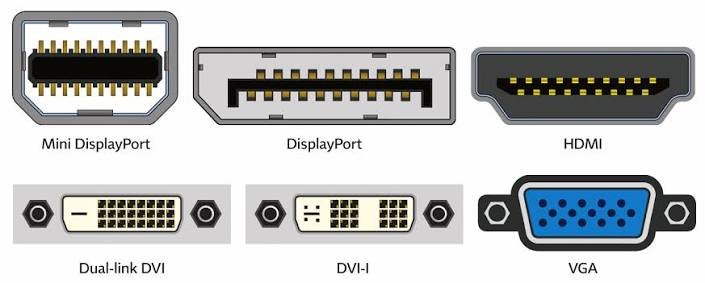
HDMI and DisplayPort carry digital video and audio, while VGA uses an older analog video signal. Vention provides HDMI cables and conversion accessories that help connect compatible modern devices and legacy display equipment.
Understanding these differences will help you select the right Vention cable or adapter without purchasing unnecessary equipment.
Need Help Choosing a Vention Display Cable?
Rapidtech Networks Limited supplies Vention HDMI cables, DisplayPort-to-VGA cables and HDMI-to-VGA converters for home, office and professional use. Explore our Vention accessories in Kenya or read our Vention HDMI, USB-C and Ethernet cable buying guide.
What Is a Vention HDMI Cable?
HDMI (High-Definition Multimedia Interface) is a digital connection commonly used for televisions, gaming consoles, projectors, computers and entertainment systems. It transmits video and audio through a single compatible connection.
Vention HDMI cables are available for different connectivity requirements, including desktop monitors, conference room displays, home entertainment equipment and projectors.
Digital Audio and Video
Carries digital video and audio between compatible HDMI devices using one cable.
Wide Compatibility
Commonly used with televisions, gaming consoles, laptops, monitors and projectors.
Flexible Applications
Suitable for home entertainment, presentations, classrooms and office displays.
What Is DisplayPort and How Does Vention Support It?
DisplayPort is a digital interface commonly used on desktop graphics cards, gaming monitors and professional computer displays. It can transmit digital video and audio, with supported resolutions and refresh rates depending on the equipment and connection standard.
DisplayPort is particularly useful in PC environments where high-refresh-rate displays or compatible multi-monitor configurations are required.
Vention offers conversion accessories such as DisplayPort-to-VGA cables for connecting compatible DisplayPort computers to older VGA monitors and projectors.
PC Monitor Connectivity
Commonly used with desktop computers, graphics cards and professional monitors.
High Refresh Rates
Supports demanding display modes when the graphics hardware, monitor and cable are compatible.
Legacy Display Conversion
Suitable Vention converters can connect DisplayPort source devices to older VGA displays.
What Is VGA and Why Is It Still Used?
VGA (Video Graphics Array) is an analog video interface found on older desktop computers, monitors and projectors. Unlike HDMI and DisplayPort, VGA carries video only and does not transmit audio.
VGA remains useful in schools, offices and institutions that still operate older display equipment. A suitable Vention converter may allow modern computers to connect to these existing displays.
Legacy Compatibility
Useful for older projectors, monitors and computers with VGA connections.
Analog Video
Carries analog video without audio, with quality influenced by equipment and cable conditions.
Display Reuse
Compatible converters may allow continued use of older monitors and projectors.
Vention HDMI vs DisplayPort vs VGA Comparison
The following table highlights the main differences between HDMI, DisplayPort and VGA to help you select an appropriate Vention connectivity accessory.
| Feature | HDMI | DisplayPort | VGA |
|---|---|---|---|
| Signal Type | Digital | Digital | Analog |
| Audio Support | Yes | Yes | No |
| Video Performance | Depends on HDMI bandwidth and equipment | Depends on DisplayPort bandwidth and equipment | Depends on analog signal quality |
| Typical Applications | TVs, consoles and projectors | PC monitors and workstations | Older monitors and projectors |
| Multi-Monitor Support | Through compatible separate outputs or hardware | MST on compatible systems | No native MST |
Vention HDMI to VGA vs DisplayPort to VGA
Both converter types help connect suitable modern digital outputs to older analog VGA displays. The correct choice depends on the output port available on your computer.
| Feature | Vention HDMI to VGA | Vention DisplayPort to VGA |
|---|---|---|
| Computer Output | HDMI | DisplayPort |
| Display Input | VGA | VGA |
| Signal Conversion | Digital HDMI to analog VGA | Digital DisplayPort to analog VGA |
| Typical Application | Laptop to older projector | Desktop PC to older monitor |
Recommended Vention HDMI, DisplayPort and VGA Products
Rapidtech Networks Limited supplies the following Vention connectivity products for different display requirements.
Vention HDMI Cable 10M AACBL
For compatible HDMI display connections requiring a longer cable run, including selected meeting room and projector installations.
Vention DisplayPort to VGA Cable 1.5M
For connecting compatible DisplayPort computers to older VGA monitors and projectors.
Vention HDMI to VGA Converter ACPBB
For connecting compatible HDMI-output computers to legacy VGA displays.
When to Choose a Vention HDMI Cable
HDMI is generally the preferred option when both the source device and display provide compatible HDMI connections.
- Connecting laptops or desktops to televisions
- Connecting gaming consoles to supported displays
- Installing compatible projectors in meeting rooms
- Setting up home entertainment equipment
- Connecting office monitors with HDMI inputs
- Using a digital audio and video connection
When to Choose Vention DisplayPort to VGA
A Vention DisplayPort-to-VGA cable is useful when a computer provides DisplayPort output but the available display only supports VGA input.
- Your computer has a DisplayPort output
- Your existing monitor has VGA input
- You need to connect a compatible older projector
- You want to continue using legacy display equipment
- The cable supports your required display resolution
- You have a separate solution for audio if needed
When to Choose Vention HDMI to VGA
A Vention HDMI-to-VGA converter is appropriate when a computer provides HDMI output and the receiving monitor or projector requires VGA input.
- Your laptop or desktop has HDMI output
- Your monitor or projector has VGA input
- You need digital-to-analog video conversion
- You are connecting modern computers to legacy projectors
- The converter supports the required resolution
- You have confirmed the correct signal direction
Best Vention Display Connectivity Applications
Vention HDMI cables and display converters are useful in different home, business and institutional environments.
| Application | Recommended Vention Connection |
|---|---|
| Home Entertainment | Compatible HDMI cable for TVs and media devices |
| Gaming Setups | HDMI or DisplayPort according to supported display modes |
| Office Presentations | HDMI cable or suitable VGA converter |
| Legacy Monitors | HDMI-to-VGA or DisplayPort-to-VGA conversion |
| Schools and Training Centres | HDMI for modern projectors; VGA converter for compatible older models |
Vention HDMI vs DisplayPort for Gaming and Office Monitors
Both HDMI and DisplayPort can support high-resolution monitors and demanding display configurations. The correct choice depends on the supported standards and capabilities of the computer, monitor and cable.
Gaming Consoles
HDMI is commonly used for connecting gaming consoles to compatible televisions and monitors.
PC Gaming Monitors
HDMI or DisplayPort may be suitable, depending on supported resolution, refresh rate and gaming features.
Office Workstations
Choose the connection supported by the computer and display, including compatible multi-monitor arrangements.
Vention Display Cable Length and Compatibility Considerations
Before purchasing a Vention display cable or converter, check the available ports, required resolution, refresh rate, installation distance and signal direction.
- Confirm the source device’s output port
- Check the display’s input connection
- Verify supported resolution and refresh rate
- Choose a suitable cable length
- Check converter direction and compatibility
- Remember that VGA does not carry audio
- Consider signal performance for longer cable runs
For a broader overview of Vention connectivity products, read our Vention Accessories Complete Buying Guide in Kenya.
Where to Buy Vention HDMI, DisplayPort and VGA Accessories in Nairobi
Rapidtech Networks Limited supplies Vention display cables and converters for individuals, businesses, schools, institutions and IT installers.
Customers can compare available products, review specifications and request quotations for individual or bulk requirements.
Looking for Vention Accessories in Nairobi?
Read our Where to Buy Vention Cables, Chargers and Accessories in Nairobi guide for additional purchasing information and related products.
Frequently Asked Questions
Is Vention HDMI better than DisplayPort for gaming?
Neither is universally better. HDMI and DisplayPort can both support demanding gaming displays, depending on the supported connection standards, graphics card and monitor.
Can Vention HDMI cables support 4K resolution?
Selected Vention HDMI cables may support 4K video. Confirm the exact model’s resolution and refresh rate specifications before ordering.
Can I connect a DisplayPort computer to a VGA monitor?
Yes, using a compatible DisplayPort-to-VGA cable or adapter. The Vention VEN-HBLBG is intended for this type of connection, subject to device compatibility.
Does VGA carry audio?
No. VGA carries analog video only. A separate audio connection is needed when sound is required.
Can I use a Vention HDMI-to-VGA converter in reverse?
No. HDMI-to-VGA converters are generally directional. Connecting a VGA source to an HDMI display requires a suitable VGA-to-HDMI converter.
Where can I buy Vention display adapters in Nairobi?
Rapidtech Networks Limited supplies Vention display cables, converters and computer connectivity accessories online and from our Nairobi CBD office.
Buy Vention HDMI, DisplayPort and VGA Accessories in Kenya
Rapidtech Networks Limited supplies Vention HDMI cables, DisplayPort-to-VGA cables and HDMI-to-VGA converters for home entertainment, office workstations, projectors, schools and professional installations.
Explore our Vention Accessories in Kenya category or browse the Vention Online Store in Kenya for additional Vention connectivity products.
Contact Rapidtech Networks Limited for product availability, quotations and assistance selecting compatible Vention display cables or adapters.
