
Accessories, How to Guides
How to Choose a Vention USB-C Hub or Docking Station for Your Laptop in Kenya
Nov
Choosing the Right Vention USB-C Hub or Docking Station in Kenya
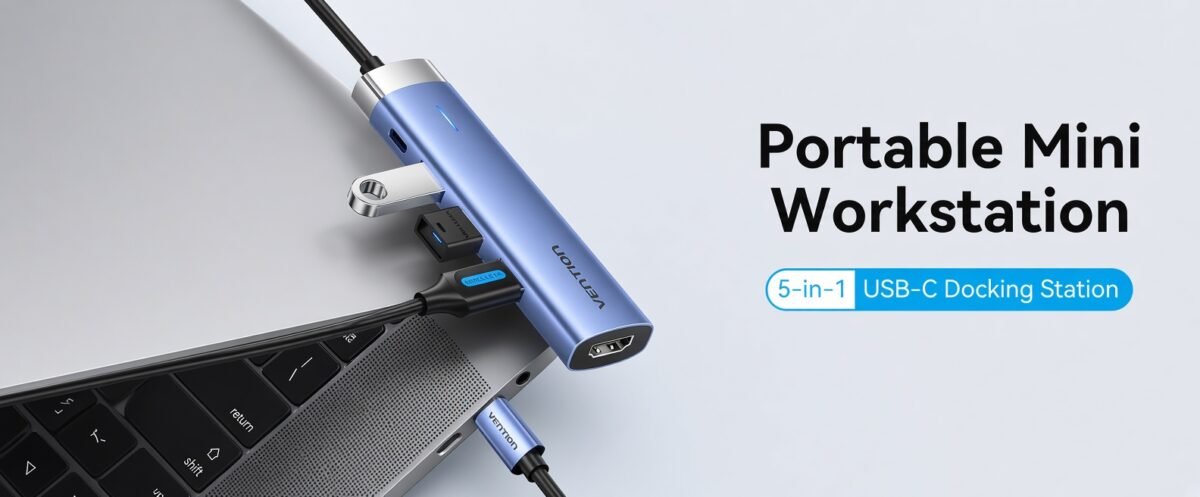
Choosing the right Vention USB-C hub or docking station for your laptop in Kenya starts with understanding your laptop’s connectivity capabilities and the devices you need to connect. Whether you use an HP, Dell, Lenovo, ASUS, Acer or MacBook laptop, the right Vention accessory can help expand your available ports and create a more convenient workspace.
Some users only need additional USB ports for a keyboard, mouse or flash drive. Others require HDMI connectivity, Gigabit Ethernet, memory card readers, laptop charging or support for external monitors. These requirements determine whether a compact USB-C hub or a more comprehensive docking station is appropriate.
This guide explains how to compare Vention USB-C hubs and docking stations, check laptop compatibility, understand Power Delivery and choose suitable connectivity accessories without paying for unnecessary features.
Before You Buy a Vention USB-C Hub
Confirm your laptop’s USB-C capabilities, required connections and charging needs. For a broader overview of available Vention products, read our Vention Accessories Complete Buying Guide in Kenya.
Vention USB-C Hub vs Docking Station: What’s the Difference?
USB-C hubs and docking stations both expand laptop connectivity. However, their features, physical design and intended applications vary by model.
Vention USB-C Hubs
Compact adapters designed to provide additional connections without occupying much desk or laptop-bag space.
- Portable and convenient for travel
- Useful for USB peripherals and storage
- Selected models include HDMI or Ethernet
- Some support USB-C PD pass-through
- Suitable for students and mobile workers
Vention Docking Stations
Multiport devices designed to connect a wider selection of peripherals through a compatible laptop connection.
- Useful for office and home workstations
- Selected models include multiple video ports
- May include Gigabit Ethernet and card readers
- Some support USB-C PD charging
- Suitable for more permanent desk setups
Important: Product names such as 7-in-1, 9-in-1 or docking station do not guarantee multiple independent external displays. Always verify the exact model’s capabilities.
Check Your Laptop’s USB-C Port Compatibility
One of the most important considerations when buying a Vention USB-C hub or docking station is whether your laptop supports the features you intend to use.
Not all USB-C ports have the same capabilities. Some support only data transfer, while others also support video output, USB Power Delivery, USB4 or Thunderbolt.
USB-C Data
Supports compatible USB devices such as keyboards, mice, flash drives and external storage. Data support alone does not guarantee video output.
DisplayPort Alt Mode
Allows compatible USB-C ports to transmit native DisplayPort video for supported HDMI, DisplayPort or other display adapters.
Thunderbolt and USB4
Can provide advanced connectivity and display capabilities, depending on the laptop, dock and supported implementation.
How to Check USB-C Compatibility
- Identify your laptop’s exact model number.
- Check the manufacturer’s USB-C port specifications.
- Confirm whether DisplayPort Alt Mode or compatible video output is supported.
- Check whether USB-C charging input is supported.
- Verify Thunderbolt or USB4 support if required.
- Compare these capabilities with the Vention product specifications.
If your laptop only supports USB data through its USB-C port, a standard USB-C HDMI hub may not provide video output. DisplayLink-based solutions can offer an alternative on supported systems, but require compatible hardware and software.
Choose the Right Vention Ports for Your Daily Work
Before selecting a Vention hub or docking station, identify the equipment you regularly connect to your laptop.
| Port or Feature | Common Application | What to Check |
|---|---|---|
| HDMI | External monitors, TVs and projectors | Resolution, refresh rate and laptop video support |
| VGA | Older monitors and projectors | Video compatibility and supported resolution |
| RJ45 Ethernet | Wired office and business networks | 10/100Mbps or Gigabit Ethernet support |
| USB-A | Keyboards, mice, printers and USB storage | Number of ports and USB transfer speed |
| USB-C Data | Compatible storage and USB-C peripherals | Whether the port carries data or only PD power |
| SD / microSD | Photography and media file transfers | Card format and supported capacity |
| 3.5mm Audio | Headphones and compatible headsets | Audio input/output support |
| USB-C PD | Laptop charging through a compatible hub | PD wattage, adapter and host charging support |
Vention USB-C Power Delivery: 65W vs 100W Charging
USB-C Power Delivery allows compatible devices to negotiate charging power through a USB-C connection. Selected Vention hubs and docking stations offer PD pass-through, enabling a compatible external USB-C charger to power the laptop while the hub remains connected.
However, a dock advertised with 100W PD does not necessarily deliver the full 100W to the laptop. Some power may be reserved for the hub itself, and the laptop must support charging through the connected USB-C port.
Laptops Requiring 65W
Check whether the Vention hub, connected charger and laptop can provide and accept sufficient charging power after accounting for hub consumption.
Laptops Requiring 90W or More
Verify the dock’s actual host charging output. Some laptops may require their original power adapter or a higher-capacity charging solution.
USB-C Charging Checklist
- Confirm that your laptop accepts USB-C PD charging.
- Check the laptop’s required charging wattage.
- Verify the dock’s maximum PD input and actual host output.
- Use a compatible charger and appropriately rated cable.
- Check whether the dock requires an external power adapter.
Can a Vention Docking Station Support Two External Monitors?
Some Vention docking stations provide multiple video connectors, such as HDMI, DisplayPort or VGA. However, having two video ports does not automatically mean the dock can extend the desktop independently across two external monitors.
Dual-monitor functionality depends on the dock’s display technology, laptop graphics capabilities, operating system and supported display modes.
Windows Laptop Compatibility
Compatible Windows laptops may support multiple extended displays through docking stations using DisplayPort Multi-Stream Transport (MST), Thunderbolt or other supported display technologies.
MacBook Compatibility
External display support varies between MacBook models and Apple silicon generations. Standard MST-based docks do not generally provide independent extended displays through MST on macOS, and some docks may mirror their outputs instead.
DisplayLink-based docks can support additional displays on compatible Macs with the required software, but this functionality must be explicitly supported by the docking station. Do not assume a Vention dock includes DisplayLink simply because it has multiple video ports.
Single Monitor vs Dual Monitor
| Requirement | What to Look For |
|---|---|
| One external monitor | Compatible USB-C video output and suitable HDMI or DisplayPort connection |
| Two mirrored monitors | Dock and laptop support for the required mirrored output configuration |
| Two independently extended monitors | Explicit multi-display support through compatible MST, Thunderbolt, DisplayLink or another supported method |
| Dual 4K monitors | Verified dual-display resolution, refresh rate and bandwidth support |
For a deeper explanation of display interfaces and legacy monitor connections, read our Vention HDMI vs DisplayPort vs VGA comparison in Kenya.
Recommended Vention USB-C Hubs and Connectivity Accessories in Kenya
Rapidtech Networks Limited offers Vention connectivity products for different laptop requirements. The following options illustrate the difference between a multiport docking station, a direct display cable and a basic USB adapter.
Vention 9-in-1 USB-C Docking Station (THAHB)
A multiport docking station option for users who need more connections than those available directly on their laptop.
Compare its exact video outputs, USB connections, Ethernet capability and PD specifications with your laptop before ordering.
Vention USB-C to HDMI Cable 2M (CGSBH)
A direct display cable option for compatible laptops with USB-C video output.
Useful when you only need to connect a laptop to an HDMI monitor or display without adding several other ports.
Vention USB 3.0 Male to USB-C Female Adapter (CDPHO)
A compact adapter for connecting compatible USB-C peripherals to a USB-A 3.0 host connection.
Suitable for supported USB data applications. It should not be treated as a replacement for a video-capable USB-C docking station.
Which Vention Connectivity Solution Should You Buy?
The best option depends on whether you need a full workstation, a simple monitor connection or additional USB compatibility.
| Your Requirement | Recommended Solution |
|---|---|
| Connect multiple USB peripherals | Vention USB hub with enough suitable USB ports |
| Connect one HDMI monitor | Compatible Vention USB-C to HDMI cable or HDMI hub |
| Connect keyboard, mouse, network and monitor | Vention multiport docking station with the required connections |
| Charge laptop through the hub | Compatible Vention dock with adequate USB-C PD pass-through |
| Connect two extended external monitors | Dock explicitly supporting the laptop’s required dual-display configuration |
| Use a USB-C data peripheral on USB-A | Compatible Vention USB-A to USB-C adapter |
How to Connect a Vention Docking Station to Your Laptop
After selecting a compatible docking station, installation is usually straightforward. The exact procedure depends on the laptop and dock model.
- Connect any required external power adapter to the docking station.
- Connect your monitor to the appropriate HDMI, DisplayPort or VGA output.
- Connect your keyboard, mouse, Ethernet cable and other peripherals.
- Connect the dock’s host cable to a compatible laptop USB-C or Thunderbolt port.
- Install any software required by the specific dock model.
- Open your operating system’s display settings and select the supported display arrangement.
- Check charging, network and peripheral functionality.
If a monitor is not detected, first confirm that the laptop’s USB-C port supports the required video output and that the dock supports the intended display configuration.
Common Mistakes When Buying Vention USB-C Hubs
Assuming Every USB-C Port Supports HDMI
USB-C data connectivity does not automatically include video output. Confirm DP Alt Mode or another supported video method.
Confusing PD Input With Laptop Charging Output
A 100W PD input rating may not mean 100W reaches the laptop. Check the actual host charging specification.
Assuming Two Video Ports Mean Two Extended Displays
Independent external monitors require explicit support from the dock, laptop and operating system.
Buying More Ports Than Necessary
If you only need one HDMI connection or an additional USB port, a simple cable or adapter may be more appropriate.
For more guidance on choosing compatible video and data cables, see our Vention HDMI, USB-C and Ethernet cables buying guide in Kenya.
Frequently Asked Questions
What is the difference between a Vention USB-C hub and a docking station?
A USB-C hub generally provides compact port expansion, while a docking station typically offers a wider range of connections for workstation use. Actual features depend on the specific Vention model.
Will a Vention USB-C docking station work with my HP, Dell or Lenovo laptop?
Compatibility depends on the laptop’s USB-C capabilities and the docking station’s requirements. Check USB data, video output and charging support before purchasing.
Can a Vention USB-C hub connect two monitors?
Some docking stations support multiple external displays, but the exact functionality depends on the dock model, laptop and operating system. Two video ports do not automatically guarantee independent extended displays.
Can I charge my laptop using a Vention docking station?
Selected models support USB-C PD pass-through charging. Confirm the laptop accepts USB-C charging and that the connected charger and dock provide sufficient power.
Do Vention USB-C hubs work with MacBooks?
Selected Vention hubs are compatible with supported MacBooks. However, charging and external display capabilities vary by MacBook model, operating system and hub technology.
Can a USB 3.0 to USB-C adapter provide HDMI output?
A basic USB-A to USB-C data adapter does not add native DisplayPort Alt Mode or HDMI video output. Video through USB data requires a separate compatible graphics solution.
Where can I buy Vention USB-C hubs and docking stations in Nairobi?
Rapidtech Networks Limited supplies Vention USB-C hubs, docking stations and laptop connectivity accessories online and from our Nairobi CBD office.
Final Recommendation: Choosing the Right Vention USB-C Hub
If you mainly need additional USB ports for everyday peripherals, a compact Vention USB hub may be sufficient. If you need HDMI, wired Ethernet, card readers and compatible laptop charging through one connection, consider a Vention multiport docking station.
For a single external display, a suitable Vention USB-C to HDMI cable may offer a simpler solution. For multiple extended displays, confirm the dock’s actual capabilities and the laptop’s supported display configuration before purchasing.
The best Vention USB-C hub or docking station is the model that matches your laptop, peripherals and working environment—not necessarily the one with the highest number of ports.
Buy Vention USB-C Hubs and Docking Stations in Kenya
Rapidtech Networks Limited supplies Vention USB-C hubs, docking stations, HDMI adapters and laptop connectivity accessories for offices, businesses, students, IT professionals and home workstations.
Explore our Vention accessories in Kenya category to compare available connectivity products.
Browse the Vention Online Store in Kenya for additional Vention cables, adapters and computer accessories.
We arrange countrywide delivery to Nairobi, Mombasa, Kisumu, Nakuru, Eldoret, Thika, Kiambu, Machakos, Nyeri, Meru, Embu, Kakamega, Kisii, Kitale, Naivasha and other towns across Kenya, subject to delivery arrangements.
Contact Rapidtech Networks Limited for product availability, quotations and assistance choosing a compatible Vention USB-C hub or docking station.
Phone: 0722 555 289
Email: sales@rapidtech.co.ke
