
Accessories
Best Logitech Accessories for Home & Office Work in Kenya: What Should You Buy?
Nov
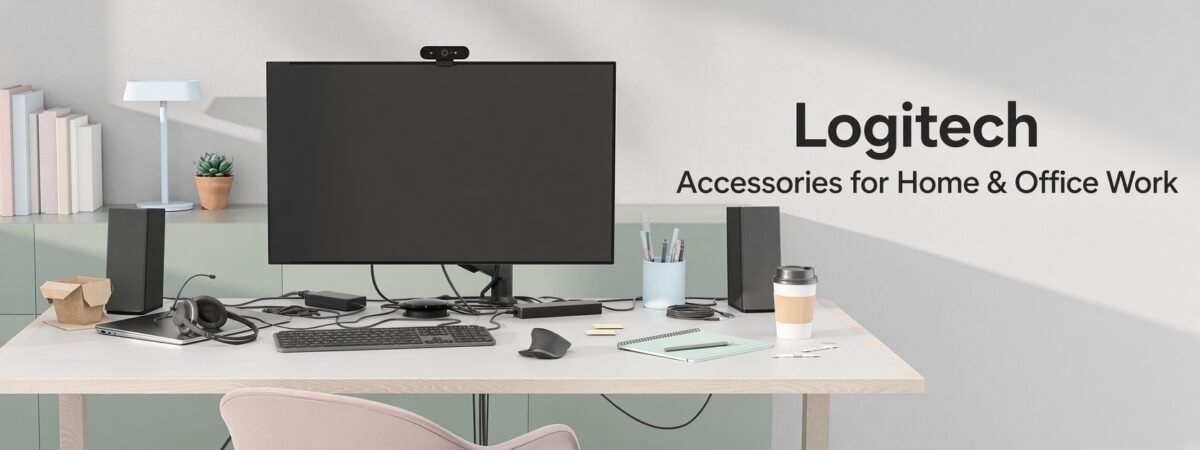
Best Logitech Accessories for Home & Office Work in Kenya
Looking for the best Logitech accessories for home and office work in Kenya? The right combination of a keyboard, mouse, webcam, headset and docking station can make your workstation more comfortable, organized and convenient for everyday tasks.
Logitech offers computer peripherals for office employees, business professionals, remote workers, students and hybrid teams. From the MX Master and MX Keys productivity ranges to compact Pebble accessories and professional video conferencing equipment, each product is designed for different working requirements.
This guide compares recommended Logitech keyboards, mice, webcams, headsets and workstation accessories available through Rapidtech Networks Limited. It also explains which products are suitable for different working environments and what to check before purchasing.
Quick Buying Recommendation
For advanced office productivity, consider an MX Keys S Combo or MX Master 3S. For compact hybrid work, the Pebble Keys 2 K380s and MX Anywhere 3S are practical options. For video meetings, compare the Brio 500 webcam, Zone 300 headset and Logi Dock according to your setup.
Best Logitech Accessories at a Glance
The following comparison helps identify suitable Logitech products before exploring their individual features.
| Logitech Product | Recommended For | Main Benefit |
|---|---|---|
| MX Keys S Combo | Professional workstations | Premium keyboard, mouse and palm rest combination |
| Wave Keys & Lift Combo | Ergonomic desktop setups | Wave-shaped keyboard and vertical mouse |
| Pebble Keys 2 K380s | Travel and compact desks | Portable Bluetooth keyboard |
| MX Master 3S | Advanced office productivity | Precision tracking and customizable controls |
| MX Anywhere 3S | Mobile professionals | Compact performance mouse |
| MK235 Combo | Everyday office computing | Wireless keyboard and mouse bundle |
| Brio 500 | Video meetings | Full HD webcam with framing features |
| Zone 300 | Remote calls and meetings | Wireless headset with noise-reducing microphone |
| Logi Dock | Permanent hybrid workstations | Docking connectivity and integrated speakerphone |
Best Logitech Keyboards for Home and Office Work
Choosing a Logitech keyboard depends on typing comfort, desk space, portability, connectivity and how many devices you use. Some keyboards prioritize a premium typing experience, while others are designed for ergonomic workstations or travel.
Logitech MX Keys S Combo – Best for Professional Productivity
The Logitech MX Keys S Wireless Keyboard, Mouse and Palm Rest Combo (920-011614) is a premium productivity package for professional desktop workstations.
The combo brings together the MX Keys S keyboard, MX Master 3S mouse and palm rest. The keyboard features low-profile typing keys and smart illumination, while the mouse provides advanced scrolling and customizable controls.
Suitable for: Business professionals, analysts, designers, programmers and users working extensively with documents, spreadsheets and multiple applications.
Smart Illumination
Backlit keys respond to lighting conditions and hand proximity, with supported customization options.
Multi-Device Work
Switch between supported paired devices using the product’s multi-device features.
Complete Desktop Setup
Combines keyboard, mouse and palm rest in one productivity-oriented package.
Buying tip: If you purchase the MX Keys S Combo, you generally do not need to buy a separate MX Master 3S for the same workstation unless you require an additional mouse. Confirm the exact package contents before ordering.
Logitech Wave Keys & Lift Combo – Best for Ergonomic Preferences
The Logitech Wave Keys and Lift Wireless Keyboard and Mouse Combo (920-013635) combines a wave-shaped keyboard with a vertical mouse for users who prefer an alternative desktop typing and mouse position.
The Wave Keys keyboard has a cushioned palm rest, while the Lift mouse uses a vertical grip design. This combination is worth considering for users who spend extended periods working at a desk.
Suitable for: Office employees, administrators, writers and professionals interested in an alternative ergonomic keyboard and mouse arrangement.
Ergonomic comfort varies by user. Consider hand size, typing preference, desk height and working posture. These products should not be treated as guaranteed prevention or treatment for repetitive strain injuries.
Logitech Pebble Keys 2 K380s – Best Compact Keyboard for Travel
The Logitech Pebble Keys 2 K380s Bluetooth Keyboard (920-011851) is a compact keyboard designed for portable and space-saving workstations.
It supports switching between up to three compatible paired devices and is suitable for users who move between a laptop, tablet and other supported equipment.
Suitable for: Students, remote workers, mobile professionals and users with limited desk space.
Buying tip: Check the keyboard layout, Bluetooth compatibility and device requirements. Its compact design may be less suitable for users who require a dedicated numeric keypad.
Best Logitech Mice for Office Productivity
A suitable mouse should match your hand size, preferred grip, desk environment and daily tasks. Logitech offers compact portable mice, everyday office models and advanced productivity mice.
Logitech MX Master 3S – Best for Advanced Desktop Work
The Logitech MX Master 3S Wireless Performance Mouse is designed for professional users who need precision tracking, advanced scrolling and configurable controls.
Its features include an 8,000 DPI optical sensor, MagSpeed electromagnetic scrolling, quieter clicks and customizable buttons. The contoured design is intended for right-handed use.
Suitable for: Spreadsheet users, creative professionals, software developers, analysts and office employees who frequently navigate large documents or applications.
Some customization functions require compatible Logi Options+ software. Confirm operating system support before ordering.
Logitech MX Anywhere 3S – Best Portable Performance Mouse
The Logitech MX Anywhere 3S Wireless Mouse (910-006930) is a compact performance mouse suitable for mobile workstations and smaller desks.
It is designed to track on a wide range of surfaces, including suitable glass surfaces, and provides advanced scrolling in a portable form factor.
Suitable for: Consultants, business travelers, laptop users and professionals who alternate between home and office workstations.
Buying tip: Confirm the supported connection method and whether a compatible USB receiver is included or needs to be purchased separately.
Best Logitech Keyboard and Mouse Combo for Everyday Office Use
Logitech MK235 – Practical for Standard Office Workstations
The Logitech MK235 Wireless Keyboard and Mouse Combo is a straightforward option for everyday desktop computing.
It combines a wireless keyboard and mouse for common office tasks such as typing, email, internet browsing, data entry and document processing.
Suitable for: Reception desks, schools, general administration, home computers and businesses purchasing peripherals for multiple workstations.
For offices where reducing keyboard and mouse noise is particularly important, compare the separate MK295 Silent Combo range. The MK235 should not be described as an MK295 Silent Combo.
Buying for Multiple Office Computers?
If you need keyboard-and-mouse combos for a reception area, school, call centre or office, request a quotation based on the required model, quantity and delivery location. Standardizing suitable peripherals can simplify purchasing and future replacements.
Best Logitech Webcam for Video Meetings – Brio 500
Video meetings are part of everyday work for remote employees, consultants, customer service teams and businesses with hybrid work arrangements.
The Logitech Brio 500 Full HD 1080p HDR Webcam is designed for professional desktop video communication.
Its features include Full HD video, automatic framing on supported configurations, light correction and Show Mode for presenting objects or documents on a desk.
Suitable for: Zoom and Microsoft Teams meetings, remote interviews, online training, presentations and home-office video calls.
Full HD Video
1080p video for compatible conferencing and communication applications.
Auto-Framing
Helps keep the user framed on supported systems and configurations.
Show Mode
Supports sharing physical objects and documents during compatible video meetings.
Buying tip: The Brio 500 is a Full HD webcam, not a 4K model. If you specifically need 4K video, compare a compatible Logitech MX Brio model and confirm the available recording and conferencing resolutions.
Best Logitech Wireless Headset for Remote Work – Zone 300
A suitable headset can help employees communicate clearly during online meetings, customer calls and remote collaboration.
The Logitech Zone 300 Bluetooth Headset with Noise-Cancelling Microphone (981-001412) is designed for wireless communication on compatible devices.
It provides Bluetooth connectivity and a microphone system intended to reduce unwanted background noise during calls.
Suitable for: Remote employees, hybrid workers, customer support teams and professionals who regularly participate in online meetings.
Important: A noise-cancelling microphone reduces unwanted noise in transmitted speech; it does not necessarily mean the headset provides active noise cancellation for the wearer’s listening experience.
Best Logitech Docking Station for Hybrid Work – Logi Dock
Professionals using laptops with external monitors and other desktop accessories may benefit from a docking station that reduces the number of cables connected directly to their computers.
The Logitech Logi Dock All-in-One Docking Station and Speakerphone (986-000024) combines workstation docking functions with an integrated speakerphone and supported meeting controls.
It is intended for users who want a more organized desktop workspace and convenient access to supported meeting functions.
Suitable for: Permanent home-office desks, hybrid professionals, business laptop workstations and users who frequently participate in video meetings.
Check Laptop Compatibility Before Buying Logi Dock
Confirm your laptop’s USB-C capabilities, supported external display configuration, charging requirements, operating system and conferencing platform. A USB-C port alone does not guarantee support for every docking feature.
Which Logitech Accessories Are Best for Your Workstation?
Instead of purchasing products individually without a plan, consider the complete workstation and the tasks you perform most frequently.
Everyday Office Setup
Suggested equipment: Logitech MK235 keyboard and mouse combo.
Suitable for basic administration, typing, browsing and general office tasks where advanced productivity features are unnecessary.
Professional Productivity Setup
Suggested equipment: Logitech MX Keys S Combo.
Suitable for professionals who want a premium keyboard, precision mouse and palm rest for a permanent desktop workstation.
Ergonomic Preference Setup
Suggested equipment: Logitech Wave Keys and Lift Combo.
For users who prefer a wave-shaped keyboard and vertical mouse arrangement during extended desktop work.
Hybrid & Travel Setup
Suggested equipment: Pebble Keys 2 K380s and MX Anywhere 3S.
A compact combination for compatible laptops and users who frequently change work locations.
Video Meeting Setup
Suggested equipment: Logitech Brio 500 and Zone 300.
For compatible workstations requiring a dedicated webcam and wireless headset for meetings and calls.
Permanent Hybrid Workstation
Suggested equipment: Logitech Logi Dock with compatible input devices and webcam.
For users who want integrated speakerphone functions and docking connectivity at a fixed desk.
Logitech Office Accessories Comparison: Which Should You Buy?
| Your Priority | Recommended Logitech Product | Why Consider It? |
|---|---|---|
| Premium keyboard and mouse | MX Keys S Combo | Integrated productivity-oriented package |
| Alternative ergonomic design | Wave Keys & Lift Combo | Wave keyboard and vertical mouse |
| Portable typing | Pebble Keys 2 K380s | Compact Bluetooth design |
| Advanced mouse controls | MX Master 3S | Precision tracking and MagSpeed scrolling |
| Travel-friendly mouse | MX Anywhere 3S | Compact performance design |
| General office computing | MK235 Combo | Straightforward wireless keyboard and mouse |
| Online meetings | Brio 500 | Full HD video and framing features |
| Wireless business calls | Zone 300 | Bluetooth headset with noise-reducing microphone |
| Desk docking and speakerphone | Logi Dock | Docking functions and integrated meeting audio |
What Should You Check Before Buying Logitech Office Accessories?
- Computer compatibility: Confirm Windows, macOS or other operating system support.
- Wireless connectivity: Check Bluetooth, Logi Bolt or model-specific USB receiver requirements.
- Keyboard layout: Confirm the physical layout, numeric keypad and language arrangement.
- Mouse comfort: Consider grip, hand size, handedness and desk usage.
- Included accessories: Check whether the package includes a mouse, palm rest, USB receiver or other components.
- Webcam and headset requirements: Verify connection type, meeting software and microphone features.
- Docking compatibility: Check USB-C display support, charging requirements and connected monitors.
- Budget and availability: Compare the current listed price, warranty and delivery arrangements.
For a broader explanation of Logitech product families and connectivity options, read our Logitech Accessories Complete Buying Guide in Kenya.
Where to Buy Logitech Office Accessories in Nairobi, Kenya
Rapidtech Networks Limited supplies Logitech mice, keyboards, desktop combos, webcams, headsets and workstation accessories for customers in Nairobi and other parts of Kenya.
Customers can compare product models online and contact our team for compatibility assistance, quotations and availability inquiries.
If you are ready to purchase, see our guide on where to buy Logitech mice, keyboards and accessories in Nairobi for ordering information and purchasing considerations.
Frequently Asked Questions
Which Logitech keyboard is best for office work?
The MX Keys S is worth considering for advanced productivity, Wave Keys for users who prefer an ergonomic layout, and Pebble Keys 2 K380s for compact workstations. For everyday office tasks, the MK235 combo is another option.
Which Logitech mouse is suitable for Excel and professional office work?
The MX Master 3S is suitable for users who value advanced scrolling and customizable controls. The MX Anywhere 3S is an alternative for users who prefer a compact mouse.
Does the Logitech MX Keys S Combo include a mouse?
The MX Keys S Combo is designed to include an MX Keys S keyboard, MX Master 3S mouse and palm rest. Confirm the exact contents of the listed package before ordering.
Is the Logitech Wave Keys and Lift Combo suitable for long working hours?
The combo offers an alternative keyboard and mouse design that may suit users seeking a different typing and hand position. Individual comfort varies, so consider your workstation setup and preferences.
Which Logitech webcam is suitable for Zoom and Teams meetings?
The Logitech Brio 500 is a Full HD webcam designed for compatible video conferencing applications. Check your computer, operating system and meeting platform requirements.
Can Logitech Zone 300 be used for remote office calls?
Yes, on compatible devices and communication applications. The Zone 300 is a Bluetooth headset with a noise-reducing microphone designed for voice communication.
Can Logi Dock connect external monitors?
Logi Dock supports external display connectivity in compatible configurations. The number and resolution of supported displays depend on the dock specifications, computer capabilities and connection method.
Where can I buy Logitech accessories in Nairobi?
Rapidtech Networks Limited supplies Logitech mice, keyboards, webcams, headsets and computer accessories online and from our Nairobi CBD office.
Final Recommendation: Which Logitech Accessories Should You Buy?
For standard office tasks, the Logitech MK235 offers a straightforward wireless keyboard and mouse combination. For advanced productivity, consider the MX Keys S Combo or an MX Master 3S mouse.
For ergonomic preferences, the Wave Keys and Lift Combo provides an alternative keyboard and mouse design. For travel and hybrid work, the Pebble Keys 2 K380s and MX Anywhere 3S are compact options.
For video communication, the Brio 500 and Zone 300 serve different video and audio requirements, while Logi Dock is worth considering for compatible permanent workstations.
Choose Logitech accessories according to your daily tasks, compatibility requirements, comfort preferences and budget rather than assuming the most expensive product is always the best option.
Buy Logitech Home & Office Accessories in Kenya
Rapidtech Networks Limited supplies Logitech wireless keyboards, mice, desktop combos, webcams, headsets and docking stations for home offices, professional workstations, businesses and institutions.
Explore our Logitech accessories in Kenya category to compare available models, specifications and current prices.
Visit our Logitech Online Store in Kenya to browse the wider Logitech product range.
We arrange deliveries to Nairobi, Mombasa, Kisumu, Nakuru, Eldoret, Thika, Kiambu, Machakos, Nyeri, Meru, Embu, Kakamega, Kisii, Kitale, Naivasha and other towns across Kenya, subject to delivery arrangements.
Contact Rapidtech Networks Limited for product availability, office procurement quotations, bulk orders and assistance selecting compatible Logitech accessories.
Phone: 0722 555 289
Email: sales@rapidtech.co.ke
