
Accessories
Best Logitech Video Conferencing Solutions, Systems & Equipment in Kenya
Nov
Best Logitech Video Conferencing Solutions, Systems & Equipment in Kenya – Webcams, Headsets & Meeting Room Solutions
Looking for the best Logitech video conferencing equipment in Kenya? Logitech offers webcams, professional headsets, conference cameras, all-in-one video bars and meeting room controllers for businesses, institutions, hybrid offices and remote workers.
Choosing the right equipment depends on the number of participants, meeting room size, audio requirements, video conferencing platform and available budget. A personal webcam may be sufficient for individual meetings, while a corporate boardroom may require a dedicated conference camera, speakerphone, microphones and room control equipment.
Rapidtech Networks Limited supplies Logitech video collaboration products in Nairobi, Kenya. Explore our Logitech audio and video conferencing systems in Kenya to compare available solutions and request assistance with equipment selection.
Quick Recommendation: Which Logitech Conferencing System Should You Buy?
For personal video calls, consider a Logitech Brio webcam and compatible Zone headset. For small meeting rooms, compare Logitech MeetUp and Rally Bar Huddle. For medium-sized conference rooms, consider Logitech GROUP. Larger boardrooms may benefit from a suitable Rally or Rally Plus modular system, while PTZ Pro 2 is an option when a dedicated pan-tilt-zoom camera is required.
Best Logitech Video Conferencing Equipment at a Glance
| Logitech Equipment | Best For | Main Consideration |
|---|---|---|
| Brio 100 Webcam | Personal video calls | Full HD desktop video |
| Zone Vibe Wireless | Hybrid and remote work | Bluetooth audio and microphone |
| Logitech MeetUp | Huddle rooms and small meeting spaces | Wide-angle conference camera with integrated audio |
| Rally Bar Huddle | Modern small meeting rooms | All-in-one video bar and intelligent framing |
| Logitech GROUP | Medium to larger meeting rooms | Camera, speakerphone and expansion options |
| PTZ Pro 2 | Dedicated camera installations | Motorized pan, tilt and zoom |
| Rally / Rally Plus | Boardrooms and larger spaces | Modular camera and audio components |
| Tap IP | Compatible meeting room systems | Touch-based room control |
Best Logitech Meeting Room Systems and Conference Cameras in Kenya
1. Logitech MeetUp – Best for Huddle Rooms and Small Meeting Spaces
The Logitech MeetUp Video Conference Camera (960-001102) is designed for smaller meeting spaces where participants sit relatively close to the display and camera.
Its ultra-wide-angle camera helps capture participants seated around a small meeting table. MeetUp also incorporates audio functions, making it a practical alternative to assembling a separate webcam, microphone and speaker for compatible computer-based conferencing setups.
Key considerations: Ultra-wide field of view, 4K-capable camera sensor, integrated audio, USB connectivity and meeting room layout. Actual video-call resolution depends on the conferencing platform and configuration.
Best For / Application Areas
- Small business meeting rooms and huddle spaces.
- Startup offices and shared collaboration rooms.
- Departmental meetings and team discussions.
- Hybrid meetings with a small number of in-room participants.
- Compact training and consultation rooms.
Buying tip: Confirm the table position, room dimensions, microphone pickup requirements and computer compatibility before ordering.
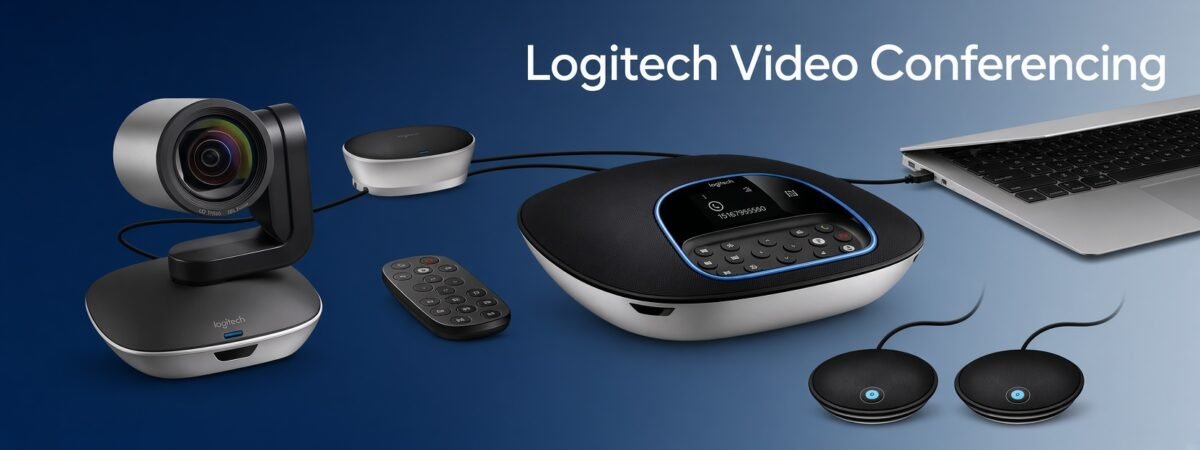
2. Logitech GROUP – Best for Medium to Large Conference Rooms
The Logitech GROUP Video Conferencing System (960-001057) is designed for business meeting rooms that require a dedicated conference camera and speakerphone.
The system features a motorized camera with 10x lossless zoom and a full-duplex speakerphone. It is commonly positioned for rooms accommodating approximately 14 participants, with compatible expansion microphones supporting larger arrangements of up to approximately 20 people.
Key considerations: Room capacity, camera zoom, speakerphone positioning, microphone expansion requirements and USB conferencing compatibility.
Best For / Application Areas
- Corporate conference rooms.
- Management and departmental meetings.
- Medium-sized boardrooms.
- Institutional and administrative meeting spaces.
- Hybrid meetings with multiple in-room participants.
Buying tip: Confirm whether expansion microphones are included in the selected package or must be purchased separately.
3. Logitech Rally Bar Huddle – Best All-in-One Video Bar for Small Rooms
The Logitech Rally Bar Huddle All-in-One 4K Video Conferencing System (960-001577) combines a conference camera, microphones, speaker and intelligent video processing in a compact meeting room device.
It features a 4K camera, wide field of view, intelligent participant framing, beamforming microphones and noise suppression. Supported deployment options include USB-connected and appliance-based meeting room configurations.
Integrated Camera
Wide-angle 4K camera with intelligent framing for supported meeting environments.
Built-In Audio
Microphone array, speaker and audio processing in one device.
Room Management
Compatible configurations support Logitech room management tools and conferencing platforms.
Best For / Application Areas
- Small corporate meeting rooms.
- Modern huddle spaces and hybrid offices.
- Executive collaboration rooms.
- Small training and interview rooms.
- Businesses standardizing compatible video meeting systems.
Buying tip: Confirm whether you require USB mode or appliance mode. Appliance-based room configurations may require a compatible controller and conferencing service license.
4. Logitech Rally and Rally Plus – Best for Corporate Boardrooms
Logitech Rally and Rally Plus are modular video conferencing systems intended for meeting spaces where flexible camera, microphone and speaker placement is important.
Unlike compact all-in-one video bars, modular Rally configurations use separate components that can be positioned according to the room’s dimensions, table layout and audio requirements.
These systems are worth considering when an organization needs a tailored conferencing installation rather than a single desktop camera or compact video bar.
Best For / Application Areas
- Corporate boardrooms and executive meeting rooms.
- Larger conference rooms.
- Government and institutional meeting facilities.
- Professional training and presentation spaces.
- Rooms requiring flexible microphone and speaker placement.
Buying tip: Confirm the exact Rally or Rally Plus configuration, room size, microphone coverage, display arrangement and conferencing platform. Rally Bar Huddle, Rally Bar and Rally Plus are different products and should not be treated as interchangeable systems.
5. Logitech PTZ Pro 2 – Best for Flexible Camera Positioning
The Logitech PTZ Pro 2 Video Conference Camera with Remote is a motorized Full HD conference camera offering pan, tilt and zoom functions.
It is designed for situations where camera positioning and framing need to be adjusted to capture different speakers, seating arrangements or presentation areas.
Unlike a complete conferencing kit, PTZ Pro 2 is primarily a camera solution. A suitable microphone, speakerphone or audio system may be required.
Best For / Application Areas
- Meeting rooms requiring adjustable camera angles.
- Training rooms and seminar spaces.
- Executive meeting rooms.
- Lecture and presentation environments.
- Conference rooms with existing compatible audio equipment.
Best Logitech Webcams for Personal Video Conferencing
Not every employee needs a dedicated meeting room system. For individual workstations, a suitable Logitech webcam can provide an effective video communication solution for supported online meeting applications.
Logitech Brio 100 – Best for Everyday Desktop Video Calls
The Logitech Brio 100 Full HD Webcam is a practical option for everyday computer-based video calls.
It offers Full HD video for compatible applications and is suited to users who want a dedicated webcam for online meetings, interviews and remote communication.
Best For / Application Areas
- Home-office workstations.
- Individual Zoom and Microsoft Teams meetings.
- Online interviews and consultations.
- Student and lecturer video communication.
- Reception and administrative desktops.
Other Logitech Brio Webcams to Consider
Businesses requiring more advanced personal video collaboration can compare other models in the Logitech Brio range, including Brio 305, Brio 505 and supported 4K Brio models.
Features differ by model and may include higher video resolution, improved light correction, automatic framing and additional privacy controls.
Buying tip: Check the exact model rather than assuming all Brio webcams offer 4K resolution or the same software features.
Best Logitech Headsets for Video Meetings and Hybrid Offices
Audio clarity is important for remote work, online training, customer calls and hybrid collaboration. A suitable headset can help users hear meeting participants and communicate through a dedicated microphone.
Logitech Zone Vibe Wireless – Best for Hybrid Work
The Logitech Zone Vibe Wireless Bluetooth Headset (981-001199) is designed for compatible work and communication environments.
It combines wireless connectivity, an over-ear design and microphone functionality for users who regularly participate in voice and video calls.
Best For / Application Areas
- Remote and hybrid employees.
- Professional video meetings.
- Online training and virtual interviews.
- Individual business communication.
- Home offices and shared workspaces.
Buying tip: Check the headset’s supported Bluetooth connection, included accessories, microphone features and compatibility with your meeting platform. Do not assume every Zone headset includes active noise cancellation.
Logitech Meeting Room Controllers – Tap IP
Organizations deploying dedicated meeting room systems may require a touch controller for convenient meeting management.
The Logitech Tap IP Meeting Room Touch Controller (952-000085) provides a touch interface for supported conferencing room configurations.
It can be used with compatible room systems to access supported meeting controls, depending on the conferencing platform and deployment.
Best For / Application Areas
- Corporate meeting rooms using compatible room systems.
- Microsoft Teams Rooms and Zoom Rooms deployments where supported.
- Conference rooms requiring a dedicated control interface.
- Organizations standardizing meeting room experiences.
- Managed business video conferencing installations.
Important: Tap IP Is Not a Complete Conferencing System
Tap IP is a meeting room controller. It does not replace the camera, microphone, speaker or compatible conferencing system. Confirm platform certification, room hardware and network requirements before purchasing.
Which Logitech Video Conferencing System Is Best for Your Application?
| Application Area | Recommended Equipment | Why Consider It? |
|---|---|---|
| Individual home office | Brio 100 + compatible Zone headset | Personal video and audio communication |
| Huddle room | MeetUp or Rally Bar Huddle | Wide-angle coverage and integrated audio |
| Medium conference room | Logitech GROUP | Dedicated camera and speakerphone system |
| Large boardroom | Rally / Rally Plus | Modular equipment placement |
| Training or presentation room | PTZ Pro 2 with suitable audio | Adjustable camera framing |
| Dedicated Teams or Zoom room | Compatible video system + Tap IP | Integrated room meeting controls |
Logitech Video Conferencing for Microsoft Teams, Zoom and Google Meet
Logitech offers conferencing products for different meeting platforms, including Microsoft Teams, Zoom and Google Meet. However, platform compatibility and certification vary by device and deployment mode.
Before purchasing, establish whether your organization needs a USB-connected conferencing device, a dedicated meeting room appliance or a system connected to an in-room computer.
USB Conferencing
Uses a compatible computer to run the conferencing application and connect to supported camera and audio equipment.
Appliance Mode
Runs a supported room conferencing solution on compatible dedicated equipment, subject to software and licensing requirements.
Managed Meeting Rooms
May include compatible touch controllers, room management tools and centralized device administration.
What Should You Check Before Buying Logitech Video Conferencing Equipment?
- Room size: Measure the room and consider the distance between the camera and participants.
- Number of participants: Select equipment with suitable video coverage and microphone pickup.
- Camera requirements: Compare field of view, resolution, zoom and framing features.
- Audio coverage: Check speakerphone performance, microphone range and expansion options.
- Meeting platform: Confirm Microsoft Teams, Zoom, Google Meet or other application compatibility.
- Deployment mode: Decide between USB conferencing and a supported dedicated room appliance.
- Room controller: Confirm whether a controller such as Tap IP is required or included.
- Network and power: Review Ethernet, Wi-Fi, power and installation requirements.
- Package contents: Check included cables, mounts, microphones, speakers and accessories.
- Budget: Consider equipment, installation, software licensing and future expansion costs.
Logitech Video Conferencing Applications in Kenya
Logitech video collaboration equipment can support communication across different industries and organizational environments.
Corporate Offices
Board meetings, departmental discussions, management reviews and hybrid collaboration.
Government Institutions
Administrative meetings, interdepartmental communication and remote coordination.
Universities & Colleges
Online lectures, academic meetings, training and remote presentations.
Healthcare Organizations
Administrative collaboration, professional training and suitable remote consultations.
Hotels & Conference Facilities
Business meeting spaces, hybrid events and conference room communication.
NGOs & International Organizations
Project meetings, distributed team coordination and stakeholder communication.
Frequently Asked Questions About Logitech Video Conferencing Equipment
Which Logitech video conferencing system is best for a small meeting room?
Logitech MeetUp and Rally Bar Huddle are options for small meeting rooms. MeetUp is a USB conference camera with integrated audio, while Rally Bar Huddle provides an all-in-one video bar with additional intelligent conferencing features.
Which Logitech conferencing system is suitable for a boardroom?
Logitech GROUP may suit medium-sized meeting rooms, while modular Rally or Rally Plus configurations are worth considering for larger boardrooms. Room dimensions, audio coverage and platform requirements determine the best option.
What is the difference between Logitech MeetUp and Rally Bar Huddle?
Both target smaller meeting spaces. MeetUp is a USB conference camera with integrated audio, while Rally Bar Huddle is an all-in-one video bar supporting additional intelligent video features and compatible room deployment options.
Does a 4K conference camera guarantee 4K video meetings?
No. Actual video-call resolution can depend on the conferencing platform, device configuration, network conditions and meeting software.
Can Logitech PTZ Pro 2 work without a separate microphone?
PTZ Pro 2 is primarily a conference camera. A compatible microphone, speakerphone or other audio solution may be needed for complete two-way meeting communication.
Do Logitech video conferencing systems work with Microsoft Teams and Zoom?
Many Logitech conferencing products support Microsoft Teams and Zoom in compatible configurations. Certification, deployment mode and licensing requirements vary by product, so confirm the exact system before purchasing.
Where can I buy Logitech video conferencing equipment in Nairobi?
Rapidtech Networks Limited supplies Logitech video conferencing systems, cameras and accessories online and from our Nairobi CBD office. Contact the sales team to confirm the required models and availability.
Can I request a quotation for a complete Logitech meeting room solution?
Yes. Provide your room dimensions, estimated participants, preferred meeting platform and required equipment so Rapidtech Networks Limited can assist with a suitable product quotation.
More Logitech Buying Guides
For an overview of Logitech product families, compatibility and connectivity, read our Logitech Accessories Complete Buying Guide in Kenya.
To compare peripherals for individual workstations, see our guide to the best Logitech accessories for home and office work in Kenya.
For supplier information and purchasing options, read where to buy Logitech mice, keyboards and accessories in Nairobi.
Final Recommendation: Which Logitech Video Conferencing Equipment Should You Buy?
For individual desktop video meetings, a Logitech Brio webcam and compatible Zone headset may be sufficient. For smaller shared meeting spaces, compare Logitech MeetUp and Rally Bar Huddle.
For medium-sized conference rooms, Logitech GROUP provides a dedicated camera and speakerphone solution. Larger boardrooms may benefit from modular Rally or Rally Plus equipment, while PTZ Pro 2 can suit installations requiring adjustable camera positioning.
The best solution is the one that matches your room size, participant count, meeting platform, audio coverage and available budget.
Buy Logitech Video Conferencing Equipment in Kenya
Rapidtech Networks Limited supplies Logitech video conferencing cameras, webcams, headsets, speakerphones, meeting room controllers and collaboration equipment for businesses, institutions and professional workspaces.
Browse our Logitech accessories in Kenya category or explore our Logitech Online Store in Kenya for available models and current product prices.
We serve customers in Nairobi and arrange deliveries to Mombasa, Kisumu, Nakuru, Eldoret, Thika, Kiambu, Machakos, Nyeri, Meru, Embu, Kakamega, Kisii, Kitale, Naivasha and other towns across Kenya, subject to delivery arrangements.
Request a quotation: Share your meeting room size, number of participants, preferred conferencing platform and equipment requirements. Our team can assist with product selection and quotation inquiries.
Phone: 0722 555 289
Email: sales@rapidtech.co.ke
