
Accessories
Logitech C920e vs C922 vs Brio 4K: Which Webcam Is Best for Video Meetings in Kenya?
Nov
Logitech C920e vs C922 vs Brio 4K: Which Webcam Is Best for Video Meetings in Kenya?
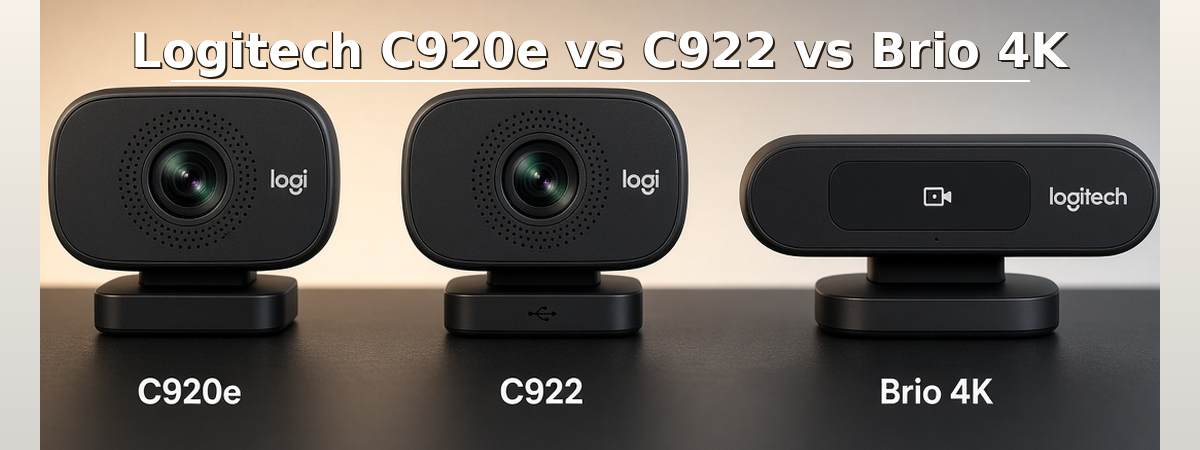
Choosing between the Logitech C920e vs C922 vs Brio 4K depends on whether you need a webcam for everyday office meetings, live streaming or premium professional video communication.
All three webcams can support computer-based video calls, but they target different users. The Logitech C920e is designed for business communication, the C922 Pro Stream emphasizes smooth video capture for creators, and the Brio 4K offers higher resolution, advanced lighting features and Windows Hello support.
This comparison from Rapidtech Networks Limited examines video resolution, frame rates, field of view, microphone features, privacy, connectivity and practical applications for customers in Nairobi and across Kenya.
Quick Answer: Which Logitech Webcam Should You Buy?
Choose C920e for everyday business meetings and corporate workstations. Choose C922 for streaming or content creation where 720p at 60 fps is useful. Choose Brio 4K for premium video quality, adjustable framing and compatible Windows Hello facial recognition. For basic Full HD video calls, the Brio 100 is another option worth comparing.
Logitech C920e vs C922 vs Brio 4K Specifications Comparison
| Feature | Logitech C920e | Logitech C922 | Logitech Brio 4K Pro |
|---|---|---|---|
| Primary Use | Business meetings | Streaming and video calls | Premium professional video |
| Maximum Resolution | 1080p at 30 fps | 1080p at 30 fps | 4K at 30 fps |
| Higher Frame Rate | 30 fps | 720p at 60 fps | 1080p at 60 fps |
| Field of View | 78° fixed | 78° optical | 65°, 78°, 90° selectable |
| Light Correction | RightLight 2 | Automatic light correction | RightLight 3 with HDR |
| Digital Zoom | 1x at Full HD | Software-dependent framing | Up to 5x |
| Microphones | Dual; activation depends on variant | Dual stereo microphones | Dual microphones |
| Privacy Cover | Included | Not standard | Attachable cover |
| Connection | USB-A | USB-A | Detachable cable; USB-A host connection, USB-C options vary |
| Windows Hello | No | No | Yes, on compatible Windows devices |
Important: Maximum webcam capture specifications do not guarantee that Zoom, Microsoft Teams or Google Meet will transmit video at the same resolution or frame rate. Actual performance depends on the application, computer, network and configuration.
1. Logitech C920e – Best for Corporate Office Video Meetings
The Logitech C920e HD Pro Webcam is a business-oriented Full HD webcam designed for professional video communication.
It supports 1080p video at 30 frames per second, autofocus, automatic light correction and a fixed 78-degree field of view. This makes it suitable for individual office workstations where the user needs a consistent head-and-shoulders view.
Key Features
- Full HD 1080p video at 30 fps.
- Fixed 78-degree diagonal field of view.
- Autofocus and RightLight 2 automatic light correction.
- Integrated dual microphones, with activation depending on the model variant.
- Attachable physical privacy shutter.
- USB connectivity for compatible computers.
Best For / Application Areas
- Corporate office workstations and employee desktops.
- Daily Microsoft Teams, Zoom and Google Meet calls.
- Government and institutional offices.
- Remote and hybrid employees.
- Online interviews, consultations and professional training.
C920e Microphone Compatibility
Some C920e variants ship with microphones disabled by default. Supported configurations allow microphone activation through Logi Tune. Confirm the exact product part number and microphone settings before deployment, especially when purchasing multiple webcams for an organization.
2. Logitech C922 Pro Stream – Best for Streaming and Content Creation
The Logitech C922 Pro Stream Webcam is designed for users who combine video meetings with live streaming, recording and content creation.
Like the C920e, it supports Full HD 1080p at 30 fps. Its main distinction is the ability to capture 720p video at 60 fps, which can provide smoother motion when recording or streaming.
Key Features
- 1080p video at 30 fps.
- 720p video at 60 fps.
- 78-degree diagonal field of view.
- Autofocus and automatic light correction.
- Integrated dual stereo microphones.
- USB connection for compatible computers.
- Tripod availability depends on the product package.
Best For / Application Areas
- YouTube and Twitch live streaming.
- Online trainers and digital content creators.
- Gaming streams and commentary videos.
- Webinars and virtual presentations.
- Users combining business video calls with recording.
Buying tip: The C922’s 60 fps capability operates at 720p, not 1080p. Choose 1080p/30 fps when image detail is more important, or 720p/60 fps when smoother movement is the priority.
3. Logitech Brio 4K Pro – Best for Premium Professional Video Quality
The Logitech Brio 4K Webcam Stream Edition (960-001194) is a premium webcam designed for professionals, content creators and business users who require high-resolution video, advanced lighting correction and flexible framing.
It supports 4K Ultra HD video capture and is suitable for professional video meetings, live streaming and high-resolution recording. Confirm the supported resolution, frame rate and software features for this specific Stream Edition before purchasing.
Key Features
- 4K Ultra HD capture at 30 fps.
- Full HD 1080p capture at 60 fps.
- Adjustable 65°, 78° and 90° diagonal field of view.
- RightLight 3 with HDR for challenging lighting conditions.
- Up to 5x digital zoom.
- Autofocus and dual microphones.
- Infrared sensor for compatible Windows Hello facial recognition.
- Attachable privacy shutter.
Best For / Application Areas
- Executive and management workstations.
- Professional remote presentations.
- Premium home-office video conferencing.
- High-resolution video recording.
- Online instructors and consultants requiring flexible framing.
- Compatible Windows workstations using Windows Hello.
Buying tip: A 4K webcam is most useful when your computer, recording application and intended workflow support higher-resolution capture. For ordinary meetings, a good Full HD webcam may already meet your requirements.
4. Logitech Brio 100 – A Budget-Friendly Full HD Alternative
Customers who do not require advanced streaming features or 4K capture can also consider the Logitech Brio 100 Full HD Webcam.
Brio 100 is a separate product from Brio 4K Pro. It offers Full HD video for everyday calls, making it an option for customers prioritizing straightforward desktop video communication.
Best For / Application Areas
- Home-office video calls.
- Student and teacher online meetings.
- General office communication.
- Remote interviews and consultations.
- Businesses equipping individual workstations with basic webcams.
Important: Brio 100 does not offer the same 4K recording, advanced zoom or Windows Hello infrared capabilities as Brio 4K Pro.
Logitech C920e vs C922 vs Brio 4K: Which Is Better for Zoom and Microsoft Teams?
For most everyday video meetings, 1080p capture is sufficient. Choosing a webcam should therefore involve more than selecting the highest available resolution.
Corporate Office Meetings
Recommended: C920e
Business-oriented features, Full HD video and a physical privacy cover make it suitable for professional desktop communication.
Streaming & Webinars
Recommended: C922
Offers a 720p/60 fps option for smoother motion during compatible streaming and recording activities.
Premium Video Communication
Recommended: Brio 4K
Provides higher-resolution capture, HDR light correction, adjustable framing and compatible Windows Hello support.
Everyday Personal Calls
Alternative: Brio 100
A straightforward Full HD option for compatible home and office computers.
1080p vs 4K Webcams: Do You Really Need 4K for Video Meetings?
For many office employees, a 1080p webcam provides sufficient detail for everyday video meetings. The overall meeting experience also depends on lighting, camera placement, microphone quality and internet connectivity.
A 4K webcam can be worthwhile for high-resolution recording, cropping, advanced framing and professional content production. However, not every video conferencing service transmits meetings in 4K.
Practical Recommendation
Choose C920e for business-focused Full HD meetings, C922 when streaming frame rates matter, and Brio 4K when higher-resolution capture and advanced imaging features justify the additional investment.
Which Logitech Webcam Is Best for Your Industry or Application?
| Application Area | Webcam to Consider | Reason |
|---|---|---|
| Corporate offices | C920e | Business video communication |
| Government institutions | C920e | Individual workstation conferencing |
| Content creators | C922 | Streaming and recording flexibility |
| Executive offices | Brio 4K | Advanced imaging and framing |
| Universities and colleges | C920e or C922 | Online teaching and presentations |
| Home offices | Brio 100 or C920e | Everyday video calls |
| Professional recording | Brio 4K | High-resolution capture |
When Should You Choose a Conference Camera Instead of a Webcam?
The C920e, C922 and Brio 4K are primarily designed for individual computer users. If your organization needs a camera for several people seated around a conference table, a dedicated meeting room system may be more appropriate.
Conference cameras and video bars can provide wider room coverage, integrated microphones, speakers and meeting room management features.
Read our guide to the best Logitech video conferencing systems and equipment in Kenya to compare MeetUp, GROUP, Rally Bar Huddle and other meeting room solutions.
What Should You Check Before Buying a Logitech Webcam in Kenya?
- Resolution: Decide whether Full HD is sufficient or 4K capture is required.
- Frame rate: Compare 30 fps and 60 fps capabilities at their supported resolutions.
- Field of view: Consider how much of your desk or background should be visible.
- Lighting: Evaluate the working environment and light correction features.
- Microphones: Check whether built-in microphones are enabled and suitable for your needs.
- Privacy: Confirm physical shutter availability and organizational requirements.
- Connectivity: Check USB port requirements and cable compatibility.
- Software: Confirm support for the intended operating system and meeting application.
- Package contents: Verify mounts, cables, covers and tripod availability.
- Price and warranty: Review the current listing and applicable product terms.
Frequently Asked Questions
Is Logitech C920e better than C922 for office meetings?
C920e is more business-focused and includes a privacy cover. C922 is more suitable when streaming and 720p/60 fps capture are priorities. Both support 1080p video at 30 fps.
Can Logitech C922 record at 1080p and 60 fps?
No. C922 supports 1080p at 30 fps or 720p at 60 fps. The higher frame rate requires the lower resolution.
Is Logitech Brio 4K worth buying for Zoom meetings?
Brio 4K is worth considering if you also need high-resolution recording, advanced lighting correction or adjustable framing. For standard video meetings, a suitable Full HD webcam may be sufficient.
Does Logitech C920e have a built-in microphone?
Yes. C920e has integrated microphones, but some variants have them disabled by default. Check the exact model and supported Logi Tune settings.
Does Logitech Brio 4K support Windows Hello?
Yes. Brio 4K includes infrared technology for Windows Hello facial recognition on compatible Windows computers.
Is Logitech Brio 100 the same as Brio 4K?
No. Brio 100 is a Full HD webcam, while Brio 4K supports higher-resolution video, advanced framing and compatible Windows Hello functionality.
Where can I buy Logitech webcams in Nairobi?
Rapidtech Networks Limited supplies Logitech webcams and computer accessories online and from our Nairobi CBD office. Confirm the required model and availability before ordering.
Related Logitech Buying Guides
For general product selection, read our Logitech Accessories Complete Buying Guide in Kenya, which explains mice, keyboards, webcams and gaming peripherals.
For a complete home workstation, see our recommendations for the best Logitech accessories for home and office work in Kenya.
For purchasing information, visit our guide on where to buy Logitech mice, keyboards and accessories in Nairobi.
Final Verdict: Logitech C920e vs C922 vs Brio 4K
Logitech C920e: A suitable choice for business users who prioritize Full HD video, a professional workstation setup and a physical privacy cover.
Logitech C922: A better fit for creators and streamers who benefit from the 720p/60 fps recording option.
Logitech Brio 4K: A premium option for users requiring 4K capture, advanced light correction, flexible framing and Windows Hello support.
Logitech Brio 100: A practical alternative for basic Full HD video calls when advanced features are unnecessary.
The best webcam is the one that meets your video communication requirements, works with your computer and offers useful features within your budget.
Buy Logitech Webcams and Video Conferencing Equipment in Kenya
Rapidtech Networks Limited supplies Logitech webcams, headsets, meeting room cameras and video conferencing equipment for homes, offices, businesses and institutions.
Explore our Logitech audio and video conferencing systems in Kenya for available conferencing products and solutions.
Browse our Logitech accessories in Kenya category or visit the Logitech Online Store in Kenya to explore the wider product range.
We arrange delivery to Nairobi, Mombasa, Kisumu, Nakuru, Eldoret, Thika, Kiambu, Machakos, Nyeri, Meru, Embu, Kakamega, Kisii, Kitale, Naivasha and other towns across Kenya, subject to delivery arrangements.
Contact Rapidtech Networks Limited for webcam availability, product quotations, business orders and assistance selecting compatible Logitech equipment.
Phone: 0722 555 289
Email: sales@rapidtech.co.ke
