
Electronics
Best Mecer UPS for Server Rooms in Kenya
Jun
Best Mecer UPS for Server Rooms and IT Infrastructure in Kenya
Server rooms and IT infrastructure require reliable backup power because even a short outage can interrupt business systems, disconnect users, stop applications, affect storage devices and increase the risk of data loss. A properly selected Mecer UPS helps protect servers, storage systems, firewalls, switches, network cabinets, virtualization hosts and other critical IT equipment from sudden shutdowns and unstable power.
This guide explains how to choose the best Mecer UPS for server rooms and IT infrastructure in Kenya. It builds on our Mecer UPS for networking equipment guide and our Mecer online UPS vs line interactive UPS comparison.
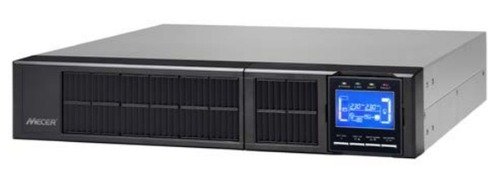
For server rooms and sensitive IT infrastructure, Mecer online UPS and rackmount UPS systems are generally more suitable than basic line interactive UPS models because they provide stronger power protection and better support for critical loads.
Why Servers Need UPS Protection
Servers, storage devices and network infrastructure should not shut down abruptly during outages. Sudden power loss can interrupt business applications, damage unsaved data, affect virtual machines, disrupt communication systems and create recovery challenges for IT teams.
| Power Risk | Business Impact | How a Mecer UPS Helps |
|---|---|---|
| Power Outage | Servers and applications shut down unexpectedly. | Provides backup power for continuity or safe shutdown. |
| Voltage Fluctuation | Hardware may become unstable or reboot. | Online UPS systems provide stronger power protection. |
| Storage Interruption | Risk of file corruption, failed writes or service interruption. | Supports controlled operation during power events. |
| Network Failure | Users lose access to systems, cloud apps and shared resources. | Keeps switches, routers and firewalls powered. |
| Unsafe Shutdown | Recovery may take longer after power returns. | Allows safe shutdown planning and runtime buffering. |
Which Server Room Equipment Needs UPS Protection?
A server room UPS should protect the equipment that keeps business systems running. This normally includes servers, storage devices, core switches, firewalls, routers, backup appliances, monitoring systems and network equipment.
| IT Equipment | UPS Priority | Reason |
|---|---|---|
| Rack Server | High | Runs business applications and services. |
| NAS or SAN Storage | High | Protects shared files, backups and application data. |
| Core Switch | High | Keeps the internal network active. |
| Firewall | High | Supports network security and routing. |
| Virtualization Host | High | May run multiple critical virtual machines. |
| Monitoring Device | Medium to High | Helps detect outages, faults and service interruptions. |
Best Mecer UPS Size for Server Rooms
Server room UPS sizing should be based on actual load, equipment criticality, required runtime, rack layout and future expansion. A small server may require a different UPS from a network rack, virtualization host or medium-sized server room.
| IT Environment | Recommended UPS Range | Recommended UPS Type |
|---|---|---|
| Single Small Server | 2000VA – 3000VA | Online UPS |
| Small Network Rack | 3000VA – 6000VA | Rackmount UPS |
| Server + Storage + Core Switch | 6kVA – 10kVA | Online or Rackmount Online UPS |
| Medium Server Room | 10kVA+ | Online UPS with assessment |
| Enterprise Infrastructure | 10kVA and above | Three-phase or enterprise UPS |
Online UPS vs Rackmount UPS for Servers
For server rooms, the decision is often between tower online UPS and rackmount UPS systems. Tower online UPS systems are suitable for standalone installations, while rackmount UPS systems are better for structured server cabinets and professional IT rooms.
| Feature | Tower Online UPS | Rackmount UPS |
|---|---|---|
| Installation | Floor or shelf placement. | Installed inside a server rack. |
| Best For | Standalone server and office IT setups. | Network cabinets and server racks. |
| Space Use | Uses floor or shelf space. | Uses rack space efficiently. |
| Cable Management | Basic cable management. | Cleaner structured cabling. |
| Ideal Buyer | Small businesses and IT offices. | IT teams and structured server rooms. |
Best UPS Type by IT Environment
Different IT environments require different levels of UPS protection. A small business server setup may not require the same UPS design as a server room with multiple racks and enterprise infrastructure.
| IT Environment | Recommended UPS | Planning Note |
|---|---|---|
| Small Business Server | Online UPS | Size based on server and storage load. |
| Network Rack | Rackmount UPS | Consider switches, firewall, router and PoE load. |
| Virtualization Host | Online UPS | Allow safe shutdown for virtual machines. |
| Data Room | Rackmount Online UPS | Plan for runtime, rack space and future expansion. |
| Enterprise Server Room | Three-Phase UPS | Requires proper assessment and project planning. |
Runtime Planning for Server Rooms
Server room runtime planning should focus on business continuity and safe shutdown. Runtime depends on UPS capacity, battery condition, connected load and the number of critical systems connected. In some environments, the UPS only needs to provide enough time for controlled shutdown. In others, it must bridge the gap until generator power or alternative backup is available.
| Runtime Objective | Recommendation | Suitable For |
|---|---|---|
| Safe Shutdown | UPS sized for controlled shutdown time. | Small business servers and NAS systems. |
| Business Continuity | UPS with longer runtime planning. | Critical business systems and network racks. |
| Generator Buffer | UPS bridges power until generator stabilizes. | Facilities with generator backup. |
| High Availability | Redundancy and proper power path planning. | Enterprise and institutional environments. |
Common Server Room UPS Mistakes
Line interactive UPS systems may not be suitable for critical server infrastructure.
NAS, SAN and backup devices should be included in UPS sizing.
Servers may still be unreachable if switches, firewalls and routers are not protected.
Server rooms should allow capacity for future systems and additional network devices.
Frequently Asked Questions
Which Mecer UPS is best for server rooms?
For server rooms, Mecer online UPS or rackmount UPS systems are usually recommended because they provide stronger protection for sensitive IT equipment.
Can I use a line interactive UPS for servers?
Line interactive UPS systems may support light IT equipment, but online UPS protection is generally better for servers, storage and critical business systems.
What size Mecer UPS do I need for a server?
The right size depends on the server load, storage devices, networking equipment and required runtime. Small server setups may require 2000VA to 3000VA, while larger racks may need 6kVA, 10kVA or higher.
Should server rooms use rackmount UPS systems?
Rackmount UPS systems are preferred where servers and network equipment are installed in racks because they improve space use and cable organization.
What affects UPS runtime in server rooms?
Runtime depends on UPS capacity, battery condition, connected load, server count, storage load, network equipment and battery configuration.
Do server room UPS systems need maintenance?
Yes. Server room UPS systems should be inspected, tested and maintained regularly to reduce the risk of runtime failure and unexpected battery issues.
Buy Mecer UPS for Server Rooms and IT Infrastructure in Kenya
Rapidtech Networks Limited supplies Mecer UPS systems for server rooms, network racks, storage systems, firewalls, switches, virtualization hosts and business-critical IT infrastructure. We help customers choose suitable UPS systems based on load size, runtime needs, rack environment and future expansion.
Explore our Mecer UPS Systems in Kenya, visit the Mecer Online Store in Kenya, compare all UPS Systems in Kenya, or learn more about UPS Power Backup Services and Solutions in Kenya. For Mecer-specific support, visit our Mecer UPS Power Backup Solutions in Kenya.
For related guidance, see our Mecer UPS for networking equipment and Mecer UPS size guide.
Contact Rapidtech Networks Limited today for help choosing the best Mecer UPS for server rooms and IT infrastructure in Kenya.
