
How to Guides
How to Choose the Right Mecer UPS Size in Kenya
Jun
How to Choose the Right Mecer UPS Size in Kenya
Choosing the right Mecer UPS size is one of the most important steps when buying a backup power solution for homes, offices, CCTV systems, networking equipment, server rooms and business-critical devices. A UPS that is too small may overload or provide very short runtime, while an oversized UPS may increase cost without delivering meaningful value for your application.
This guide explains how to choose the right Mecer UPS capacity based on connected load, backup runtime, UPS type, equipment sensitivity and installation environment. For price planning, read our Mecer UPS Price Guide in Kenya. For a broader overview of Mecer UPS types and applications, see our Complete Guide to Mecer UPS Systems in Kenya.
Do not size a Mecer UPS by VA rating alone. Always consider watt rating, total connected load, backup runtime expectations, UPS technology and whether the equipment is basic electronics or sensitive business-critical infrastructure.
Why Mecer UPS Sizing Matters
UPS sizing determines whether your backup power system can safely support connected devices during an outage. If the UPS is undersized, it may beep continuously, overload, shut down unexpectedly or fail to provide enough time for safe shutdown. If it is correctly sized, it can help protect equipment, maintain operations during short outages and reduce the risk of data loss.
For a router or modem, a small Mecer UPS may be enough. For CCTV, office computers, network cabinets or servers, you need to calculate the load more carefully. For server rooms and enterprise equipment, sizing should include future expansion, runtime needs, power distribution and the sensitivity of the connected equipment.
Understanding VA, Watts and kVA
Mecer UPS capacity is usually shown in VA, kVA and watts. VA or kVA shows apparent power capacity, while watts show the real usable power available for connected equipment. When comparing Mecer UPS models, the watt rating is especially important because it tells you how much actual equipment load the UPS can support.
| Term | Meaning | Why It Matters |
|---|---|---|
| VA | Volt-amperes, used to show UPS apparent power capacity. | Helps compare UPS size categories such as 650VA, 1000VA and 3000VA. |
| kVA | Kilovolt-amperes. 1kVA equals 1000VA. | Commonly used for larger UPS systems such as 3kVA, 6kVA and 10kVA. |
| Watts | The actual usable power available to connected equipment. | This is critical when checking whether a UPS can support your devices. |
| Load | The total power demand of all devices connected to the UPS. | The UPS should have enough spare capacity above the load. |
Step 1: List the Devices You Want to Protect
Start by listing every device that will connect to the Mecer UPS. This may include routers, modems, desktop computers, monitors, DVRs, NVRs, switches, firewalls, servers, storage systems and POS terminals. Avoid connecting high-power appliances that are not suitable for UPS backup.
For smaller setups, you can estimate the load based on device type. For business-critical systems, check the power rating on the device label, power adapter, manufacturer documentation or power distribution unit.
Step 2: Add the Total Load
After listing the devices, add their estimated wattage. This gives you the approximate connected load. The UPS you choose should support this load comfortably, with enough headroom to avoid operating at maximum capacity.
| Device Type | Typical Load Level | Sizing Advice |
|---|---|---|
| Router, ONT or Modem | Low | A small Mecer UPS is usually enough for short internet backup. |
| Desktop Computer and Monitor | Low to moderate | Choose enough capacity for safe shutdown and short backup time. |
| CCTV DVR or NVR | Moderate | Include recorder, router, switch and monitor if connected. |
| PoE Switch | Moderate to high | Check PoE load because cameras or access points increase demand. |
| Network Cabinet | Moderate to high | Calculate the combined load of switches, router, firewall and accessories. |
| Server and Storage Equipment | High | Use online or rackmount UPS with proper sizing and shutdown planning. |
Step 3: Add Capacity Headroom
A UPS should not be sized exactly at the same level as the connected load. Running too close to maximum capacity can reduce runtime and increase overload risk. A practical approach is to allow extra capacity so the UPS can handle normal load fluctuations and future additions.
For most office, CCTV and networking applications, avoid loading the UPS to full capacity. Leave room for startup load, future devices and battery aging.
Mecer UPS Size Guide by Application
The table below provides a practical Mecer UPS sizing guide based on common applications. It is a planning guide, not a replacement for load assessment where many devices are involved.
| Application | Recommended Mecer UPS Size | Best UPS Type | Main Purpose |
|---|---|---|---|
| Home Internet Backup | 650VA – 1000VA | Line Interactive UPS | Keep router, modem and ONT powered during short outages. |
| Single Desktop Workstation | 850VA – 1500VA | Line Interactive UPS | Allow safe shutdown and short backup time. |
| Small Office Setup | 1000VA – 3000VA | Line Interactive UPS | Support computers, router, printer and business devices. |
| CCTV System | 1000VA – 3000VA | Line Interactive or Online UPS | Support DVR, NVR, PoE switch, router and security devices. |
| Network Cabinet | 1500VA – 6000VA | Rackmount UPS | Protect switches, firewall, routers and access points. |
| Server Room | 3kVA – 10kVA+ | Online or Rackmount UPS | Protect servers, storage and business-critical infrastructure. |
| Enterprise Loads | 10kVA+ | Three-Phase Online UPS | Support larger critical systems and institutional power backup. |
Mecer UPS Capacity Breakdown
650VA to 850VA Mecer UPS
This capacity range is suitable for light backup needs such as routers, modems, ONTs, small desktop computers and basic electronics. It is a practical entry-level range for home users and small offices that need short backup time.
1000VA Mecer UPS
A 1000VA Mecer UPS is suitable for home offices, small workstations, basic CCTV systems, POS terminals and networking equipment. It gives more flexibility than smaller UPS models while remaining suitable for light to moderate loads.
2000VA Mecer UPS
A 2000VA Mecer UPS is suitable for small offices, CCTV systems, routers, switches, POS systems and multiple low-power devices. It is a common choice where users need more output capacity than a basic home UPS.
3000VA Mecer UPS
A 3000VA Mecer UPS is better suited for larger CCTV systems, small network cabinets, multiple office devices and selected business-critical equipment. It provides more headroom and is useful where additional devices may be added later.
6kVA Mecer UPS
A 6kVA Mecer UPS is more suitable for server rooms, network racks, business systems and professional IT environments. This level normally requires more careful planning around load, runtime, installation and power distribution.
10kVA and Above
Mecer UPS systems from 10kVA and above are usually selected for larger offices, institutions, server rooms, data rooms and enterprise environments. These systems should be sized through proper assessment rather than guesswork.
Line Interactive vs Online UPS for Sizing
UPS size is not the only decision. You also need to choose the right UPS technology. A line interactive Mecer UPS may be suitable for general backup power, while an online Mecer UPS is better for servers, network infrastructure and sensitive business systems.
| UPS Type | Best For | Sizing Consideration |
|---|---|---|
| Line Interactive UPS | Homes, offices, CCTV, routers and POS systems | Good for general loads where affordable backup is the priority. |
| Online UPS | Servers, storage, networking and sensitive systems | Recommended where clean, stable power and stronger protection are needed. |
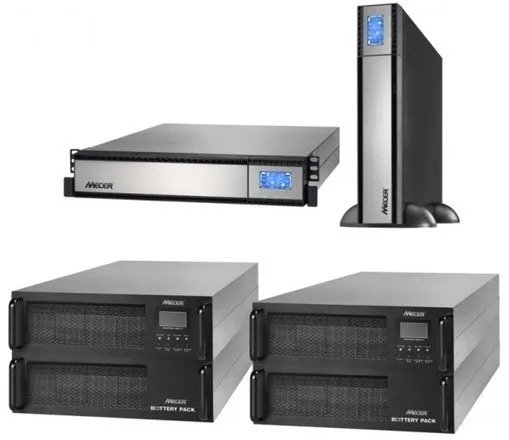
| Rackmount UPS | Server racks and network cabinets | Choose based on rack space, load, runtime and cable organization. |
Runtime Expectations When Choosing a Mecer UPS
UPS runtime depends on connected load, battery size, battery age and UPS capacity. A UPS powering only a router will usually run much longer than the same UPS powering a desktop, monitor, switch and CCTV recorder.
When runtime is important, do not only ask what size UPS you need. Ask what load you need to support and how long you need it to stay powered. This is especially important for CCTV systems, network equipment, server rooms and business-critical applications.
Common Mecer UPS Sizing Mistakes
A cheaper UPS may not have enough output capacity or runtime for your equipment.
VA rating is useful, but the watt rating shows the real usable load the UPS can support.
Running a UPS near full capacity can reduce runtime and increase overload risk.
Basic backup UPS systems are not ideal for sensitive server and storage equipment.
Growing offices and IT rooms should allow spare capacity for future devices.
UPS systems should not be used for high-power appliances that exceed their design purpose.
When to Request Professional UPS Sizing
Professional UPS sizing is recommended when the load is business-critical, when many devices are involved, when runtime is important or when the installation involves racks, servers, CCTV systems, hospitals, schools or enterprise environments. Proper sizing helps avoid overload, poor runtime and unnecessary cost.
For larger Mecer UPS installations, assessment should include load measurement, rack layout, battery condition, ventilation, bypass requirements, monitoring needs and future expansion.
Frequently Asked Questions About Mecer UPS Sizing
What size Mecer UPS do I need for a router?
For a router, ONT or modem, a small Mecer UPS in the 650VA to 1000VA range is usually enough, depending on how many devices are connected and the desired runtime.
What size Mecer UPS is best for office computers?
For office computers, 1000VA to 3000VA is common depending on the number of computers, monitors, routers, printers and other devices connected.
What size Mecer UPS is suitable for CCTV?
CCTV systems commonly use 1000VA to 3000VA UPS systems, depending on the DVR or NVR, number of cameras, PoE switches, router and required backup time.
Do servers need a larger Mecer UPS?
Yes. Servers, storage and network racks usually require online or rackmount UPS systems with proper load calculation and runtime planning.
Should I buy a bigger UPS for longer backup time?
A bigger UPS can help, but runtime also depends on battery capacity, load and battery condition. For long runtime needs, proper battery and load planning is important.
Is a 2000VA Mecer UPS better than a 1000VA UPS?
A 2000VA UPS supports more load than a 1000VA UPS, but the right choice depends on your actual devices and runtime requirements.
Need Help Choosing the Right Mecer UPS Size?
Rapidtech Networks Limited supplies Mecer UPS systems for homes, offices, CCTV systems, network cabinets, server rooms, schools, hospitals, retail shops and enterprise environments. We help customers choose the right UPS capacity based on connected load, runtime expectations, UPS technology and installation environment.
Browse our Mecer UPS Systems in Kenya, visit the Mecer Online Store in Kenya, or explore our Mecer UPS Power Backup Solutions in Kenya for installation, runtime testing, battery replacement and support.
Contact Rapidtech Networks Limited today for Mecer UPS sizing guidance and product selection support in Kenya.

Pingback: Which Mecer UPS Should I Buy? Complete Buyer's Guide | Rapidtech Networks Limited
Pingback: Best Mecer UPS for CCTV Systems in Kenya | Rapidtech Networks Limited
Pingback: Mecer 1000VA vs 2000VA vs 3000VA UPS: Which One Should You Choose? | Rapidtech Networks Limited