
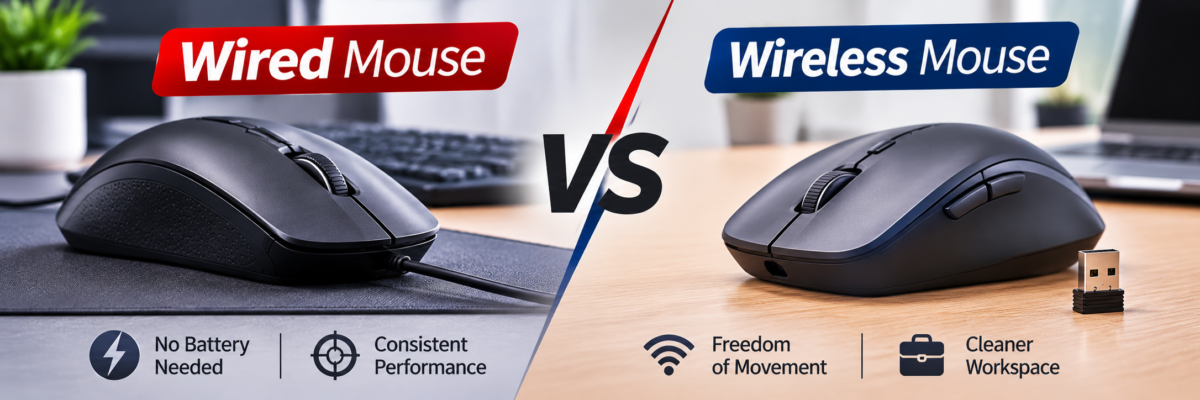
Wired vs wireless mouse: which should you buy in Kenya? Both connection types can provide reliable cursor control, but the right choice depends on your budget, computer setup, portability requirements and how you use your mouse every day.
A wired mouse connects directly to your laptop or desktop through a USB cable, making it practical for fixed workstations, schools, offices and users who prefer not to manage batteries. A wireless mouse removes the connecting cable and offers greater flexibility for laptop users, mobile professionals and home offices.
In this comparison, we explain the differences in cost, connection reliability, latency, battery requirements, portability and gaming performance to help you decide which mouse is better for your needs.
Quick Verdict: Wired or Wireless Mouse?
Choose a wired mouse if you want an affordable option for a fixed desk, a direct USB connection and no battery maintenance.
Choose a wireless mouse if you frequently move between workstations, prefer a clutter-free desk or need convenient laptop portability.
For gaming: Both wired mice and well-designed gaming wireless mice can deliver responsive performance. Compare the actual sensor, polling rate and connection technology.
For modern laptops: A compatible Bluetooth mouse can be convenient when USB ports are limited.
Wired vs Wireless Mouse: Key Differences
Wired and wireless mice differ mainly in how they communicate with the computer and receive power. Their performance, comfort and price also vary by manufacturer and model.
| Feature | Wired Mouse | Wireless Mouse |
|---|---|---|
| Connection | Direct USB cable | USB receiver or Bluetooth |
| Typical Purchase Cost | Often lower for basic models | Varies from affordable to premium |
| Power | Powered through USB | Replaceable or rechargeable batteries |
| Portability | Cable must be carried and managed | Cable-free and convenient for travel |
| Connection Reliability | Not affected by radio interference | May be affected by interference, pairing or battery issues |
| Latency | Often consistently low on suitable models | Depends on connection technology and model |
| USB Port Requirement | Requires a compatible USB port | Receiver models use a USB port; Bluetooth may not |
| Best Applications | Fixed desks, shared computers and budget gaming | Laptops, travel, flexible desks and mobile work |
Key takeaway: A wired connection does not automatically make every mouse faster or more accurate, and a wireless connection does not automatically mean noticeable lag. Overall performance depends on the complete mouse design.
What Is a Wired Mouse?
A wired mouse uses a physical cable, commonly with a USB-A connector, to communicate with the computer and receive electrical power.
Wired mice are widely used in offices, schools, computer laboratories and desktop workstations because they are straightforward to connect and do not require battery replacement or charging.
Advantages of a Wired Mouse
No Battery Maintenance
Power comes directly from the computer’s USB connection, eliminating the need to replace or recharge mouse batteries.
Affordable Options
Basic wired mice are often available at lower prices than advanced wireless models, making them practical for budget-conscious buyers.
Direct Connectivity
A compatible USB connection avoids wireless pairing and radio interference, although cable and USB port faults remain possible.
Suitable for Shared Computers
Wired mice can be convenient for school laboratories, reception desks and workstations used by multiple people.
Disadvantages of a Wired Mouse
- The connecting cable may create additional desk clutter.
- Cable length limits how far the mouse can be positioned from the computer.
- A USB port must remain available.
- Cables and connectors can wear or become damaged.
- Wired models may be less convenient when moving between locations.
What Is a Wireless Mouse?
A wireless mouse communicates with a compatible computer without a permanent connecting cable. Common connection methods include a dedicated 2.4GHz USB receiver and Bluetooth.
Wireless mice are popular for laptops, flexible workspaces, home offices and users who frequently move between locations.
Advantages of a Wireless Mouse
Cleaner Workstation
Without a permanent connecting cable, wireless mice help reduce desk clutter and allow flexible positioning.
Portable Laptop Setup
Compact wireless mice are convenient for commuting, business travel, meetings and hybrid work.
Flexible Connectivity
Depending on the model, users can connect through a USB receiver, Bluetooth or both methods.
Multi-Device Options
Selected wireless mice support pairing with multiple compatible devices and switching between them.
Disadvantages of a Wireless Mouse
- Requires batteries or periodic charging.
- Some models need a dedicated USB receiver.
- Wireless interference or pairing problems can occasionally affect connectivity.
- Replacement receivers may not be interchangeable between brands or models.
- Advanced wireless features may increase the purchase price.
Wireless USB Receiver vs Bluetooth: Which Connection Is Better?
Not all wireless mice connect in the same way. Understanding the difference between USB receiver and Bluetooth connectivity helps prevent compatibility problems.
2.4GHz USB Receiver Mouse
Uses a compatible USB receiver to communicate with the computer. Many models connect automatically after the receiver is inserted and the mouse is switched on.
Suitable for: Everyday office computers and laptops with compatible USB ports.
Consider: Receiver compatibility, USB port availability and wireless interference.
Bluetooth Mouse
Pairs through supported Bluetooth hardware without requiring a separate mouse-specific USB receiver.
Suitable for: Compatible ultrabooks, MacBooks, tablets and portable workstations.
Consider: Operating system support, Bluetooth pairing and availability before login or during system setup.
Compatibility tip: A 2.4GHz USB receiver mouse is not necessarily Bluetooth-compatible. Some models support both methods, but others require their specific receiver. Bluetooth mice may also be unavailable in certain BIOS or pre-boot environments.
Wired vs Wireless Mouse for Office Work
For everyday office applications such as Microsoft Word, Excel, email, web browsing and business software, both wired and wireless mice can perform effectively.
When a Wired Mouse Makes Sense
Choose a wired mouse when the computer remains on a fixed desk, several employees share a workstation or minimizing battery maintenance is important.
For example, the Logitech M110 Silent Wired USB Mouse is an option for everyday office navigation where quieter clicking is preferred.
When a Wireless Mouse Makes Sense
Choose a wireless mouse when employees use laptops, move between meeting rooms or prefer a cleaner desk setup.
The HP 150 Wireless Mouse (2S9L1AA) is an example of a wireless mouse designed for everyday computing.
Office recommendation: For fixed desktop workstations, a basic wired mouse is often sufficient. For mobile employees and laptop users, wireless connectivity may be more convenient.
Wired vs Wireless Mouse for Gaming
Gaming mouse performance depends on sensor quality, polling rate, button response, connection stability, weight and grip design.
Wired gaming mice are popular because they avoid battery requirements and can provide consistent low-latency connectivity. However, modern gaming-grade wireless mice can also deliver highly responsive performance.
| Gaming Consideration | Wired Gaming Mouse | Wireless Gaming Mouse |
|---|---|---|
| Cable Movement | Cable may create drag | No cable drag during wireless use |
| Battery Requirements | None | Battery or charging required |
| Responsiveness | Can provide low latency | Gaming-grade models can provide similarly responsive performance |
| Price | Many affordable gaming options | Premium gaming wireless models may cost more |
| Buying Priority | Sensor, grip, polling rate and cable | Sensor, grip, polling rate, wireless technology and battery |
Does a Wired Gaming Mouse Have Zero Lag?
No. Every mouse has some input latency, including wired models. A wired connection avoids wireless transmission, but total responsiveness still depends on the sensor, electronics, polling rate and computer.
Likewise, a high-quality gaming wireless mouse is not necessarily slower than a basic wired office mouse.
Logitech G300s Wired Gaming Mouse
The Logitech G300s is a wired optical gaming mouse with configurable controls for supported gaming and productivity applications.
Explore the Logitech G300s Optical Gaming Mouse for product details and specifications.
Gaming recommendation: If you have a limited budget, consider a suitable wired gaming mouse. If cable-free movement matters, compare gaming-grade wireless models rather than assuming any ordinary wireless office mouse provides the same performance.
Which Mouse Is Better for Laptops and Travel?
Wireless mice are often more convenient for laptop users who regularly move between home, office, school and client meetings.
A compact wireless mouse is easier to pack without a long connecting cable. Bluetooth models can also help preserve USB ports on compatible laptops.
For Students and Mobile Professionals
A lightweight wireless mouse may suit users who frequently change working locations. Check battery life, mouse size and whether a receiver must be carried separately.
For MacBooks and USB-C Laptops
Some modern laptops have limited USB-A connectivity. A compatible Bluetooth mouse can connect without a separate USB-A receiver.
For example, the Microsoft Surface Arc Mouse offers a travel-oriented design, while the Apple Magic Mouse Black provides a Multi-Touch surface for compatible Apple systems.
Check the exact product’s operating system support and features before ordering.
Battery Life and Charging: What Wireless Mouse Buyers Should Know
Wireless mice use either replaceable batteries or built-in rechargeable batteries. Battery performance varies by model, connection technology and usage conditions.
Replaceable Battery Mice
Typically use AA or AAA batteries. Some models offer manufacturer-rated battery life measured in months under specified conditions.
Advantage: Batteries can be replaced without waiting for charging.
Rechargeable Wireless Mice
Use an integrated battery that requires periodic charging through a supported connector or charging system.
Advantage: No routine purchase of disposable batteries.
Some office wireless mice are rated for extended battery life, but a 12-month or 24-month rating should never be assumed for every model. Review the manufacturer’s published specification.
Power tip: A wired mouse avoids its own battery maintenance, but it still requires power from the computer. During a power outage, both wired and wireless mice depend on the laptop or desktop remaining operational.
Wired vs Wireless Mouse for Ergonomics and Comfort
Comfort depends primarily on the mouse’s physical shape, size, weight, button placement and how it fits your hand, rather than whether it uses a cable.
Both wired and wireless mice are available in ergonomic designs. Some feature vertical grips, contoured bodies or additional thumb support.
Logitech Lift Vertical Ergonomic Mouse
The Logitech Lift Vertical is an example of a wireless ergonomic mouse designed around an alternative hand position.
View the Logitech Lift Vertical Ergonomic Wireless and Bluetooth Mouse for the listed features.
Comfort recommendation: Choose a mouse that suits your hand size, preferred grip and working environment. Wireless connectivity alone does not make a mouse more ergonomic.
Wired vs Wireless Mouse Prices in Kenya
Mouse prices in Kenya depend on the manufacturer, connection technology, sensor, design, programmable controls and other features.
Basic wired USB mice are often among the most affordable options. Wireless office mice may cost more because they include radio communication and battery systems, while advanced productivity and gaming mice can be priced substantially higher.
However, a premium wired gaming mouse can cost more than a basic wireless office mouse. Compare individual products rather than assuming every wired mouse is cheaper.
Check the current product listing, applicable VAT and delivery charges before ordering.
Popular Mouse Brands to Compare in Kenya
Several established computer peripheral manufacturers offer wired and wireless mice for different applications. Compare the exact model’s connectivity, comfort, compatibility and warranty conditions.
Logitech
Offers wired office mice, wireless productivity models, gaming mice and ergonomic designs.
HP
Offers computer peripherals including wired and wireless mice for compatible office and home computers.
Microsoft
Offers selected Bluetooth and portable mouse designs for compatible productivity environments.
Rapoo
Offers selected wired and wireless computer peripherals for everyday use.
Which Mouse Should You Choose for Your Computer Setup?
| Your Situation | Suggested Mouse | Reason |
|---|---|---|
| Fixed Office Desktop | Wired USB | Simple connection and no battery maintenance |
| Student Laptop | Compact wireless or wired | Choose based on portability and budget |
| Mobile Professional | Wireless or Bluetooth | Convenient for travel and changing workstations |
| Budget Gaming Setup | Wired gaming mouse | Gaming features without wireless battery requirements |
| Premium Gaming Setup | Suitable wired or gaming-grade wireless | Choose according to sensor, latency, weight and grip |
| USB-C Laptop with Limited Ports | Compatible Bluetooth mouse | No dedicated USB receiver required |
| Extended Office Work | Comfortable ergonomic model | Prioritizes suitable hand position and grip |
What to Check Before Buying a Wired or Wireless Mouse
Before purchasing, consider the following specifications and practical requirements.
- Connection: USB cable, 2.4GHz USB receiver or Bluetooth.
- USB compatibility: Check USB-A and USB-C port requirements.
- Operating system: Verify Windows, macOS or other supported platforms.
- Mouse size: Choose a suitable shape for your hand and grip.
- Sensor: Review tracking performance and adjustable sensitivity.
- Gaming requirements: Compare polling rate, sensor quality and button configuration.
- Battery: Check replaceable or rechargeable power options.
- Receiver: Confirm whether a USB receiver is included and required.
- Software: Check support for programmable buttons and other advanced features.
- Warranty: Review the specific product’s applicable warranty conditions.
- Total cost: Confirm the current price, VAT and delivery charges.
Where to Buy Wired and Wireless Mice in Kenya
Rapidtech Networks Limited supplies computer mice for compatible laptops, desktops, office workstations and gaming setups. Customers can compare available models by connection type, features and price.
For the full range of mouse types, browse our computer mice category. You can also explore our computer and electronic accessories for related workstation requirements.
For a broader introduction to mouse types, sensor features and buying considerations, read our complete computer mouse buying guide in Kenya.
Customers may also contact our team before visiting our Nairobi CBD office to confirm model availability and collection arrangements.
Frequently Asked Questions About Wired vs Wireless Mice
Is a wired mouse better than a wireless mouse?
A wired mouse is useful for fixed workstations and users who want to avoid battery maintenance. A wireless mouse offers greater portability and cable-free convenience. Neither is universally better.
Which mouse is better for office work?
Both wired and wireless mice are suitable for office applications. Wired models work well at fixed desks, while wireless models are convenient for laptop users and flexible workspaces.
Are wireless mice slower than wired mice?
Not necessarily. Performance depends on the model and wireless technology. Modern gaming-grade wireless mice can offer very responsive performance, while basic wireless office models prioritize everyday productivity.
Do wired mice have zero input lag?
No. Wired mice also have input latency. Their responsiveness depends on the sensor, electronics, polling rate and connected computer.
Is a wireless mouse suitable for gaming?
Yes. Gaming-grade wireless mice can provide responsive tracking and low latency. Compare the exact model’s sensor, connection technology and polling rate.
What is the difference between a Bluetooth mouse and a wireless USB mouse?
Bluetooth mice pair with compatible Bluetooth-enabled computers, while USB receiver mice use a dedicated wireless receiver. Some models support both connection methods.
Do wireless mice need batteries?
Yes. Wireless mice require a power source, typically replaceable batteries or an integrated rechargeable battery.
Can I use a wireless mouse during a power outage?
Yes, if the connected computer remains powered and the mouse has sufficient battery charge. A wireless mouse cannot operate a computer that has shut down.
Which mouse is better for a laptop?
A compact wireless or Bluetooth mouse is often convenient for portable laptop use. A wired mouse remains suitable when cost and avoiding battery maintenance are priorities.
Can I connect a wireless mouse to a desktop computer?
Yes, provided the desktop supports the required USB receiver or Bluetooth connection. Check the mouse and computer specifications.
Which computer mouse brands should I consider?
Logitech, HP, Microsoft, Rapoo and other established manufacturers offer models for different computing requirements. Compare individual specifications and warranty conditions.
Where can I buy wired and wireless mice in Nairobi?
Rapidtech Networks Limited supplies wired and wireless computer mice and accessories online and from our Nairobi CBD office.
Do you deliver computer mice outside Nairobi?
Rapidtech Networks Limited offers delivery arrangements across Kenya, subject to product availability, order confirmation and applicable charges.
Buy Wired and Wireless Computer Mice in Kenya from Rapidtech Networks Limited
Rapidtech Networks Limited supplies wired USB mice, wireless mice, Bluetooth mice and gaming mice for compatible laptops, desktops, office workstations and gaming setups. Compare available Logitech, HP, Microsoft, Rapoo and other mouse models by connectivity, comfort, specifications and price before purchasing.
We serve customers in Nairobi, Mombasa, Kisumu, Nakuru, Eldoret, Thika, Kiambu, Nyeri, Meru, Embu, Machakos, Kitale, Kericho, Kisii, Malindi and other towns throughout Kenya.
Our team can assist with USB and Bluetooth compatibility, wireless receiver requirements, battery options, mouse sensors and selecting a suitable model for your computer. Contact Rapidtech Networks Limited with your intended use and device details for product enquiries and quotations.
Call or WhatsApp 0722 555 289, or email sales@rapidtech.co.ke for assistance.
[…] For a broader technical comparison, read our wired vs wireless mouse buying guide. […]