
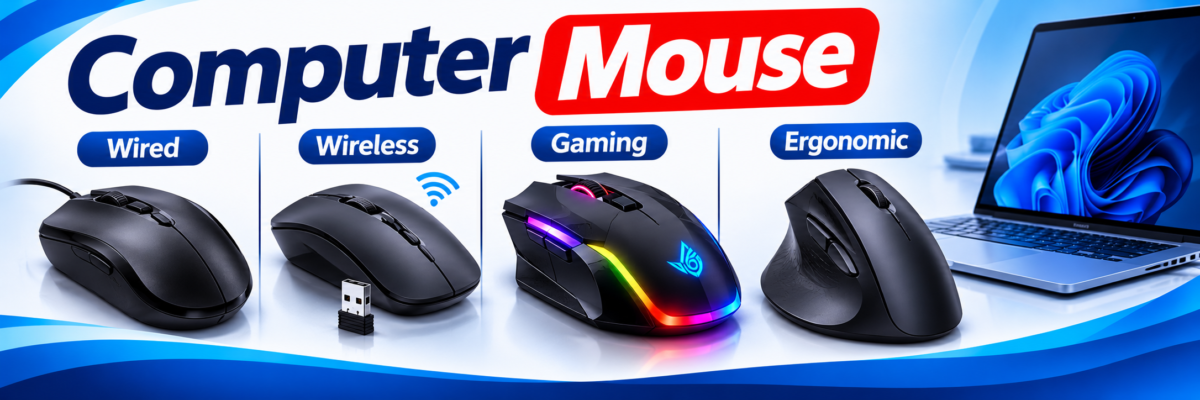
Choosing the right computer mouse in Kenya involves more than comparing prices or selecting a familiar brand. The best mouse for your laptop or desktop depends on connectivity, hand comfort, sensor performance, battery requirements and how you use your computer.
Whether you need an affordable wired USB mouse for office work, a wireless mouse for your laptop, a Bluetooth mouse for travel or a gaming mouse with adjustable DPI, understanding the differences can help you make a suitable purchase.
This computer mouse buying guide in Kenya compares wired, wireless, Bluetooth, gaming and ergonomic mice, explains important specifications and highlights selected models from Logitech, HP, Microsoft, Apple and other computer peripheral brands.
Quick Guide: Which Computer Mouse Should You Buy?
Basic office work: Choose a comfortable wired USB mouse or a reliable wireless mouse.
Laptops and travel: Consider a compact Bluetooth or wireless mouse with suitable battery life.
Gaming: Look for a responsive optical sensor, adjustable DPI, suitable polling rate and comfortable grip.
Extended office sessions: Compare ergonomic shapes, button placement and hand support.
Multiple computers: Consider a mouse with supported multi-device pairing and switching.
Browse our computer mice in Kenya to compare available wired, wireless, Bluetooth, ergonomic and gaming mouse models.
1. Types of Computer Mice Available in Kenya
Computer mice are available in several designs and connection types. Each offers different advantages depending on your workstation, budget and intended application.
Wired USB Mice
Connect directly through a compatible USB port. They do not require batteries and are practical for fixed desks, shared computers and basic office use.
Best for: Schools, offices, computer laboratories and budget workstations.
2.4GHz Wireless Mice
Typically use a dedicated USB receiver for cable-free operation. Suitable for everyday productivity and portable laptop setups.
Best for: Home offices, laptops and users who prefer fewer cables.
Bluetooth Mice
Pair directly with compatible Bluetooth-enabled computers or tablets without requiring a separate USB receiver.
Best for: Modern laptops, supported tablets and mobile workstations.
Gaming Mice
Selected models offer adjustable sensitivity, responsive sensors, programmable controls and gaming-focused software.
Best for: Gaming and users requiring customizable input controls.
Ergonomic Mice
Feature contoured, vertical or alternative shapes intended to accommodate different hand positions and grip preferences.
Best for: Office professionals and users prioritizing hand comfort.
Rechargeable & Travel Mice
Include compact designs and models with rechargeable batteries. Connectivity and charging features vary by product.
Best for: Business travel, hybrid work and portable computer setups.
2. Wired vs Wireless vs Bluetooth Mouse: Key Differences
Connectivity is one of the most important factors when buying a computer mouse. Wired USB mice provide a direct connection, while wireless and Bluetooth models offer greater freedom of movement.
| Mouse Type | Connection | Main Advantage | Common Application |
|---|---|---|---|
| Wired USB | USB cable | No battery or charging requirement | Fixed office workstations |
| 2.4GHz Wireless | USB receiver | Cable-free operation | Home and office laptops |
| Bluetooth | Bluetooth pairing | No dedicated USB receiver required | Ultrabooks and tablets |
| Gaming | Wired or wireless | Specialized sensors and controls | Gaming and customizable workflows |
| Ergonomic | Wired, receiver or Bluetooth | Alternative hand positioning | Extended computer use |
Important: Gaming and ergonomic describe a mouse’s intended use or design, not necessarily its connection type. A gaming or ergonomic mouse may also be wired, wireless or Bluetooth.
3. Best Wired USB Mice for Office and Everyday Computing
Wired mice are practical for fixed workstations because they connect directly to a computer and do not require battery replacement or charging.
They are commonly used in offices, schools, cybercafés, reception desks and shared computer environments.
Logitech M110 Silent Wired Mouse
The Logitech M110 Silent is designed for everyday computer navigation with quieter clicking than conventional mouse designs. It is a suitable option for shared offices, libraries and workspaces where reduced click noise is preferred.
Rapidtech Networks Limited lists the Logitech USB Silent Mouse M110 Red (910-005489).
HP and Dell Wired USB Mice
Selected HP and Dell wired optical mice provide straightforward computer navigation for compatible desktops and laptops. Compare the exact model’s sensor resolution, USB connection and operating system support.
Buying recommendation: Choose a wired USB mouse when simplicity, predictable connectivity and avoiding battery maintenance matter more than portability.
4. Best Wireless Mice for Laptops and Office Work
Wireless mice reduce cable clutter and allow flexible positioning on a desk. Many office-oriented models connect through a small USB receiver, while others offer Bluetooth or dual-mode connectivity.
HP 150 Wireless Mouse
The HP 150 Wireless Mouse is an option for everyday computer navigation on compatible laptops and desktops. It is suited to users looking for a straightforward wireless pointing device.
Explore the HP 150 Wireless Mouse (2S9L1AA) for the listed product specifications.
Logitech M170 and M185 Wireless Mice
The Logitech M170 and M185 families are commonly considered for basic wireless productivity. Compare receiver requirements, supported operating systems, battery specifications and individual model features.
Logitech M220 and M330 Silent Mice
Selected Logitech Silent mouse models are designed to reduce click noise, making them useful options for quiet office environments and shared workspaces.
Wireless buying tip: Check whether the mouse uses a USB-A receiver, USB-C receiver or Bluetooth. Battery life varies by model, usage conditions and battery type.
5. Bluetooth and Multi-Device Mice for Laptops and Travel
Bluetooth mice are useful for compatible laptops and tablets because they do not require a dedicated USB receiver. This can be particularly convenient for computers with limited USB ports.
Selected multi-device mice also allow users to switch between paired computers or tablets, although the number of supported devices and switching method vary by model.
Microsoft Surface Arc Mouse
The Microsoft Surface Arc Mouse offers a slim, travel-oriented design for compatible devices. Its distinctive folding shape is intended to support portability.
Apple Magic Mouse
The Apple Magic Mouse combines a low-profile design with a Multi-Touch surface for supported gestures on compatible Apple devices.
Logitech Multi-Device Mice
Selected Logitech Pebble, M720, MX Anywhere and MX Master models offer features intended for portable productivity and supported multi-device workflows.
Compatibility tip: Bluetooth connectivity does not guarantee support for every gesture, shortcut or customization feature. Check the exact mouse model and operating system requirements.
6. Gaming Mice: What Should You Look For?
Gaming mice are designed for users who want responsive cursor control, customizable buttons and suitable sensor performance. Some models also include RGB lighting, onboard profiles and manufacturer configuration software.
Gaming mouse performance depends on several specifications, including sensor tracking, polling rate, weight, shape and connection quality.
Logitech G300s Optical Gaming Mouse
The Logitech G300s is a wired gaming mouse designed with programmable controls and adjustable tracking settings. It is suitable for users who want additional mouse commands and configurable gaming profiles.
View the Logitech G G300s Optical Gaming Mouse at Rapidtech Networks Limited.
Other Gaming Mouse Families to Compare
Logitech G102 / G203
Entry-level wired gaming mouse families with adjustable sensitivity and gaming-focused controls on selected versions.
Razer DeathAdder
A gaming mouse family known for right-handed ergonomic shapes, with features and specifications varying by model.
Logitech G305 LIGHTSPEED
A wireless gaming mouse option for users seeking gaming-oriented wireless connectivity and suitable sensor performance.
Logitech G502 / G PRO Families
Gaming mouse families designed for different preferences, including customizable controls and lightweight competitive designs on selected models.
Confirm the exact model’s availability, sensor specifications, connectivity and warranty before purchasing.
7. Understanding Mouse DPI, Polling Rate and Sensor Performance
Mouse specifications can be confusing, particularly when comparing gaming models. DPI, polling rate and sensor tracking each describe different aspects of mouse performance.
| Specification | Meaning | Why It Matters |
|---|---|---|
| DPI / CPI | Sensor movement sensitivity | Affects cursor movement relative to physical mouse movement |
| Polling Rate | How frequently mouse reports are sent to the computer | Higher supported rates can reduce the interval between reports |
| Sensor Tracking | How accurately the sensor follows physical movement | Important for consistent control, especially in gaming |
| Programmable Buttons | Additional controls assignable to supported functions | Useful for shortcuts, gaming commands and productivity |
Is Higher DPI Always Better?
No. Higher DPI allows greater cursor movement for a given physical movement, but it does not automatically improve tracking accuracy or gaming performance.
The ideal sensitivity depends on your display, operating system settings, application and personal preferences.
125Hz vs 1,000Hz Mouse Polling Rate
At 125Hz, the nominal interval between mouse reports is approximately 8 milliseconds. At 1,000Hz, the interval is approximately 1 millisecond.
These figures describe report intervals, not total input latency. Actual responsiveness also depends on the mouse, connection, operating system and application.
For everyday office work, very high polling rates are often unnecessary. Competitive gaming users may value higher supported rates and consistent sensor performance.
8. Ergonomic Mice for Office and Professional Workstations
Ergonomic mice are designed to accommodate different hand positions and grip preferences. Some models use vertical or contoured shapes, while others provide thumb rests or alternative button placement.
Logitech Lift Vertical Ergonomic Mouse
The Logitech Lift Vertical is designed around a vertical hand position and offers wireless connectivity for supported computers. Its shape may appeal to users who prefer an alternative to conventional flat mouse designs.
Explore the Logitech Lift Vertical Ergonomic Wireless and Bluetooth Mouse – Graphite.
How to Choose an Ergonomic Mouse
- Consider your hand size and preferred grip.
- Check whether the mouse is designed for right-handed or left-handed use.
- Compare button placement and scroll-wheel accessibility.
- Consider the mouse’s weight and surface grip.
- Verify compatibility with your computer and software.
- Allow time to adjust to an unfamiliar mouse shape.
An ergonomic design may improve comfort for some users, but no single shape suits everyone. Desk height, posture, breaks and individual preferences also matter.
9. Computer Mouse Brands to Consider in Kenya
Rapidtech Networks Limited provides access to computer peripherals from several established brands. Compare available models by specifications, intended use and compatibility rather than assuming every mouse from a particular brand offers the same features.
Logitech
Wired, wireless, gaming and ergonomic mouse families for compatible office and personal computing setups.
HP
Computer mice and peripheral accessories for compatible office, business and home computing applications.
Microsoft
Selected mouse models designed for portable computing and compatible productivity environments.
Rapoo
Computer peripheral options including selected wired and wireless mouse models for everyday use.
Apple
Mouse accessories and compatible peripherals for selected Apple computer environments.
10. Computer Mouse Compatibility: USB-A, USB-C and Bluetooth
Before buying a mouse, check the available ports and wireless capabilities of your laptop or desktop.
USB-A Mouse Connections
Many wired mice and wireless receivers use USB-A. If your computer only has USB-C ports, a compatible adapter or hub may be necessary.
USB-C Computers
Modern laptops may offer USB-C ports without traditional USB-A ports. Check whether your chosen mouse connects directly through Bluetooth or requires a receiver or adapter.
Bluetooth Compatibility
Bluetooth mice require supported Bluetooth hardware and an operating system capable of pairing with the mouse. Some advanced features require additional manufacturer software.
For compatible USB connectivity accessories, browse our UGREEN products and Vention products. Confirm the specific adapter or hub specifications before ordering.
Compatibility tip: A wireless USB mouse is not necessarily a Bluetooth mouse. Some models support both connection methods, while others work only with their supplied USB receiver.
11. Rechargeable vs Battery-Powered Wireless Mice
Wireless mice may use replaceable AA or AAA batteries, or integrated rechargeable batteries. Neither power system is automatically better for every user.
| Feature | Replaceable Batteries | Rechargeable Mouse |
|---|---|---|
| Power Source | Replaceable batteries | Built-in rechargeable battery |
| Maintenance | Battery replacement when depleted | Periodic charging |
| Convenience | Quick battery replacement | No regular disposable battery purchases |
| Buying Consideration | Battery availability and replacement cost | Charging connector and battery serviceability |
Compare the exact manufacturer’s battery-life estimates and charging specifications. Battery performance depends on usage and operating conditions.
12. Which Mouse Is Best for Different Applications?
| Application | Suggested Mouse Type | Priority Features |
|---|---|---|
| Office & Business | Wired or wireless office mouse | Comfort, connectivity and reliable everyday control |
| Student & School Use | Basic wired or compact wireless mouse | Ease of use and affordability |
| Laptop Travel | Compact Bluetooth or wireless mouse | Portability and battery requirements |
| Gaming | Gaming mouse | Sensor performance, polling rate and grip |
| Creative Work | Comfortable mouse with suitable precision and controls | Tracking consistency and programmable buttons |
| Extended Work Sessions | Ergonomic or appropriately sized office mouse | Hand comfort, grip and button placement |
13. Computer Mouse Prices in Kenya: What Determines the Cost?
Computer mouse prices in Kenya vary according to brand, connectivity, sensor technology, ergonomic design, battery system and additional features.
Basic wired office mice are often more affordable than advanced wireless productivity or gaming models. Premium mice may include multi-device switching, customizable buttons, specialized sensors or rechargeable batteries.
Compare the exact product specifications, current listed price, applicable VAT and delivery charges before ordering.
Browse our computer mice category for available models and pricing.
14. How to Avoid Buying an Incompatible or Misrepresented Mouse
When purchasing computer accessories, check the manufacturer, model number, product specifications and seller’s stated warranty conditions.
Computer Mouse Buying Checklist
- Confirm the exact brand and model number.
- Check whether the mouse is wired, USB receiver wireless or Bluetooth.
- Verify compatibility with your laptop or desktop.
- Compare mouse dimensions and grip suitability.
- Review sensor specifications and adjustable DPI where relevant.
- Check battery type, charging requirements and included accessories.
- Confirm supported operating systems and configuration software.
- Review warranty and returns conditions.
- Check the final price, VAT and delivery charges.
- Keep purchase documentation for future support.
15. Where to Buy Computer Mice in Nairobi, Kenya
Rapidtech Networks Limited supplies computer mice and related accessories through its online store and Nairobi CBD office.
Customers can compare available wired, wireless, Bluetooth, gaming and ergonomic mice, review product specifications and request assistance with compatibility before ordering.
Contact our team before visiting the Nairobi CBD office to confirm the required model, availability and collection arrangements.
Frequently Asked Questions About Buying Computer Mice in Kenya
Where can I buy computer mice in Nairobi?
Rapidtech Networks Limited supplies computer mice and accessories online and from our Nairobi CBD office.
Which is better, a wired or wireless mouse?
A wired mouse is practical for fixed desks and avoids battery maintenance. A wireless mouse offers cable-free convenience. The best choice depends on your workstation and preferences.
Is a Bluetooth mouse better than a USB wireless mouse?
Bluetooth avoids a dedicated USB receiver, while receiver-based wireless mice may offer straightforward pairing and responsive performance. Compatibility and features vary by model.
Can I use a wireless mouse with my laptop?
Yes, provided the laptop supports the mouse’s connection method. Check USB receiver requirements or Bluetooth compatibility before purchasing.
What DPI is best for a computer mouse?
The ideal DPI depends on your display, applications and personal preference. Adjustable sensitivity can be useful, but a higher maximum DPI does not automatically mean better performance.
Do gaming mice work for office tasks?
Yes. Gaming mice can perform ordinary computer navigation, and selected programmable controls may also be useful for productivity applications.
Are ergonomic mice suitable for long working hours?
Ergonomic mice provide alternative shapes and hand positions that some users find comfortable. Suitability varies by hand size, grip and working habits.
Does a Bluetooth mouse require a USB receiver?
No dedicated receiver is required when pairing directly with a compatible Bluetooth-enabled computer. Some dual-mode mice also support a separate USB receiver.
Do wireless mice use rechargeable batteries?
Some wireless mice have rechargeable batteries, while others use replaceable AA or AAA batteries. Check the exact model’s power specifications.
Which computer mouse brands are available in Kenya?
Common brands include Logitech, HP, Microsoft, Rapoo, Apple, Razer and Dell. Available products and specifications vary by retailer and model.
Do computer mice come with a warranty?
Warranty coverage depends on the manufacturer, model and applicable seller terms. Confirm the warranty information for the selected product before purchasing.
Do you deliver computer mice outside Nairobi?
Rapidtech Networks Limited offers delivery arrangements across Kenya, subject to product availability, order confirmation and applicable delivery charges.
Buy Wired, Wireless, Bluetooth & Gaming Mice in Kenya from Rapidtech Networks Limited
Rapidtech Networks Limited supplies wired USB mice, wireless mice, Bluetooth mice, ergonomic mice and gaming mice for compatible laptops, desktops, office workstations and gaming setups. Compare available Logitech, HP, Microsoft, Rapoo, Apple and other computer mouse products by connectivity, design, specifications and price before purchasing.
We serve customers in Nairobi, Mombasa, Kisumu, Nakuru, Eldoret, Thika, Kiambu, Nyeri, Meru, Embu, Machakos, Kitale, Kericho, Kisii, Malindi and other towns throughout Kenya.
Our team can assist with USB and Bluetooth compatibility, wireless connectivity, mouse sensors, ergonomic designs and suitable computer mice for different applications. Contact Rapidtech Networks Limited with your computer model and intended use for product enquiries and quotations.
Shop our computer mice in Kenya, call or WhatsApp 0722 555 289, or email sales@rapidtech.co.ke.
[…] For a broader introduction to mouse types, sensor features and buying considerations, read our complete computer mouse buying guide in Kenya. […]
[…] For a broader introduction to computer mouse types and compatibility, read our computer mouse buying guide in Kenya. […]
[…] For an introduction to wired, wireless, gaming and ergonomic mouse types, read our complete computer mouse buying guide in Kenya. […]