
Complete Storage Accessories Buying Guide in Kenya
A storage accessories buying guide in Kenya helps you choose the right SSD, HDD, USB flash drive, memory card or network storage device for your computer, camera, smartphone or business. Storage devices differ in speed, capacity, connection interface, durability and intended application, so the best choice depends on how you plan to use them.
Whether you are upgrading a laptop, backing up office documents, recording 4K video or expanding CCTV storage, understanding these differences can help you avoid incompatible products and unnecessary expenses. This guide explains the main storage technologies, important specifications and buying considerations for customers in Kenya.
Looking for Storage Accessories in Kenya?
Rapidtech Networks Limited supplies storage devices and accessories for personal computers, photography, surveillance and business applications. Browse our storage accessories in Kenya to compare available SSDs, HDDs, USB drives, memory cards and other storage solutions.
Types of Storage Accessories: Which One Do You Need?
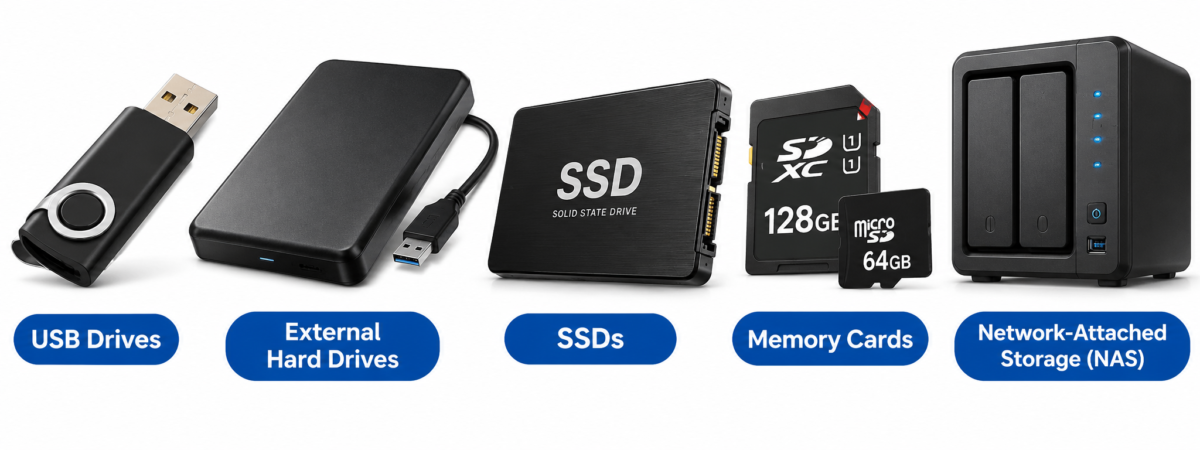
Different storage devices are designed for different purposes. Some prioritize speed, others offer large capacities at a lower cost per gigabyte, while removable storage provides portability for file transfers and recording devices.
| Storage Type | Main Advantage | Common Application | Key Compatibility Check |
|---|---|---|---|
| NVMe M.2 SSD | High-speed storage | Modern laptops, desktops and gaming PCs | M.2 slot, NVMe support and PCIe generation |
| 2.5-inch SATA SSD | Responsive computing | Compatible laptop and desktop upgrades | SATA interface and drive dimensions |
| External SSD | Fast portable storage | Creative projects and large file transfers | USB interface and host speed |
| Internal / External HDD | High-capacity storage | Archives, backups and compatible storage systems | Form factor, interface and workload rating |
| USB Flash Drive | Convenient file portability | Documents and everyday transfers | USB-A, USB-C and supported transfer speeds |
| SD / microSD Card | Compact removable storage | Cameras, drones, dashcams and smartphones | Card format, capacity and speed class |
| NAS Storage | Shared network storage | Office files, shared backups and collaboration | NAS compatibility, drive bays and network requirements |
Internal SSDs: SATA vs NVMe Storage
Internal solid-state drives are widely used to upgrade laptops and desktop computers. Unlike mechanical hard drives, SSDs have no moving storage platters, allowing faster data access and more responsive everyday computing.
Two common options are 2.5-inch SATA SSDs and M.2 NVMe SSDs. They differ in connection interface, physical design and potential transfer performance.
2.5-Inch SATA SSD
A practical upgrade for compatible laptops and desktops that use SATA storage. SATA III SSDs commonly advertise sequential transfer speeds around 500–560 MB/s, depending on the model.
M.2 NVMe SSD
Uses the PCIe interface for higher potential transfer speeds. Performance depends on the SSD controller, PCIe generation, available lanes and computer compatibility.
PCIe Gen 3 vs Gen 4
PCIe Gen 4 provides higher available bandwidth than Gen 3, but the computer must support the relevant interface to benefit from the drive’s advertised performance.
What to Check Before Buying an Internal SSD
- Storage interface: Confirm whether the computer supports SATA, M.2 SATA or M.2 NVMe.
- Form factor: Check 2.5-inch drive dimensions or the supported M.2 length, such as 2280.
- PCIe generation: Review the motherboard or laptop’s supported PCIe standard.
- Storage capacity: Choose enough space for the operating system, applications and files.
- Drive endurance: Compare the manufacturer’s TBW or other endurance specifications when relevant.
- Installation: Confirm whether the computer requires additional mounting hardware or configuration.
SSD compatibility tip: M.2 describes a physical form factor, not a guarantee of NVMe support. Some M.2 slots support SATA, some support NVMe and some support both. Always verify the device specifications rather than relying on the connector shape alone.
Explore our internal SSD drives in Kenya to compare available capacities, interfaces and specifications.
External SSDs vs External Hard Drives
External storage is useful for backing up documents, transferring large files and carrying photographs, videos or project data between compatible computers.
External SSDs generally provide faster data access and better resistance to mechanical shock, while external HDDs remain useful for storing large amounts of data at a lower cost per gigabyte.
| Feature | External SSD | External HDD |
|---|---|---|
| Storage Technology | Flash memory | Mechanical magnetic storage |
| Transfer Performance | Generally faster, depending on USB interface | Generally slower sequential transfers |
| Physical Durability | No moving storage platters | Moving parts require careful handling |
| Cost per Gigabyte | Typically higher | Typically lower |
| Best Application | Fast portable transfers and active projects | Bulk storage and backup archives |
Browse our external SSD drives in Kenya for portable high-speed storage, or compare external hard drives in Kenya for larger backup and file storage requirements.
USB Flash Drives: USB-A, USB-C & OTG Storage
USB flash drives are compact storage devices commonly used for transferring documents, presentations, photographs and other files between compatible computers and mobile devices.
USB-A flash drives are suitable for many desktop and laptop computers, while USB-C models can connect to supported modern laptops, tablets and smartphones. Dual-connector flash drives provide both USB-A and USB-C connections on compatible devices.
USB-A Flash Drives
Suitable for everyday file transfers between computers equipped with compatible USB-A ports.
USB-C Flash Drives
Useful for supported USB-C laptops, smartphones and tablets that allow external storage access.
Dual USB-A / USB-C Drives
Provide convenient file transfers between devices using different USB connector types.
USB 2.0 vs USB 3.2: Does Speed Matter?
USB 3.2 supports different signaling rates, including 5Gbps, 10Gbps and 20Gbps, depending on the generation and implementation. However, these interface ratings are not the same as a flash drive’s actual file transfer speed.
Performance also depends on the storage controller, flash memory, file size, host port and cable. A USB-C connector alone does not guarantee faster transfers than USB-A.
For everyday storage, explore our USB flash drives in Kenya to compare available capacities and connection options.
Memory Cards: SD, microSD, UHS-I, UHS-II, V30 & A2
Memory cards are used in compatible digital cameras, smartphones, drones, dashcams, action cameras and other recording devices. Selecting the correct card requires checking the format, capacity and speed requirements of the device.
A card’s advertised maximum read speed does not necessarily indicate its sustained write performance. This distinction matters when recording video or capturing continuous bursts of photographs.
| Memory Card Rating | What It Means | Why It Matters |
|---|---|---|
| UHS-I | SD bus interface | Common in compatible cameras and mobile devices |
| UHS-II | Higher-bandwidth SD bus interface | Useful for supported high-performance cameras and readers |
| U3 | Minimum sustained write performance class of 30 MB/s | Supports compatible recording workloads |
| V30 | Video Speed Class rated for at least 30 MB/s sustained sequential writing under specified conditions | Relevant to video recording when supported by the device |
| V60 / V90 | Higher video speed classes | For compatible demanding video workflows |
| A1 / A2 | Application performance classes | Relevant to supported devices running apps from memory cards |
Which Memory Card Is Suitable for Your Device?
Smartphones & Tablets
Check microSD compatibility, maximum supported capacity and application performance requirements.
DSLR & Mirrorless Cameras
Check the camera’s supported SD format, bus interface and minimum recording speed requirements.
Drones & Action Cameras
Confirm the manufacturer’s recommended capacity and video speed class for the selected recording mode.
Dashcams & Security Cameras
Consider compatible high-endurance memory cards designed for repeated recording and overwriting.
Memory card buying tip: A V30 rating describes a minimum sustained write-speed class under specified conditions; it does not mean the card will always transfer files at exactly 30 MB/s. Likewise, A2 performance depends on compatible host support.
Explore our memory cards in Kenya to compare available SanDisk, Lexar and other compatible storage products.
Storage for CCTV Surveillance & NAS Systems
CCTV recorders and network-attached storage systems may operate for extended periods and handle demanding read/write workloads. Selecting a suitable storage drive requires more than checking capacity alone.
Surveillance-grade HDDs are designed for supported recording workloads, while NAS-oriented drives are intended for compatible network storage environments. Product specifications vary by manufacturer and model.
CCTV Surveillance Drives
Check DVR/NVR compatibility, recording workload, number of cameras and required video retention period.
NAS Hard Drives
Consider supported NAS drive models, bay count, workload ratings and compatibility with the storage enclosure.
Business File Storage
Review network access, user permissions, backup requirements, capacity planning and data protection.
For shared office storage, browse our network-attached NAS storage in Kenya to compare available systems and accessories.
How Much Storage Capacity Do You Need?
The appropriate storage capacity depends on the size of your files, the number of applications installed and how much additional space you expect to need over time.
| Capacity | Typical Application | Important Consideration |
|---|---|---|
| 64GB – 128GB | USB file transfers and compatible memory cards | Check file sizes and device capacity limits |
| 256GB – 512GB | Basic computer storage and portable file collections | Allow room for updates and applications |
| 1TB | General-purpose computer storage and backups | Consider current and future file requirements |
| 2TB – 4TB | Large media libraries and business file storage | Review backup and redundancy requirements |
| Higher Capacities | NAS, surveillance and large archives | Calculate workload, retention and system compatibility |
These are general examples rather than fixed capacity recommendations. High-resolution video, games, virtual machines and surveillance recordings may require considerably more space.
Storage Accessories for PlayStation 5 & Gaming PCs
Gaming computers benefit from fast storage for game installation, loading and large software files. Compatible NVMe SSDs can provide high transfer performance, but the supported PCIe generation and M.2 dimensions must be checked.
PlayStation 5 consoles have specific requirements for internal M.2 SSD expansion. Sony specifies a supported PCIe Gen4 x4 NVMe M.2 SSD, an appropriate heat-dissipation mechanism and compatible physical dimensions. Sony recommends a sequential read speed of at least 5,500 MB/s.
PS5 compatibility tip: Not every M.2 NVMe SSD is suitable for PlayStation 5. Check Sony’s official M.2 SSD requirements before purchasing. M.2 SATA SSDs are not supported for this expansion slot.
Storage Accessories Brands to Consider in Kenya
Different storage manufacturers offer products for personal computing, photography, portable file transfers, surveillance and business storage. Product availability and supported features depend on the individual model.
SanDisk
Known for USB flash drives, memory cards and portable solid-state storage products.
Samsung
Offers internal and portable SSD products for compatible computers and other devices.
Lexar
Provides memory cards, SSDs and portable storage products for supported applications.
Western Digital
Offers hard drives and storage solutions for personal computing, NAS and surveillance workloads.
Dahua
Offers surveillance and security-related products, including storage options for supported recording systems.
UGREEN
Offers storage connectivity accessories such as compatible drive enclosures, adapters and USB accessories.
How to Identify Genuine Storage Accessories in Kenya
Counterfeit or misrepresented storage devices can create serious data-loss risks. Some fraudulent USB flash drives and memory cards are programmed to display more capacity than the physical memory actually provides.
When purchasing storage accessories, use the following checks to reduce the risk of buying an unsuitable or misrepresented product.
- Confirm the manufacturer, exact model number and advertised capacity.
- Compare the product specifications with the manufacturer’s documentation.
- Inspect packaging, labels and product markings for inconsistencies.
- Be cautious of unusually low prices or unverifiable sellers.
- Request appropriate purchase documentation and warranty information.
- Use reputable capacity-verification tools when practical, before storing important files.
- Keep separate backups of important data instead of relying on one storage device.
How to Test a USB Drive or Memory Card
Tools such as H2testw on Windows or F3 on supported macOS and Linux systems can help verify whether a storage device can actually write and read the advertised capacity. These tests can take time and may overwrite or fill available storage, so back up any existing files first.
Disk speed benchmarking tools can measure transfer performance, but speed testing alone does not establish the authenticity or full usable capacity of a device.
Common Storage Buying Mistakes to Avoid
Storage products may look similar but differ significantly in compatibility, performance and endurance. Avoid these common mistakes before ordering.
- Buying an M.2 NVMe SSD for a laptop that supports only SATA storage.
- Assuming every USB-C connection supports the same transfer speed.
- Choosing a memory card based only on maximum advertised read speed.
- Using an unsuitable consumer drive for demanding surveillance workloads.
- Buying a storage capacity that is insufficient for future requirements.
- Assuming all NAS systems support every hard drive model.
- Storing important data on only one device without a separate backup.
- Ignoring warranty conditions and product compatibility requirements.
Storage Accessories Prices in Kenya
Storage accessory prices in Kenya vary by brand, capacity, storage technology, interface, transfer performance, endurance rating and warranty conditions.
Internal NVMe SSDs, SATA SSDs, portable external SSDs, mechanical hard drives, USB flash drives and memory cards serve different requirements and should be compared using equivalent specifications.
For current prices, browse the available products on Rapidtech Networks Limited’s storage category pages. If you are purchasing multiple drives for an office, surveillance system or storage upgrade, contact our team with the required specifications.
Frequently Asked Questions About Storage Accessories
Where can I buy storage accessories in Nairobi?
Rapidtech Networks Limited supplies storage devices and accessories online and from our Nairobi CBD office.
Is an SSD better than an HDD?
SSDs generally provide faster data access and better resistance to mechanical shock. HDDs remain useful for high-capacity storage at a lower cost per gigabyte.
What is the difference between SATA SSD and NVMe SSD?
SATA SSDs use the SATA interface, while NVMe SSDs commonly use PCIe for higher potential transfer performance. Compatibility depends on the computer’s supported interface and form factor.
Can I install any SSD in my laptop?
No. Check the laptop’s supported storage interface, physical dimensions and hardware specifications before purchasing.
Is an external SSD faster than an external HDD?
External SSDs generally provide faster transfers, although actual speed depends on the storage model, USB interface, cable and connected device.
What does V30 mean on a memory card?
V30 is a video speed class specifying at least 30 MB/s sustained sequential write performance under the standard’s defined conditions.
Which memory card is suitable for a dashcam?
A compatible high-endurance memory card is often appropriate for repeated recording. Check the dashcam manufacturer’s supported format, capacity and speed requirements.
Can I use a normal hard drive for CCTV recording?
A compatible surveillance-grade HDD is generally preferable for continuous recording workloads. Confirm the recorder’s supported interface, capacity and recommended drive specifications.
Is NAS storage suitable for small businesses?
NAS systems can provide shared file access and centralized storage for compatible business networks. Proper backup, user permissions and system configuration remain important.
How can I check whether a USB flash drive is genuine?
Verify the model and specifications, inspect product markings, retain purchase documentation and consider using a reputable capacity-verification tool before storing important data.
Do storage accessories include a warranty?
Warranty coverage varies by manufacturer and product. Review the applicable warranty period and conditions before purchasing.
Do you deliver storage accessories outside Nairobi?
Yes. Rapidtech Networks Limited offers delivery arrangements across Kenya, with applicable charges and delivery times depending on the order and destination.
Buy Storage Accessories in Kenya from Rapidtech Networks Limited
Rapidtech Networks Limited supplies SSDs, internal and external hard drives, USB flash drives, memory cards and storage accessories for laptops, desktops, cameras, surveillance systems and business applications. Compare available products, capacities, interfaces and specifications before purchasing.
We serve customers in Nairobi, Mombasa, Kisumu, Nakuru, Eldoret, Thika, Kiambu, Nyeri, Meru, Embu, Machakos, Kitale, Kericho, Kisii, Malindi and other towns throughout Kenya.
Our team can assist with storage compatibility, capacity selection, SSD and HDD interfaces, memory card requirements, NAS storage and suitable storage solutions for personal or business use. Contact Rapidtech Networks Limited for assistance with your requirements.
Explore our complete range of storage accessories in Kenya or call 0722 555 289 for product enquiries and quotations.
[…] Read our complete storage buying guide […]