
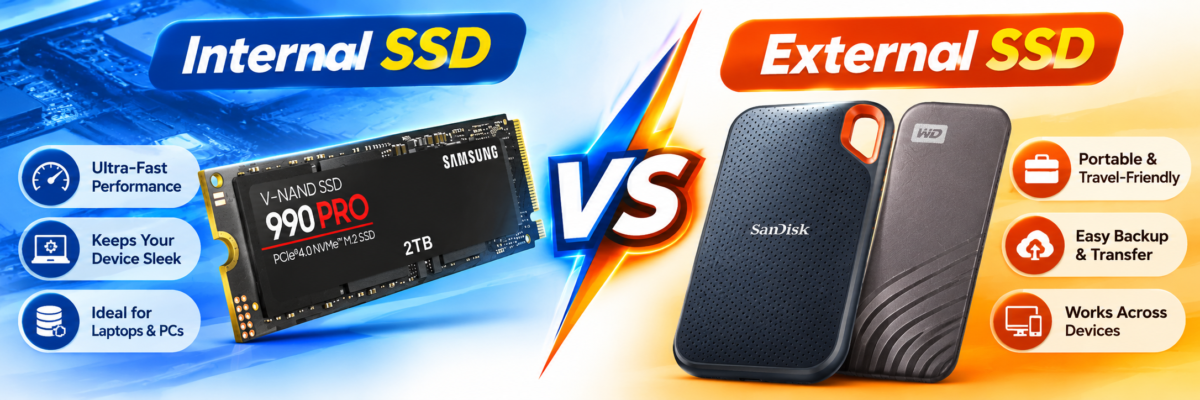
Internal SSD vs External SSD: Differences, Speed & Best Uses
Internal SSD vs external SSD is an important comparison when upgrading a laptop, improving desktop performance, expanding gaming storage or buying a portable drive for work and backups. Both use solid-state flash memory, but they differ in how they connect to devices, their achievable speeds, portability and intended applications.
Internal SSDs connect through supported SATA or PCIe storage interfaces inside a computer, making them suitable for operating systems, installed applications and performance-intensive workloads. External SSDs connect through USB, USB4 or Thunderbolt and prioritize portability, convenient file transfers and use across compatible devices.
Internal SSD or External SSD: Which Should You Buy?
Choose an internal SSD when upgrading your computer’s primary storage, installing Windows, improving application responsiveness or running games and demanding software.
Choose an external SSD when you need fast portable storage, convenient backups or the ability to move files between compatible laptops, desktops and other devices.
Compare our internal SSD drives in Kenya and external SSD drives in Kenya to explore available models, capacities and interfaces.
Internal SSD vs External SSD: Head-to-Head Comparison
Although both storage types use flash memory, their installation methods, interfaces and intended applications are different. Understanding these differences helps you select suitable storage without paying for performance your device cannot support.
| Feature | Internal SSD | External SSD |
|---|---|---|
| Connection | SATA or PCIe/NVMe through compatible internal connections | USB, USB4 or Thunderbolt through an external port |
| Installation | Installed inside a compatible computer | Usually connected using an external cable |
| Potential Speed | Very high with suitable PCIe NVMe drives | Limited by the SSD, enclosure, cable and external interface |
| Portability | Designed to remain installed in the host device | Easy to carry between compatible devices |
| Operating System | Commonly used as primary boot storage | External boot support depends on the host and configuration |
| Compatibility | Requires a supported internal slot or connection | Requires a compatible external port, file system and device support |
| Typical Cost | Often lower per GB for comparable bare drives | May include additional enclosure and interface costs |
| Best Uses | Windows, applications, gaming and active workloads | Portable projects, backups and file transfers |
What Is an Internal SSD?
An internal solid-state drive is installed inside a laptop, desktop computer or other compatible system. It connects to the host through a supported storage interface, commonly SATA or PCIe NVMe.
Internal SSDs are frequently used for operating systems, applications, games and working files because they can provide responsive data access without depending on an external cable or enclosure.
Common Types of Internal SSDs
2.5-Inch SATA SSD
Uses a SATA connection and is suitable for many compatible laptop and desktop upgrades. Common high-performance SATA models advertise sequential speeds around 500–560 MB/s.
M.2 PCIe NVMe SSD
Uses PCIe lanes for high-speed storage access. Available performance varies according to PCIe generation, lane configuration and the SSD model.
High-Performance PCIe SSD
Selected PCIe Gen 4 and Gen 5 NVMe drives are designed for demanding gaming, creative applications and high-throughput workloads on supported systems.
What Is an External SSD?
An external SSD is a portable storage device containing solid-state memory and an external connection interface. It may be a complete manufacturer-built portable SSD or a compatible internal SSD installed in a suitable external enclosure.
External SSDs are useful when files need to move between computers or when a device requires additional storage without replacing its internal drive.
Common External SSD Connections
USB 5Gbps & 10Gbps
Common external storage interfaces for everyday portable SSDs. Actual transfer performance depends on the SSD, controller, cable and connected port.
USB 20Gbps
Can provide higher transfer bandwidth on compatible hosts and devices. Not every USB-C port supports this connection mode.
USB4 & Thunderbolt
Higher-bandwidth interfaces suitable for compatible high-performance external SSDs and professional storage workflows.
Important USB-C compatibility tip: USB-C describes the connector shape, not a guaranteed transfer speed. A USB-C port may support different USB data rates or Thunderbolt capabilities. Check the specifications of both the computer and external SSD before purchasing.
Internal SSD vs External SSD Speed Comparison
Internal NVMe SSDs can deliver substantially higher sequential transfer speeds than many conventional external SSDs because they connect directly through supported PCIe storage interfaces.
External SSD performance depends on the underlying flash storage, bridge controller, enclosure, cable and available host bandwidth. A fast internal NVMe drive installed in a slower USB enclosure will be limited by that external connection.
| SSD Type | Interface | Illustrative Sequential Read Speeds | Main Consideration |
|---|---|---|---|
| Internal SATA SSD | SATA III | Approximately 500–560 MB/s | SATA interface limit |
| Internal NVMe Gen 3 | PCIe Gen 3 x4 | Up to roughly 3,500 MB/s on selected models | PCIe lane and drive support |
| Internal NVMe Gen 4 | PCIe Gen 4 x4 | Up to roughly 7,000–7,500 MB/s on selected models | Compatible motherboard and cooling |
| Internal NVMe Gen 5 | PCIe Gen 5 x4 | Over 10,000 MB/s on selected high-end models | Host compatibility and thermal requirements |
| External SSD 5Gbps | USB 5Gbps | Often up to approximately 400–500 MB/s | USB connection and device performance |
| External SSD 10Gbps | USB 10Gbps | Around 1,000 MB/s on selected models | Compatible USB port and cable |
| External SSD 20Gbps | USB 20Gbps | Around 2,000 MB/s on selected models | Specific host support required |
| External USB4 / Thunderbolt SSD | Compatible high-bandwidth external interface | Several thousand MB/s on selected models | Host, enclosure and cable compatibility |
Speed note: These are illustrative maximum sequential read speeds for selected product classes, not guaranteed read/write performance. Actual results vary by drive model, workload, temperature, connection and host hardware. Sequential speeds also do not fully describe random-access responsiveness.
Internal SSD vs External SSD for Laptop Upgrades
If your laptop is slow because it uses an older mechanical hard drive, replacing that drive with a compatible internal SSD can improve startup, application loading and everyday responsiveness.
An external SSD is useful when you need additional storage without replacing the laptop’s existing drive. It can store photographs, videos, documents and other files, but it does not automatically improve the performance of an operating system installed on a slower internal drive.
Choose Internal SSD
When upgrading a compatible laptop’s operating system drive or replacing a slow HDD.
Choose External SSD
When the laptop has limited upgrade options or you need additional portable file storage.
Use Both
Keep Windows and applications on the internal SSD, while storing large project files and backups externally.
Internal SSD vs External SSD for Gaming & Consoles
Modern games can require substantial storage capacity and fast access to installed files. Internal SSDs are generally the preferred option for a gaming PC’s primary game library, particularly when supported by the motherboard and game requirements.
External SSDs can also be useful for transferring game files or storing compatible games, but console support varies by platform and game generation.
PlayStation 5 SSD Compatibility
PlayStation 5 games can be stored on compatible USB extended storage, but they cannot be played directly from that USB storage. To play PS5 games, they must be installed on the console’s internal storage or a compatible installed M.2 SSD.
For M.2 expansion, Sony specifies a supported PCIe Gen4 x4 NVMe SSD with appropriate physical dimensions and heat dissipation. Always confirm the console’s official storage requirements before buying.
Gaming storage tip: An external SSD may be useful for storing games and transferring them back to supported internal storage, but it is not a direct substitute for a compatible internal M.2 expansion drive when playing PS5 games.
Internal SSD vs External SSD for Video Editing & Content Creation
Video editors, photographers, graphic designers and other creative professionals often work with large files, project caches and demanding applications. Both internal and external SSDs can support these workflows, depending on the required performance and mobility.
Internal SSD for Active Workloads
Useful for operating systems, editing applications, scratch files, rendering caches and demanding project workflows.
External SSD for Portable Projects
Useful for transferring video footage, RAW photographs and active project files between compatible workstations.
Combined Creative Workflow
Use an internal SSD for software and working caches, with a suitable external SSD for portable media and separate backup storage.
For 4K or 8K workflows, confirm the editing software’s storage requirements, media bitrate and supported connection bandwidth. Video resolution alone does not determine the required SSD speed.
External SSDs for Backups, File Transfers & Travel
External SSDs provide a convenient way to store additional files without opening a computer. Their portability makes them useful for office staff, students, photographers and professionals moving between compatible devices.
They can also serve as local backup destinations for supported backup software. However, an external SSD should not be treated as the only backup of important files.
Common External SSD Applications
- Transferring large documents and media files between computers.
- Carrying photography and video projects between locations.
- Creating local backups of selected files and folders.
- Storing additional data when internal upgrade options are limited.
- Moving files between compatible Windows and macOS systems.
- Keeping a portable copy of important business or project information.
Backup reminder: Use a suitable backup strategy that maintains additional independent copies of important data. Portable SSDs can be lost, damaged or corrupted, and a single external drive does not provide complete data protection.
Can You Turn an Internal SSD into an External SSD?
Yes. A compatible internal SSD can be installed in a suitable external enclosure, allowing it to connect to a computer through USB, USB4 or Thunderbolt.
This approach may be useful when reusing an existing SSD or selecting a particular capacity and enclosure combination. However, compatibility must be checked carefully.
What to Check When Buying an SSD Enclosure
| Requirement | What to Confirm | Why It Matters |
|---|---|---|
| SSD Interface | M.2 NVMe, M.2 SATA or 2.5-inch SATA | Not all enclosures support every SSD type |
| SSD Dimensions | Supported length and thickness | Ensures the drive fits correctly |
| External Interface | USB 5Gbps, 10Gbps, 20Gbps, USB4 or Thunderbolt | Determines available connection bandwidth |
| Cooling | Enclosure material and heat dissipation | Helps manage temperature under sustained load |
| Host Compatibility | Computer port, operating system and cable | Affects connectivity and performance |
Brands such as UGREEN offer storage connectivity accessories, including selected SSD enclosures and adapters. Check the individual product specifications before purchasing.
Internal SSD vs External SSD: Capacity & Price in Kenya
Internal and external SSD prices in Kenya vary by capacity, manufacturer, storage interface, performance rating, endurance and warranty conditions.
Internal SSDs can provide better cost-per-gigabyte value when comparing similar underlying storage technology, while pre-built external SSDs include portable housing and connection electronics. However, pricing varies between models and promotions, so internal drives are not always cheaper.
500GB – 512GB SSD
Suitable for selected everyday computing upgrades, basic application storage and portable file collections.
1TB SSD
A practical capacity for many laptops, gaming computers, active projects and external file storage requirements.
2TB & Higher SSDs
Useful for larger games, media libraries, creative workloads and professional storage requirements.
For current prices, compare the available products on Rapidtech Networks Limited’s internal and external SSD category pages. Check the exact model, capacity and interface before ordering.
Internal SSD vs External SSD: Which One Fits Your Needs?
The best SSD depends on whether your priority is system performance, portable file access, gaming compatibility or additional backup capacity.
| Application | Recommended SSD Type | Reason |
|---|---|---|
| Windows Laptop Upgrade | Compatible internal SSD | Improves primary storage responsiveness |
| Desktop Operating System | Internal SATA or NVMe SSD | Direct internal storage access |
| Gaming PC | Compatible internal NVMe SSD | High-performance game storage |
| Portable Photography Projects | External SSD | Easy movement between compatible computers |
| Video Editing Workstation | Internal SSD with suitable external storage | Combines fast local workloads with portability |
| Office File Transfers | External SSD | Convenient portable data transfers |
| Local Backup Storage | External SSD or suitable alternative | Provides a separate copy of selected files |
SSD Brands to Consider in Kenya
Several manufacturers offer internal and external solid-state drives for different budgets and applications. Compare individual model specifications rather than assuming all SSDs from the same brand perform identically.
Samsung SSDs
Internal and portable SSD product families for compatible laptops, desktops and demanding storage workflows.
Western Digital SSDs
Internal and portable solid-state storage products for compatible personal computing and performance applications.
SanDisk SSDs
Portable storage products for file transfers, creative workflows and compatible external storage applications.
Lexar SSDs
Internal and portable SSD options with different capacities, interfaces and performance specifications.
SSD Buying Checklist Before You Order
Before purchasing an internal or external SSD, verify the specifications of the intended device and how the storage will be used.
- Confirm whether you need internal primary storage or portable external storage.
- Check SATA, M.2 NVMe, USB, USB4 or Thunderbolt compatibility.
- Verify the supported drive dimensions and physical form factor.
- Compare actual drive performance rather than connector names alone.
- Choose enough capacity for current files and future requirements.
- Check the manufacturer’s endurance and warranty specifications.
- Confirm the host port and cable capabilities for external SSDs.
- Review cooling requirements for high-performance SSDs and enclosures.
- Back up existing data before replacing or reformatting storage.
- Confirm compatibility with your computer, gaming console or other intended device.
Related Storage Buying Guides
Complete Computer Storage Accessories Buying Guide in Kenya
Explore the differences between SSDs, HDDs, USB flash drives, memory cards and NAS storage, including capacity, speed, compatibility and buying considerations.
Read the complete storage accessories buying guide
SSD vs HDD: Which Storage Drive Should You Buy in Kenya?
Compare solid-state drives and mechanical hard drives for speed, durability, capacity, gaming, backups and business storage.
Frequently Asked Questions About Internal vs External SSDs
What is the difference between an internal SSD and external SSD?
An internal SSD connects through a compatible internal storage interface, while an external SSD connects through an external interface such as USB or Thunderbolt and is designed for portable use.
Is an internal SSD faster than an external SSD?
High-performance internal NVMe SSDs can be considerably faster than many external SSDs. However, actual performance depends on the models and connection standards being compared.
Can I use an external SSD instead of an internal SSD?
An external SSD can provide additional file storage, but it is not always a direct replacement for internal boot storage. Operating system and application support depend on the host device.
Which SSD is better for Windows installation?
A compatible internal SSD is generally the preferred option for installing Windows and frequently used applications.
Can I play PS5 games directly from an external SSD?
No. PS5 games can be stored on compatible USB extended storage but must be moved to supported internal console storage or an installed compatible M.2 SSD to play.
Is an external SSD suitable for 4K video editing?
Yes, a suitable external SSD can support compatible 4K editing workflows. The required speed depends on the video codec, bitrate, editing software and available interface bandwidth.
Does USB-C mean an external SSD is faster?
No. USB-C describes the connector shape. Transfer performance depends on the supported USB or Thunderbolt standard and the connected hardware.
Can I install an internal NVMe SSD in an external enclosure?
Yes, provided the enclosure supports the SSD’s interface, form factor, capacity and other requirements.
Are external SSDs more expensive than internal SSDs?
Pre-built external SSDs may cost more per gigabyte because they include an enclosure and connection electronics. Actual prices vary by model, performance and capacity.
Can I use an external SSD with both Windows and Mac?
Yes, if the SSD, connection and file system are compatible with both systems. Reformatting may be necessary in some cases and can erase existing files.
Where can I buy internal and external SSDs in Nairobi?
Rapidtech Networks Limited supplies internal SSDs, external SSDs and storage accessories online and from our Nairobi CBD office.
Do you deliver SSDs outside Nairobi?
Yes. Rapidtech Networks Limited offers delivery arrangements across Kenya, subject to product availability, applicable charges and delivery conditions.
Buy Internal & External SSDs in Kenya from Rapidtech Networks Limited
Rapidtech Networks Limited supplies internal SATA SSDs, M.2 NVMe SSDs, portable external SSDs and compatible storage accessories for laptops, desktops, gaming computers, creative workstations and business applications. Compare available models, capacities, interfaces, performance specifications and prices before purchasing.
We serve customers in Nairobi, Mombasa, Kisumu, Nakuru, Eldoret, Thika, Kiambu, Nyeri, Meru, Embu, Machakos, Kitale, Kericho, Kisii, Malindi and other towns throughout Kenya.
Our team can assist with internal SSD compatibility, external SSD connectivity, storage capacity, USB interface requirements, SSD enclosure selection and suitable storage options for personal or business use. Contact Rapidtech Networks Limited for product enquiries and quotations.
Browse our complete range of storage accessories in Kenya or call 0722 555 289 for assistance.